







Question: I need help in this accounting work. Please do it in excel and do it 100%. Please show the formulas and everything so i can
I need help in this accounting work. Please do it in excel and do it 100%. Please show the formulas and everything so i can easily understand the question and can solve it
Please must follow all the instructions as these are very important.
Identification number: (AAA:132)-(BB:24)-(CCC:6810)---------------> Please use these numbers in a way that i can change these numbers if i need... Please must show formulas of excel
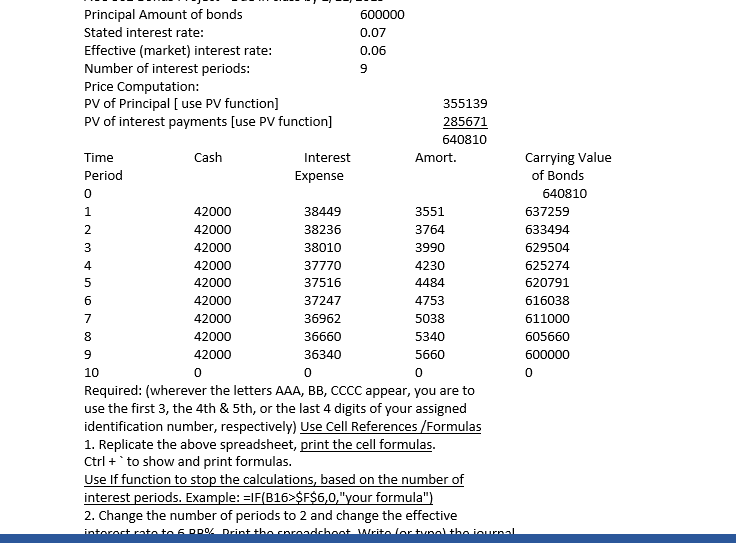
| ACC 302 Bonds Project - | ||||||||
| Principal Amount of bonds | 600000 | |||||||
| Stated interest rate: | 0.07 | |||||||
| Effective (market) interest rate: | 0.06 | |||||||
| Number of interest periods: | 9 | |||||||
| Price Computation: | ||||||||
| PV of Principal [ use PV function] | 355139 | |||||||
| PV of interest payments [use PV function] | 285671 | |||||||
| 640810 | ||||||||
| Time | Cash | Interest | Amort. | Carrying Value | ||||
| Period | Expense | of Bonds | ||||||
| 0 | 640810 | |||||||
| 1 | 42000 | 38449 | 3551 | 637259 | ||||
| 2 | 42000 | 38236 | 3764 | 633494 | ||||
| 3 | 42000 | 38010 | 3990 | 629504 | ||||
| 4 | 42000 | 37770 | 4230 | 625274 | ||||
| 5 | 42000 | 37516 | 4484 | 620791 | ||||
| 6 | 42000 | 37247 | 4753 | 616038 | ||||
| 7 | 42000 | 36962 | 5038 | 611000 | ||||
| 8 | 42000 | 36660 | 5340 | 605660 | ||||
| 9 | 42000 | 36340 | 5660 | 600000 | ||||
| 10 | 0 | 0 | 0 | 0 | ||||
| Required: (wherever the letters AAA, BB, CCCC appear, you are to | ||||||||
| use the first 3, the 4th & 5th, or the last 4 digits of your assigned | ||||||||
| identification number, respectively) Use Cell References /Formulas | ||||||||
| 1. Replicate the above spreadsheet, print the cell formulas. | ||||||||
| Ctrl + ` to show and print formulas. | ||||||||
| Use If function to stop the calculations, based on the number of | ||||||||
| interest periods. Example: =IF(B16>$F$6,0,"your formula") | ||||||||
| 2. Change the number of periods to 2 and change the effective | ||||||||
| interest rate to 6.BB%. Print the spreadsheet. Write (or type) the journal | ||||||||
| entries at the bottom. You should have 3 journal entries, | ||||||||
| 1 for the bond issuance, and 2 interest payments. | ||||||||
| 3. Change the stated interest rate to 5.CCCC%. Print the | ||||||||
| spreadsheet. Write (or type) the 3 journal entries at the bottom. | ||||||||
| 4. Change the number of periods to 8, change the principal amount | ||||||||
| to $AAA,BBC,CCC. (hint: you will need to widen your columns) | ||||||||
| Print the spreadsheet. No need to do JEs, there would be 9. | ||||||||
This is in picture form..
Principal Amount of bonds Stated interest rate: Effective (market) interest rate: Number of interest periods: Price Computation: PV of Principal [ use PV function] PV of interest payments [use PV function] 600000 0.07 0.06 355139 285671 640810 Cash Amort. Carrying Value Time Period 0 Interest Expense of Bonds 640810 637259 633494 629504 625274 620791 616038 611000 605660 3551 3764 3990 4230 42000 42000 42000 42000 42000 42000 42000 42000 42000 0 38449 38236 38010 37770 37516 37247 36962 36660 36340 0 6 4753 5038 5340 5660 0 10 Required: (wherever the letters AAA, BB, CCCC appear, you are to use the first 3, the 4th & 5th, or the last 4 digits of your assigned identification number, respectively) Use Cell References/Formulas 1. Replicate the above spreadsheet, print the cell formulas Ctrl+to show and print formulas. Use If function to stop the calculations, based on the number of interest periods. Example: IF(B16 SFS6,0,"your formula" 2. Change the number of periods to 2 and change the effective 0 Principal Amount of bonds Stated interest rate: Effective (market) interest rate: Number of interest periods: Price Computation: PV of Principal [ use PV function] PV of interest payments [use PV function] 600000 0.07 0.06 355139 285671 640810 Cash Amort. Carrying Value Time Period 0 Interest Expense of Bonds 640810 637259 633494 629504 625274 620791 616038 611000 605660 3551 3764 3990 4230 42000 42000 42000 42000 42000 42000 42000 42000 42000 0 38449 38236 38010 37770 37516 37247 36962 36660 36340 0 6 4753 5038 5340 5660 0 10 Required: (wherever the letters AAA, BB, CCCC appear, you are to use the first 3, the 4th & 5th, or the last 4 digits of your assigned identification number, respectively) Use Cell References/Formulas 1. Replicate the above spreadsheet, print the cell formulas Ctrl+to show and print formulas. Use If function to stop the calculations, based on the number of interest periods. Example: IF(B16 SFS6,0,"your formula" 2. Change the number of periods to 2 and change the effective 0
Step by Step Solution
There are 3 Steps involved in it

Get step-by-step solutions from verified subject matter experts
 Study Help