







Question: I need help inserting the def main ( ) : function into my text based game code. If i delete def main ( )
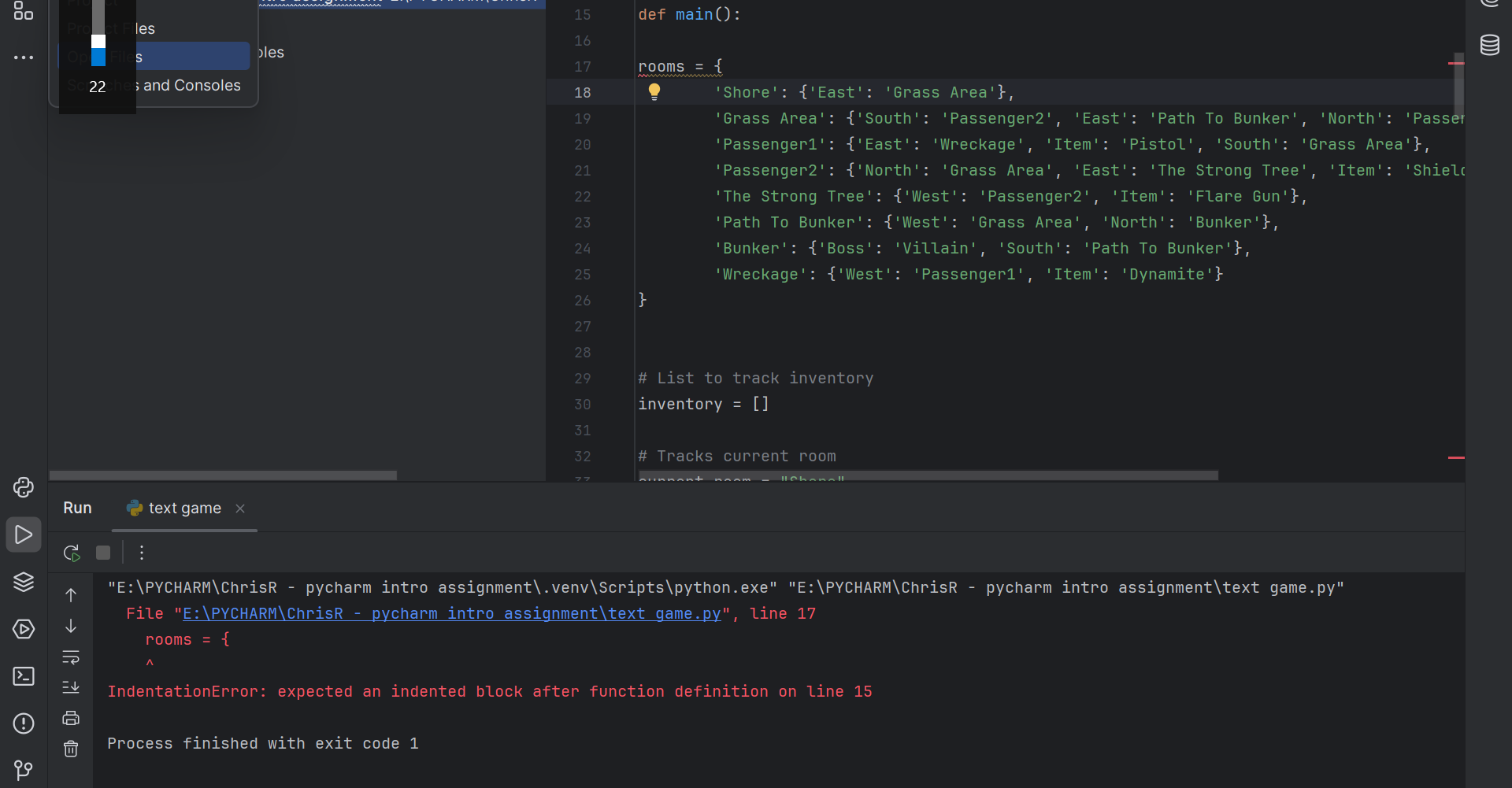
I need help inserting the "def main: function into my text based game code. If i delete def main: my code runs fine, but I need it for points. I've attached the errors in the screenshots.
Here is my code.
import os
def showinstructions:
printWelcome to my game"
printYou must collect all five items before fighting the boss to escape the island.
printMove Commands: go direction travel north, south, east, or west'
printget item to add nearby item to inventory'
inputPress any key to continue..."
# Clear screen
def clear:
ossystemcls if osname nt else 'clear'
def main:
rooms
'Shore': East: 'Grass Area'
'Grass Area': South: 'Passenger 'East': 'Path To Bunker', 'North': 'Passenger 'Item': 'Pineapple'
'Passenger: East: 'Wreckage', 'Item': 'Pistol', 'South': 'Grass Area'
'Passenger: North: 'Grass Area', 'East': 'The Strong Tree', 'Item': 'Shield'
'The Strong Tree': West: 'Passenger 'Item': 'Flare Gun'
'Path To Bunker': West: 'Grass Area', 'North': 'Bunker'
'Bunker': Boss: 'Villain', 'South': 'Path To Bunker'
'Wreckage': West: 'Passenger 'Item': 'Dynamite'
# List to track inventory
inventory
# Tracks current room
currentroom "Shore"
# Tracks last move
msg
clear
showinstructions
# Gameplay loop
while True:
clear
# Display player info
printfYou are in the currentroom
Inventory : inventory
# Display msg
printmsg
# Item indicator
if "Item" in roomscurrentroomkeys:
nearbyitem roomscurrentroomItem
if nearbyitem not in inventory:
printfYou see nearbyitem
# Boss encounter
if "Boss" in roomscurrentroomkeys:
if leninventory:
printfBetter luck next time. You lost a fight with roomscurrentroomBoss
break
else:
printfYou beat roomscurrentroomBoss and escaped the island!"
break
# Accepts player's move as input
userinput inputEnter your move:
# Splits move into words
nextmove userinput.split
# First word is action
action nextmovetitle
# Reset item and direction
item "Item"
direction "null"
# Second word is object or direction
if lennextmove:
item nextmove:
direction nextmovetitle
item joinitemtitle
# Moving between rooms
if action Go:
try:
currentroom roomscurrentroomdirection
msg fYou travel direction
except:
msg "You can't go that way."
# Picking up items
elif action "Get":
try:
if item roomscurrentroomItem:
if item not in inventory:
inventory.appendroomscurrentroomItem
msg fitem retrieved!"
else:
msg fYou already have the item
else:
msg fCant find item
except:
msg fCant find item
# Exit program
elif action "Exit":
break
# Any other commands invalid
else:
msg "Invalid command"
ifnamemain
Run
text game xx
E:PYCHARMChrisR pycharm intro assignment.venv Scriptspythonexe" E:PYCHARMChrisR pycharm intro assignment text game.py
File E:PYCHARMChrisR pycharm intro assignment text game.py line
rooms
IndentationError: expected an indented block after function definition on line
Process finished with exit code
Step by Step Solution
There are 3 Steps involved in it
1 Expert Approved Answer
Step: 1 Unlock

Question Has Been Solved by an Expert!
Get step-by-step solutions from verified subject matter experts
Step: 2 Unlock
Step: 3 Unlock
 Study Help