







Question: i need help making this with this code below: change to a php based //html: Body Mass Index-BMI crossorigin=anonymous> BMI Calculator Weight in kg Height
i need help making this with this code below: change to a php based Body Mass Index-BMI 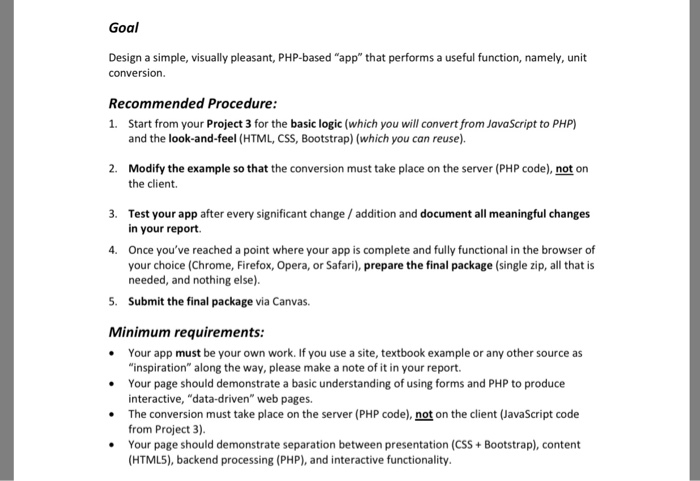 Goal Design a simple, visually pleasant, PHP-based "app" that performs a useful function, namely, unit conversion Recommended Procedure 1. Start from your Project 3 for the basic logic (which you will convert from JavaScript to PHP) and the look-and-feel (HTML, CSS, Bootstrap) (which you can reuse). 2. Modify the example so that the conversion must take place on the server (PHP code), not on the client. 3. Test your app after every significant change /addition and document all meaningful changes in your report. Once you've reached a point where your app is complete and fully functional in the browser of your choice (Chrome, Firefox, Opera, or Safari), prepare the final package (single zip, all that is needed, and nothing else) Submit the final package via Canvas. 4. 5. Minimum requirements: Your app must be your own work. If you use a site, textbook example or any other source as Your page should demonstrate a basic understanding of using forms and PHP to produce The conversion must take place on the server (PHP code), not on the client (JavaScript code Your page should demonstrate separation between presentation (CSS Bootstrap), content "inspiration" along the way, please make a note of it in your report. interactive, "data-driven" web pages. from Project 3) (HTML5), backend processing (PHP), and interactive functionality
//html:
crossorigin="anonymous">
BMI Calculator
Weight
in kg
Height
in kg
Your Body Mass Index =
0.00
//Js:
var BMI = {
init: function() {
BMI.buttonClick();
},
buttonClick: function() {
var button = document.getElementById('btnCalculateBMI');
button.onclick = function() {
BMI.checkValues();
BMI.calculateBMI();
};
},
calculateBMI: function() {
var height = parseFloat(document.getElementById('height').value);
var weight = parseFloat(document.getElementById('weight').value);
var result = document.getElementById('result');
result.innerHTML = (weight * 100 * 100/ (height * height)).toFixed(2);
},
checkValues: function() {
var flag=0;
var height = document.getElementById('height').value;
var weight = document.getElementById('weight').value;
if(!weight.match(/\S/)) {
alert ('Empty value in weight');
flag=1;
}
if(!height.match(/\S/) && flag==0) {
alert ('Empty value in height');
}
}
};
window.onload = BMI.init;
//css:
html {
font: 14px Arial;
}
h1 {
font-size: 16px;
color: #333;
text-align: center;
text-transform: uppercase;
}
.calculator, label {
background: #f7f7f7;
padding: 10px;
border: 1px solid #B4B4B4;
border-radius: 10px;
}
.calculator {
width: 400px;
margin: 50px auto;
min-height: 300px;
}
label {
color: #333;
display: block;
font-weight: bold;
margin-bottom: 10px;
text-align: right;
margin-bottom: 20px;
}
input {
border: 2px solid #CCC;
border-radius: 5px;
padding: 5px;
width: 250px;
}
button, .result span {
border-radius: 10px;
}
button {
background: #e6b52c;
border-radius: 8px;
cursor: pointer;
display: block;
padding: 8px 25px;
border: 1px solid #BEA280;
color: #fff;
font-weight: bold;
}
button:hover {
background: #dd9917;
}
.bmiResult {
text-align: center;
margin-top: 15px;
}
.bmiResult span {
width: 70px;
background: #F2F4F6;
display: block;
font-size: 24px;
color: #EFAF37;
margin: 0 auto;
box-shadow: 3px 3px 4px 0 #CCC;
padding:10px;
}
.container{
width: 50%;
}
Step by Step Solution
There are 3 Steps involved in it
1 Expert Approved Answer
Step: 1 Unlock

Question Has Been Solved by an Expert!
Get step-by-step solutions from verified subject matter experts
Step: 2 Unlock
Step: 3 Unlock
 Study Help