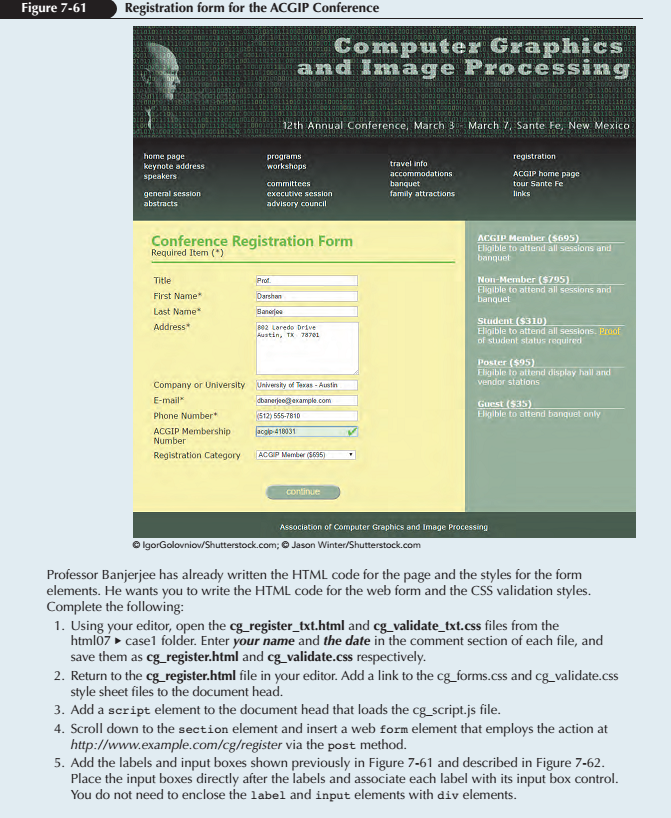
Conference Registration Form Required Item (*)
ACGIP Member ($695) Eligible to attend all sessions and banquet Non-Member ($795) Eligible to attend all sessions and banquet Student ($310) Eligible to attend all sessions. Proof of student status required Poster ($95) Eligible to attend display hall and vendor stations Guest ($35) Eligible to attend banquet only Association of Computer Graphics and Image Processing
cg_validate_txt
/* New Perspectives on HTML and CSS, 7th Edition Tutorial 7 Case Problem 1
ACGIP Registration Validation Style Sheet Author: Date:
Filename: cg_validate.css
*/
/* Validation Styles */
cg_styles.css
@charset "utf-8";
/* New Perspectives on HTML and CSS, 7th Edition Tutorial 7 Case Problem 1
ACGIP General Style Sheet Filename: cg_styles.css
*/
/* HTML and Body styles */
html { background: rgb(51, 51, 51) url(cg_back.png); font-family: Verdana, Geneva, sans-serif; height: 100%; }
body { background-color: white; box-shadow: black 20px 0px 40px, black -20px 0px 40px; border-left: 3px solid black; border-right: 3px solid black; display: -webkit-flex; display: flex; -webkit-flex-flow: row wrap; flex-flow: row wrap; margin: 0px auto; min-width: 320px; max-width: 1020px; width: 100%; }
/* Header styles */
header { width: 100%; }
header img#logoimg { display: block; width: 100%; }
/* Navigation Styles */
nav { width: 100%; }
nav ul { background: linear-gradient(to bottom, black, rgb(44, 70, 44)); -moz-column-width: 200px; -webkit-column-width: 200px; column-width: 200px;
-moz-column-gap: 25px; -webkit-column-gap: 25px; column-gap: 25px; padding: 25px; }
nav ul li.newgroup { margin-top: 15px; }
nav ul li a { color: white; text-decoration: none; font-size: 0.9em; }
nav a:hover { color: rgb(191, 231, 191); text-decoration: underline; }
/* Section Styles */
section { background: rgb(245,245,165); -webkit-flex: 2 1 421px; flex: 2 1 421px; padding: 10px 20px 20px 40px; }
section h1 { font-family: Segoe, "Segoe UI", "DejaVu Sans", "Trebuchet MS", Verdana, sans-serif; font-size: 1.8em; margin: 20px 0px 5px; color: rgb(83, 183, 51); }
section > p { margin-bottom: 20px; padding-bottom: 9px; border-bottom: 3px solid rgb(83, 183, 51); }
/* Aside Styles */
aside { background: rgb(144, 170, 144); color: white; -webkit-flex: 1 2 220px; flex: 1 2 220px ; padding: 25px; }
dt { font-size: 1em; border-bottom: 1px solid white; font-weight: bold; }
dd { margin-bottom: 25px; }
dl a { color: gold; }
/* Footer styles */
footer { color: white; background: rgb(44, 70, 44); height: 70px; padding-top: 20px; text-align: center; font-size: 0.9em; width: 100%; }
/* =============================== Mobile Styles: 0px to 640px =============================== */ @media only screen and (max-width: 640px) {
section h1 { font-size: 1.5em; } section p { font-size: 0.9em; } nav { -webkit-order: 99; order: 99; } footer { -webkit-order: 100; order: 100; } }
/* ============================================= Tablet and Desktop Styles: greater than 640px ============================================= */ @media only screen and (min-width: 641px) {
}
cg_base.css
@charset "utf-8";
/* New Perspectives on HTML5 and CSS3, 7th Edition Tutorial 7 Case Problem 1 ACGIP Base Style Sheet Filename: cg_base.css
*/
/* Basic styles to be used with all devices and under all conditions */
article, aside, figcaption, figure, footer, header, main, nav, section { display: block; }
address, article, aside, blockquote, body, cite, div, dl, dt, dd, em, figcaption, figure, footer, h1, h2, h3, h4, h5, h6, header, html, img, li, main, nav, nav a, ol, p, section, span, ul, table, tr, td, th, col, colgroup { margin: 0; padding: 0; border: 0; font-size: 100%; background: transparent; -webkit-box-sizing: border-box; -moz-box-sizing: border-box; box-sizing: border-box; }
/* Set the default page element styles */
body { line-height: 1.2em; }
ul, ol { list-style: none; }
nav ul { list-style: none; list-style-image: none; }
nav a { text-decoration: none; }
cg_forms.css
/* New Perspectives on HTML and CSS, 7th Edition Tutorial 7 Case Problem 1
ACGIP Registration Form Style Sheet
Filename: cg_forms.css
*/
/* Form Layout Styles */
label { display: block; float: left; clear: left; margin: 5px; width: 200px; }
input, select, textarea { display: block; float: left; margin: 5px 0px; width: 200px; }
textarea { height: 100px; }
form p { clear: left; text-align: center; padding-top: 40px; }
input[type='submit'] { background-color: rgb(144, 170, 144); color: rgb(245,245,165); border-radius: 20px; float: none; display: inline; font-size: 1.1em; height: 30px; width: 150px;
}
New Perspectives on HTML and CSS, 7th Edition
Tutorial 7
Case Problem 1
ACGIP Registration Validation Style Sheet
Author:
Date:
Filename: cg_validate.css
*/
/* Validation Styles */
Figure 7-61 Registration form for the ACGIP Conference Computer Graphics and Image Processing 12th Annual Conference, March 3 March Sante Fe. New Mexico home page keynote address speakers prograTIS travel info ACGIP home page tour Sante Fe links family attractions general session abstracts advisory council Conference Registration Form Required Item () ACGIP Member ($695) Eligible to attend all sessions and banquet Nou-Member ($795) Eligible to attend all sessions and banquet Title First Name Last Name Address* Darshan Baneroa 892 Laredo Drive Student ($310 Eligible to attend all sessions. Proo of student status required Poster ($95) Eligible to attend display hall and vendor stations Company or University s-Austih E-mail Phone Number ACGIP Membership 41803 512) 555-7810 Elgible to attend banquet only Number Registration Category ACGP Mamber (5695) Association of Computer Graphics and Image Processing lgorGolovniov/Shutt O Jason Winter/S Professor Banjerjee has already written the HTML code for the page and the styles for the form elements. He wants you to write the HTML code for the web form and the CSS validation styles. Complete the following: 1. Using your editor, open the cg_register_txt.html and cg validate_txt.css files from the 2. Return to the cg_register.html file in your editor. Add a link to the cg forms.css and cg_validate.css 3. Add a script element to the document head that loads the cg_script.js file. html 07 case folder. Enter your name and the date in the comment section of each file, and save them as cg_register.html and cg_validate.css respectively. style sheet files to the document head. 4. Scroll down to the section element and insert a web form element that employs the action at http://www.example.com/cg/register via the post method. 5. Add the labels and input boxes shown previously in Figure 7-61 and described in Figure 7-62. Place the input boxes directly after the labels and associate each label with its input box control. You do not need to enclose the label and input elements with div elements