







Question: I need help on this exercise, this is confusing and I do not know how to add this problem into a lc-3 simulator Here is
I need help on this exercise, this is confusing and I do not know how to add this problem into a lc-3 simulator
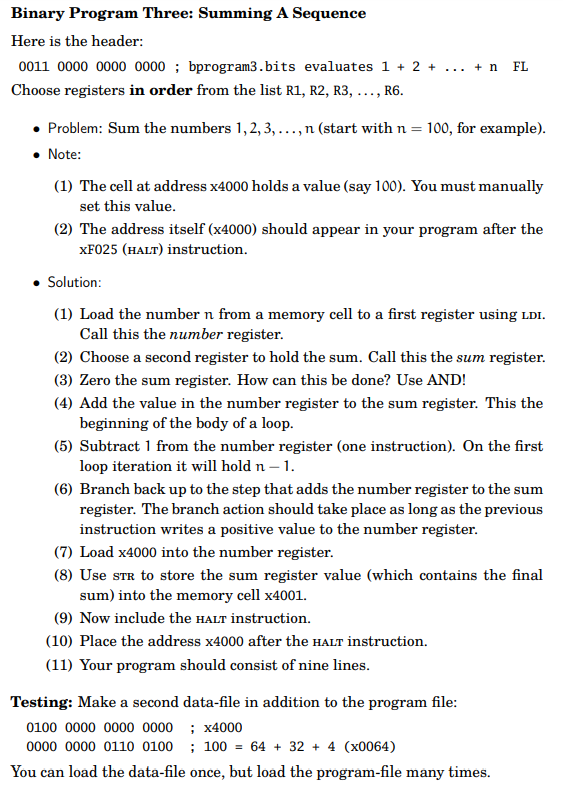
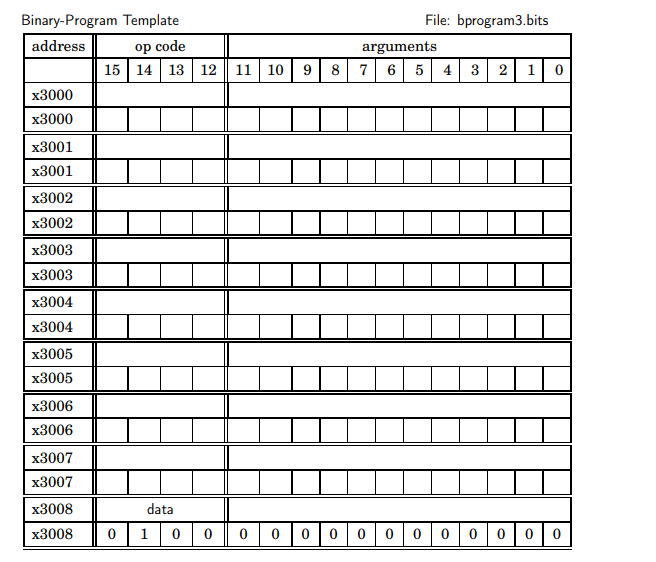 Here is the table I hope this helps
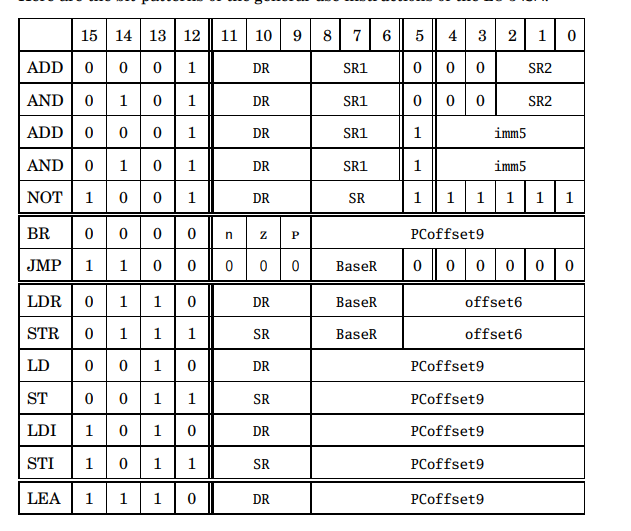
Binary Program Three: Summing A Sequence Here is the header: 0011000000000000 ; bprogram3.bits evaluates 1+2++n FL Choose registers in order from the list R1, R2, R3, .., R6. - Problem: Sum the numbers 1, 2,3, .., n (start with n=100, for example). - Note: (1) The cell at address x4000 holds a value (say 100). You must manually set this value. (2) The address itself (x4000) should appear in your program after the xF025 (HALT) instruction. - Solution: (1) Load the number n from a memory cell to a first register using LDI. Call this the number register. (2) Choose a second register to hold the sum. Call this the sum register. (3) Zero the sum register. How can this be done? Use AND! (4) Add the value in the number register to the sum register. This the beginning of the body of a loop. (5) Subtract 1 from the number register (one instruction). On the first loop iteration it will hold n1. (6) Branch back up to the step that adds the number register to the sum register. The branch action should take place as long as the previous instruction writes a positive value to the number register. (7) Load x 4000 into the number register. (8) Use str to store the sum register value (which contains the final sum) into the memory cell x4001. (9) Now include the HALT instruction. (10) Place the address x4000 after the HALT instruction. (11) Your program should consist of nine lines. Testing: Make a second data-file in addition to the program file: 01000000000000000000011000000100;x4000;100=64+32+4(x0064) You can load the data-file once, but load the program-file many times. Binary-Program Template File: bprogram3.bits
Step by Step Solution
There are 3 Steps involved in it

Get step-by-step solutions from verified subject matter experts
 Study Help