







Question: I need help specifically with ( 1 H , Part 3 Important Reminders This assignment has hidden tests: tests that are not visible here, but
I need help specifically with H Part
Important Reminders
This assignment has hidden tests: tests that are not visible here, but that will be run on your submitted assignment for grading.
This means passing all the tests you can see in the notebook here does not guarantee you have the right answer!
In particular many of the tests you can see simply check that the right variable names exist. Hidden tests check the actual values.
It is up to you to check the values, and make sure they seem reasonable.
A reminder to restart the kernel and rerun the code as a first line check if things seem to go weird.
For example, note that some cells can only be run once, because they rewrite a variable for example, your dataframe and change it in a way that means a second execution will fa
Also, running some cells out of order might change the dataframe in ways that may cause an error, which can be fixed by rerunning.
Run the following cell. These are all you need for the assignment. Do not import additional packages.
: # Imports
matplotlib inline
import numpy as np
import pandas as pd
import matplotlib.pyplot as plt
import seaborn as sns
snsset
snssetcontexttalk
import warnings
warnings.filterwarningsignore
import patsy
import statsmodels.api as sm
import scipy.stats as stats
from scipy.stats import ttestind, chisquare, normaltest
Note: the statsmodels import may print out a 'FutureWarning'. Thats fine.
Part : Load & Clean the Data points
Fixing messy data makes up a large amount of the work of being a Data Scientist.
The real world produces messy measurements and it is your job to find ways to standardize your data such that you can mak
In this section, you will leam, and practice, how to successfully deal with unclean data.
a Load the data
Import datafile COGSIntroQuestionnaireData.csv into a DataFrame called df
YOUR COOE HERE
import pandas as pd
df pdreadcsvCOGSIntroQuestionnaireData.csv
assert isinstancedf pdDataFrame
HCheck out the data
df head
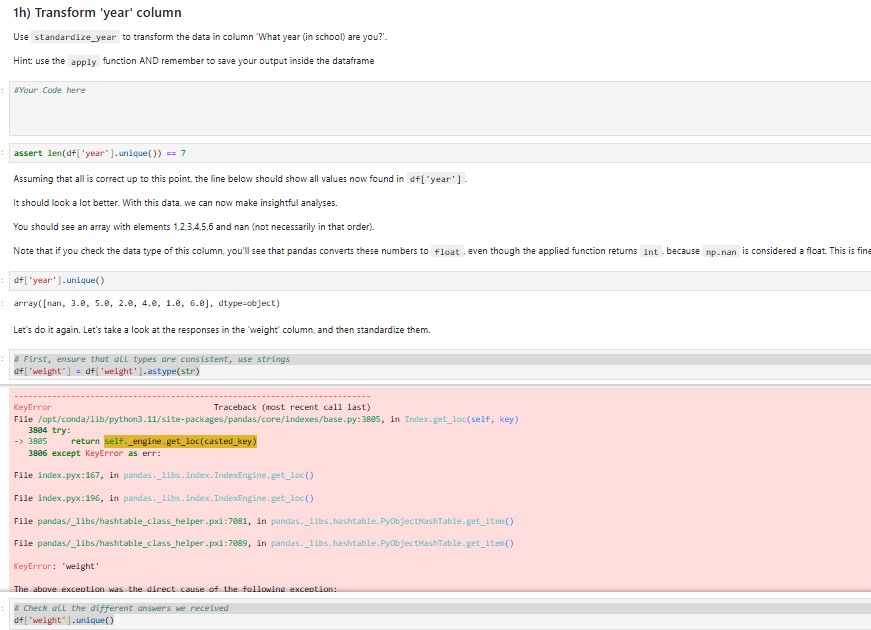
h Transform 'year' column
Use standardizeyear to transform the data in column 'What year in school are you?
Hint: use the apply function AND remember to save your output inside the dataframe
sYour Code here
assert lendf 'year'unique
Assuming that all is correct up to this point, the line below should show all values now found in df 'year'
It should look a lot better. With this data, we can now make insightful analyses.
You should see an array with elements and nan not necessarily in that order
Note that if you check the data type of this column, you'll see that pandas converts these numbers to float, even though the applied function returns int, because np nan is considered a float. This is fine
dfyearunique
array nan, dtypeobject
Let's do it again. Let's take a look at the responses in the 'weight' column, and then standardize them.
First, ensure that all types are consistent, use strings
dfweight dfweightastypestr
KeyError
Traceback most recent call last
Fileoptcondalibpythonsitepackagespandascoreindexesbasepy: in Index.getlocself key
try:
return self.engine.getloccastedkey
except KeyError as err:
File index.pyx: in pandas.bsindex.IndexEngine.getloc
File index.pyx: in pandas.ibs.index.IndexEngine.getloc
File pandaslibshashtableclasshelper.pxi: in pandas.ibs.hashtable.PyobjecthashTable.getiten
File pandaslibshashtableclasshelper.pxi:e in pandas.ibs.hashtable.PyObjectHashTable.getiten
KeyError: 'weight'
The above exceation was the direct cause of the followine excedtion:
Check all the different answers we received
dfweightunique
Part : Load & Clean the Data points
Fixing messy data makes up a large amount of the work of being a Data Scientist.
The real world produces messy measurements and it is your job to find ways to standardize your data such that you can mak
In this section, you will leam, and practice, how to successfully deal with unclean data.
a Load the data
Import datafile COGSIntroQuestionnaireData.csv into a DataFrame called df
YOUR COOE HERE
import pandas as pd
df pdreadcsvCOGSIntroQuestionnaireData.csv
assert isinstancedf pdDataFrame
HCheck out the data
df head
Step by Step Solution
There are 3 Steps involved in it
1 Expert Approved Answer
Step: 1 Unlock

Question Has Been Solved by an Expert!
Get step-by-step solutions from verified subject matter experts
Step: 2 Unlock
Step: 3 Unlock
 Study Help