







Question: I need help, this is a lab for my java class. If you can do this i'd be very grateful. -> Go to the wikipedia
I need help, this is a lab for my java class. If you can do this i'd be very grateful.
-> Go to the wikipedia page download "pixLab.zip"
https://mathorama.com/apcs/pmwiki.php?n=Main.PictureLab
Here are the instructions:
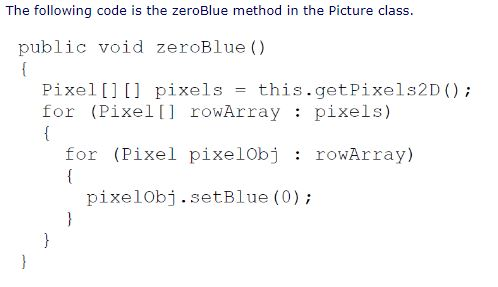
- Using the zeroBlue method as a starting point, write the method keepOnlyBlue that will keep only the blue values, that is, it will set the red and green values to zero. Create a class (static) method to test this new method in the class PictureTester. Be sure to call the new test method in the main method in PictureTester.
- Write the negate method to negate all the pixels in a picture. To negate a picture, set the red value to 255 minus the current red value, the green value to 255 minus the current green value and the blue value to 255 minus the current blue value. Create a class (static) method to test this new method in the class PictureTester. Be sure to call the new test method in the main method in PictureTester.
- Write the grayscale method to turn the picture into shades of gray. Set the red, green, and blue values to the average of the current red, green, and blue values (add all three values and divide by 3). Create a class (static) method to test this new method in the class PictureTester. Be sure to call the new test method in the main method in PictureTester.
- Challenge Explore the "water.jpg" picture in the images folder. Write a method fixUnderwater() to modify the pixel colors to make the fish easier to see. Create a class (static) method to test this new method in the class PictureTester. Be sure to call the new test method in the main method in PictureTester.
The following code is the zeroBlue method in the Picture class. public void zeroBlue () Pixel[][] pixels = this.getPixels2D ( ); for (Pixel[ rowArray pixels) for (Pixel pixelObj : rowArray) pixelObj.setBlue (0)
Step by Step Solution
There are 3 Steps involved in it
1 Expert Approved Answer
Step: 1 Unlock

Question Has Been Solved by an Expert!
Get step-by-step solutions from verified subject matter experts
Step: 2 Unlock
Step: 3 Unlock
 Study Help