







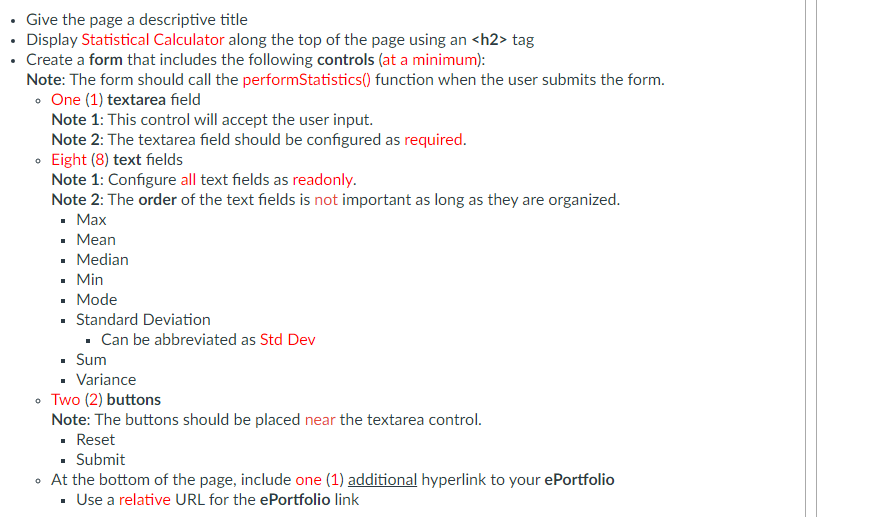
Question: I need help this is html required. This is javascript . Give the page a descriptive title Display Statistical Calculator along the top of the
I need help this is html required.
This is javascript
. Give the page a descriptive title Display Statistical Calculator along the top of the page using an
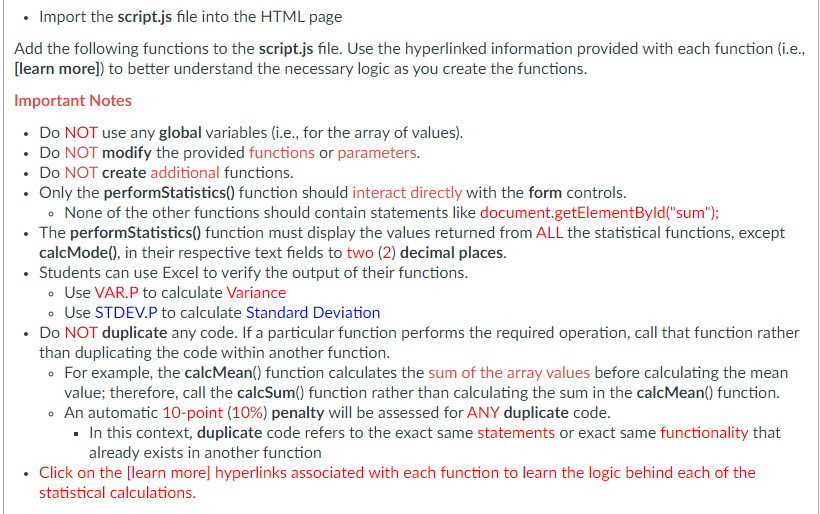
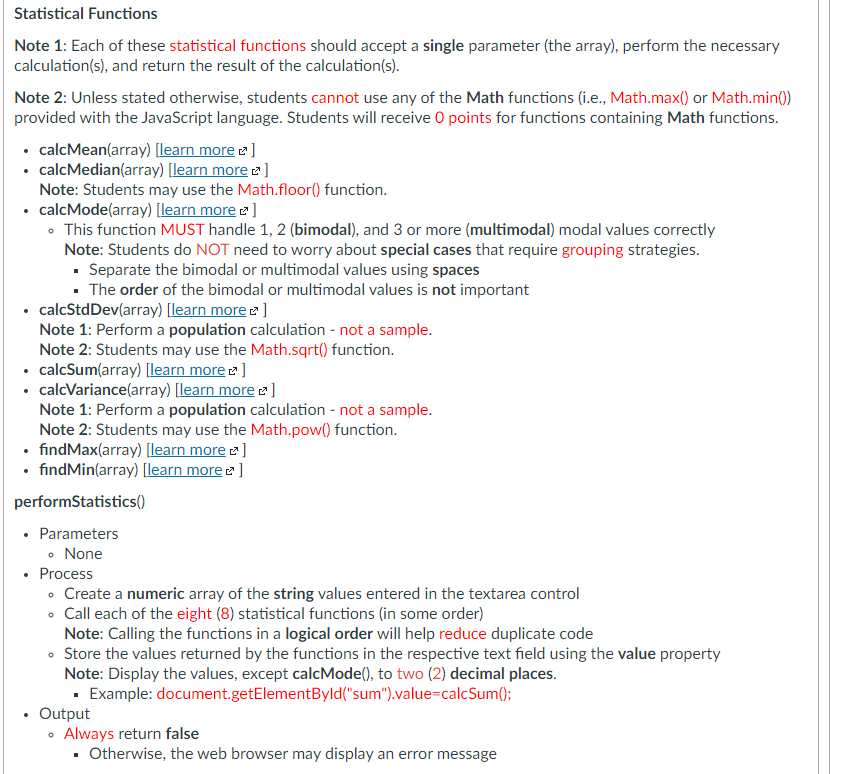
tag Create a form that includes the following controls (at a minimum): Note: The form should call the performStatistics() function when the user submits the form. . One (1) textarea field Note 1: This control will accept the user input. Note 2: The textarea field should be configured as required. Eight (8) text fields Note 1: Configure all text fields as readonly. Note 2: The order of the text fields is not important as long as they are organized. Max Mean Median Min Mode Standard Deviation . Can be abbreviated as Std Dev Sum . Variance Two (2) buttons Note: The buttons should be placed near the textarea control. Reset Submit At the bottom of the page, include one (1) additional hyperlink to your ePortfolio Use a relative URL for the ePortfolio link o 0 I Import the script.js file into the HTML page Add the following functions to the script.js file. Use the hyperlinked information provided with each function (i.e., [learn more]) to better understand the necessary logic as you create the functions. Important Notes Do NOT use any global variables (i.e., for the array of values). Do NOT modify the provided functions or parameters. Do NOT create additional functions. . Only the performStatistics() function should interact directly with the form controls. . None of the other functions should contain statements like document.getElementById("sum"); The performStatistics() function must display the values returned from ALL the statistical functions, except calcMode(), in their respective text fields to two (2) decimal places. Students can use Excel to verify the output of their functions. . Use VAR.P to calculate Variance . Use STDEV.P to calculate Standard Deviation Do NOT duplicate any code. If a particular function performs the required operation, call that function rather than duplicating the code within another function. . For example, the calcMean() function calculates the sum of the array values before calculating the mean value; therefore, call the calcSum() function rather than calculating the sum in the calcMean() function. . An automatic 10-point (10%) penalty will be assessed for ANY duplicate code. . In this context, duplicate code refers to the exact same statements or exact same functionality that already exists in another function Click on the [learn more] hyperlinks associated with each function to learn the logic behind each of the statistical calculations. Statistical Functions Note 1: Each of these statistical functions should accept a single parameter (the array), perform the necessary calculation(s), and return the result of the calculation(s). Note 2: Unless stated otherwise, students cannot use any of the Math functions (i.e., Math.max() or Math.min()) provided with the JavaScript language. Students will receive 0 points for functions containing Math functions. calcMean(array) [learn more ] calcMedian(array) (learn more e ] Note: Students may use the Math.floor() function. calcMode(array) (learn more 2] This function MUST handle 1, 2 (bimodal), and 3 or more (multimodal) modal values correctly Note: Students do NOT need to worry about special cases that require grouping strategies. . Separate the bimodal or multimodal values using spaces The order of the bimodal or multimodal values is not important calcStd Dev(array) [learn more ] Note 1: Perform a population calculation - not a sample. Note 2: Students may use the Math.sqrt() function. calcSum(array) [learn more ] calcVariance(array) [learn more e ] Note 1: Perform a population calculation - not a sample. Note 2: Students may use the Math.pow() function. findMax(array) [learn more e ] find Min(array) [learn more z] performStatistics() Parameters . None Process - Create a numeric array of the string values entered in the textarea control Call each of the eight (8) statistical functions in some order) Note: Calling the functions in a logical order will help reduce duplicate code Store the values returned by the functions in the respective text field using the value property Note: Display the values, except calcMode(), to two (2) decimal places. . Example: document.getElementById("sum").value=calcSum(); . Output Always return false . Otherwise, the web browser may display an error message
Step by Step Solution
There are 3 Steps involved in it
1 Expert Approved Answer
Step: 1 Unlock

Question Has Been Solved by an Expert!
Get step-by-step solutions from verified subject matter experts
Step: 2 Unlock
Step: 3 Unlock
 Study Help