







Question: I need help to solve it with explanation please. A B D F 2 3 Income Tax Calculation Using the VLOOKUP function 4 5 6
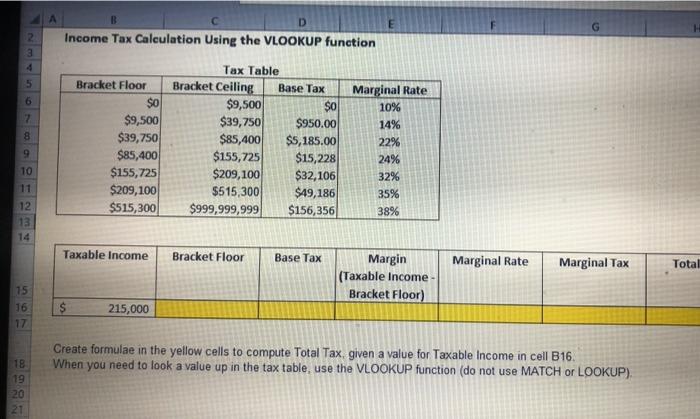
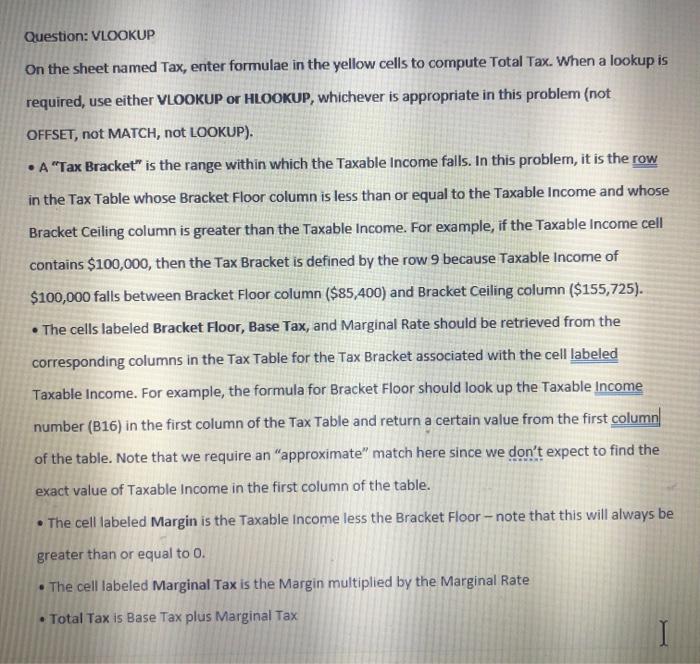
A B D F 2 3 Income Tax Calculation Using the VLOOKUP function 4 5 6 7 8 Bracket Floor $0 $9,500 $39,750 $85,400 $155,725 $209,100 $515,300 Tax Table Bracket Ceiling Base Tax $9,500 $o $39,750 $950.00 $85,400 $5,185.00 $155,725 $15,228 $209,100 $32,106 $515,300 $49,186 $999,999,999 $156,356 9 Marginal Rate 10% 14% 22% 24% 32% 35% 38% 10 11 12 13 14 Taxable income Bracket Floor Base Tax Marginal Rate Marginal Tax Total Margin (Taxable income Bracket Floor) 15 16 17 $ 215,000 Create formulae in the yellow cells to compute Total Tax, given a value for Taxable income in cell B16. When you need to look a value up in the tax table, use the VLOOKUP function (do not use MATCH or LOOKUP) 18 19 20 21 Question: VLOOKUP On the sheet named Tax, enter formulae in the yellow cells to compute Total Tax. When a lookup is required, use either VLOOKUP or HLOOKUP, whichever is appropriate in this problem (not OFFSET, not MATCH, not LOOKUP). A "Tax Bracket" is the range within which the Taxable income falls. In this problem, it is the row in the Tax Table whose Bracket Floor column is less than or equal to the Taxable income and whose Bracket Ceiling column is greater than the Taxable income. For example, if the Taxable income cell contains $100,000, then the Tax Bracket is defined by the row 9 because Taxable income of $100,000 falls between Bracket Floor column ($85,400) and Bracket Ceiling column ($155,725). The cells labeled Bracket Floor, Base Tax, and Marginal Rate should be retrieved from the corresponding columns in the Tax Table for the Tax Bracket associated with the cell labeled Taxable income. For example, the formula for Bracket Floor should look up the Taxable income number (016) in the first column of the Tax Table and return a certain value from the first column of the table. Note that we require an "approximate" match here since we don't expect to find the exact value of Taxable income in the first column of the table. The cell labeled Margin is the Taxable income less the Bracket Floor - note that this will always be greater than or equal to 0. The cell labeled Marginal Tax is the Margin multiplied by the Marginal Rate Total Tax is Base Tax plus Marginal Tax
Step by Step Solution
There are 3 Steps involved in it

Get step-by-step solutions from verified subject matter experts
 Study Help