







Question: I need help using the text to columns function. Im getting stuck on the delimiters. I select the Other option and typed the underscore (_)
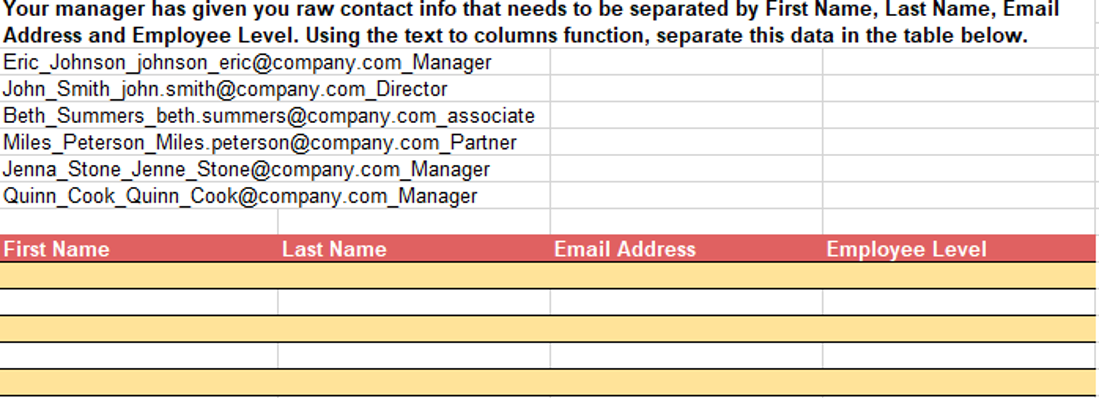
I need help using the text to columns function. Im getting stuck on the delimiters. I select the Other option and typed the underscore (_) to separate the names, however I want to keep the underscore in the email portion. How can I take out the underscore in the name but keep it in the email portion?
Your manager has given you raw contact info that needs to be separated by First Name, Last Name, Email Address and Employee Level. Using the text to columns function, separate this data in the table below. Eric_Johnson_johnson_eric@company.com_Manager John_Smith_john.smith@company.com_Director Beth_Summers_beth.summers@company.com_associate Miles_Peterson_Miles.peterson@company.com_Partner Jenna_Stone_Jenne_Stone@company.com_Manager Quinn Cook Quinn Cook@company.com_Manager First Name Last Name Email Address Employee Level
Step by Step Solution
There are 3 Steps involved in it
1 Expert Approved Answer
Step: 1 Unlock

Question Has Been Solved by an Expert!
Get step-by-step solutions from verified subject matter experts
Step: 2 Unlock
Step: 3 Unlock
 Study Help