







Question: I need help with 8-10 ioi Cascading Style Sheets | HTML and CSS 8. Create a style for the body element so text on the
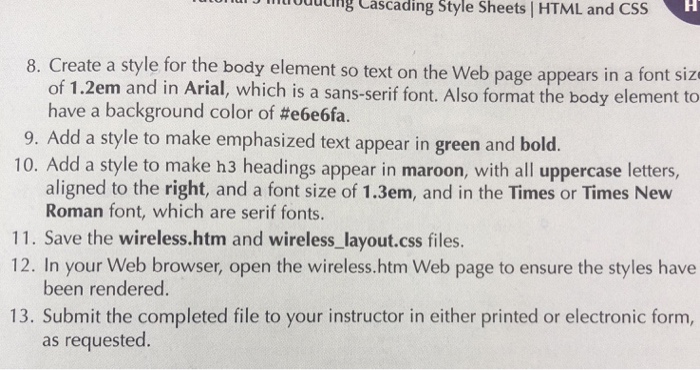
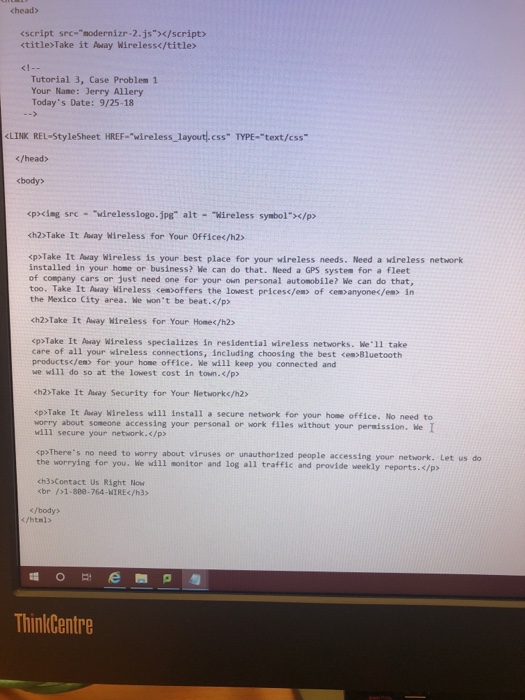
ioi Cascading Style Sheets | HTML and CSS 8. Create a style for the body element so text on the Web page appears in a font size of 1.2em and in Arial, which is a sans-serif font. Also format the body element to have a background color of #e6e6fa. 9. Add a style to make emphasized text appear in green and bold. 10. Add a style to make h3 headings appear in maroon, with all uppercase letters, aligned to the right, and a font size of 1.3em, and in the Times or Times New Roman font, which are serif fonts. 11. Save the wireless.htm and wireless_layout.css files. 12. In your Web browser, open the wireless.htm Web page to ensure the styles have been rendered. 13. Submit the completed file to your instructor in either printed or electronic form, as requested
Step by Step Solution
There are 3 Steps involved in it

Get step-by-step solutions from verified subject matter experts
 Study Help