







Question: I need help with adding these to my existing code in java fx . no swing or awt please. I provided my existing code and
I need help with adding these to my existing code in java fx no swing or awt please. I provided my existing code and a picture of the expected outcome.
Ex: Enhance your Dorm Meal, Others Calculator app by providing a send an order confirmation
email function through Gmail if a customer chosen to do so If necessary, refer to referencea for
howto use Java code to send an email through a Gmail account.
What do you need to do:
a Enhance your app so it will send an order confirmation email through your free Gmail
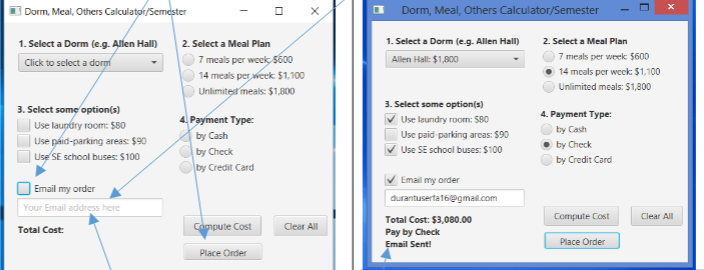
account if a customer puts a Check mark checkbox and an Email on the textfield control
and then click the Place Order button.
Refer to the screenshot below.
To keep things simple, we just assume that when the Place Order button is clicked, a
user has some items a payment type, email checkbox checked, and email filled already.
b Add a prompt text Your Email address herenote: dont use the setText method to do
this to the email textfield and an addition message Email sent! to your Total Cost output
control to let the user know that the email has been sent
c Enhance the Clear All function to also remove the email checkbox and email address, if any.
d Make sure the order confirmation email includes the following messages refer to the
screenshot below:
In the subject: Your order placed at the ordered date and time
In the body:
Dorm and price if any Meal Plan and price if any Options and prices if
any Total amount, Payment Type, Thank you for your business.
f Make sure that the appearance of your app resembles to the ones on the screenshots or in the
demonstration video.
g Verify the correctness of your app to produce the expected results.
Step by Step Solution
There are 3 Steps involved in it
1 Expert Approved Answer
Step: 1 Unlock

Question Has Been Solved by an Expert!
Get step-by-step solutions from verified subject matter experts
Step: 2 Unlock
Step: 3 Unlock
 Study Help