







Question: I need help with Excel Steps; 5,7, 9, 11, 13, 14 Use the Art worksheet to create a blank PivotTable on a new worksheet named
I need help with Excel Steps; 5,7, 9, 11, 13, 14
| Use the Art worksheet to create a blank PivotTable on a new worksheet named Sold Out. Name the PivotTable Average Price by Type. |
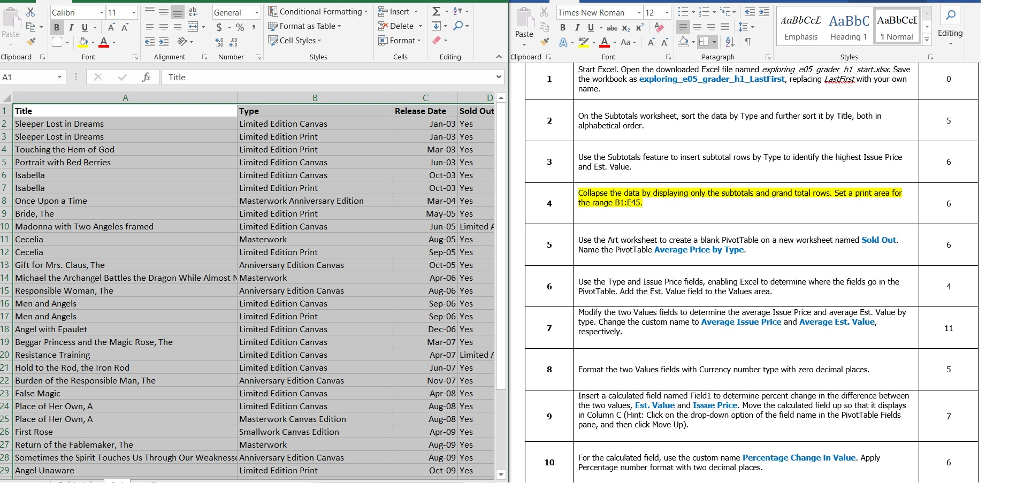

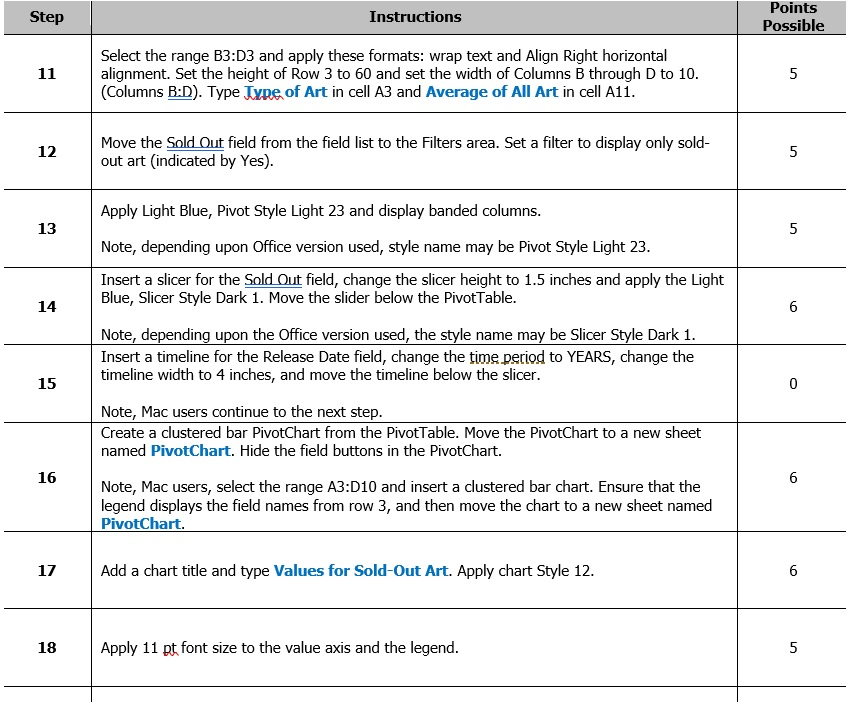
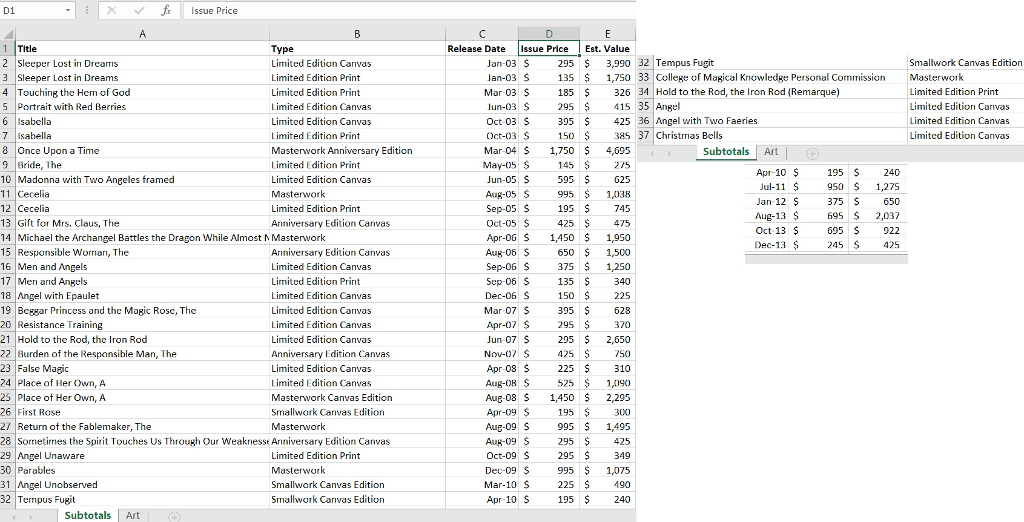
-E Conditional Formatting. ?.T Times New Roman-12 General Inscrt. . ? . > ?Cril Styles. Emphasis HeadingNomal " ?? Paragraph Start Fxel. Open the downkaded Fxcrl fil narmedn5 rh stat Save lthe workbock as exploring. e05_grader hl Lastfirst, replacing Lastbrst with your own Release Date Sold Out On the Subtotals worksheet, sort the data by Type and further sort it by Tde, both in lphabetical ordor. 2 Sleeper Lost in Dreams 3 Sleeper Lost in Ureams 4Touching the Hem of God 5 Portrait with Red Rerrirs Limited Edition Canvas Limited tdition Print Limited Edition Print l imited Fditinn Canvas Lirniterd Ecdition Carvas Lirnited Editiun Prir?t Masterwork Anniversary Edition Limited tdition Print Limited Edition Canvas Mar 03 Yes un-03 Yrs Use the Subtotas feature to insert suboows by Type to identify the highest Issue Piie and Est. Value. Isabella 8 Once Upon a Time 9 Bride, Ihe OLL-03 Yes Mar-04 Yes May-0s Yes Collapse the data by displaying only the subtotals and orand total rows. Set a print area for the rangs 81:E15. Jun 0G Limited Madonna with Two Angeles framed 11 Corelia Use the Aut worksheet to create a blank PrvotTable on a new worksheet named Sold Out. Namc the PivotTable Averagc Price by Type. Lirnited Edition Prirt Ariniversaty Edition Canvas Cetelia 13 Gift for Mrs. Claus, The 14 Micheel the Archangel Battles the Dragon While most N Masterwork 5 Responsible Woman, Ihe 6 Men and Angels 17 Men and Angels 1 Angel with Epaulet Apr-Ds Yes Use the Type and Issue Price fields, enabling Excal to deternine where the fields go in the PivntTable. Arkd the Est. Value field to the Valiuees ar Anniversary Edition Canvas Limited Edition Canvas limited Fditinn Print Lirnited Edition Carivas Lirnited Editiuri Carivas Limited Edition Canvas Limited Edition Canvas Anniversary Edition Canvas Limiterd Fdition Canvas lirniterd Feditinn Carvas Mastervwork Canves Edition Smalhvork Canves Edition Mudily the twoalueslied to deterire he averae Issue Pricl aEst. Value by type. Change the custom name to Average Issue Price and Average Est. Value, Beggar Princess and the Magic Ruse, The Mar-07 Yes Apr-D7 Limited Hold to the Rod, the Iron Rod 8Fcrrnat the twn Valurs firlds with Cureny numhrr type with zea drrimal pers. Nov 0 Yes Burden of the Responsible Man, The 3 False Magir 4 Place of Her Own, A 25 Place ol Her Ouwn, A 26 First Rose 27 Return of the Fablemaker, The Insert a caloulated ficld named rizld1 to determine poncent change in the differonce batwzen th? twu values. Est. Value dnd Issue Price. Move the calculated lidd up su that it displays in Column C (Hin: Cck on the drop-down opton of the field name in the PivotTable Fields pan and then click Move Up Apr-D9 Yes Sometimes the Spirit Touches Us Through Our Weaknesss Anniversary Edition Canvas 9 Angel Unawarc 1 or the cacuatd field, use the custom name lPercentage Change In Valuc. Apply Limited Edition Print Oct 09 Yes Percentagre numier foernat with t drrinal pars. -E Conditional Formatting. ?.T Times New Roman-12 General Inscrt. . ? . > ?Cril Styles. Emphasis HeadingNomal " ?? Paragraph Start Fxel. Open the downkaded Fxcrl fil narmedn5 rh stat Save lthe workbock as exploring. e05_grader hl Lastfirst, replacing Lastbrst with your own Release Date Sold Out On the Subtotals worksheet, sort the data by Type and further sort it by Tde, both in lphabetical ordor. 2 Sleeper Lost in Dreams 3 Sleeper Lost in Ureams 4Touching the Hem of God 5 Portrait with Red Rerrirs Limited Edition Canvas Limited tdition Print Limited Edition Print l imited Fditinn Canvas Lirniterd Ecdition Carvas Lirnited Editiun Prir?t Masterwork Anniversary Edition Limited tdition Print Limited Edition Canvas Mar 03 Yes un-03 Yrs Use the Subtotas feature to insert suboows by Type to identify the highest Issue Piie and Est. Value. Isabella 8 Once Upon a Time 9 Bride, Ihe OLL-03 Yes Mar-04 Yes May-0s Yes Collapse the data by displaying only the subtotals and orand total rows. Set a print area for the rangs 81:E15. Jun 0G Limited Madonna with Two Angeles framed 11 Corelia Use the Aut worksheet to create a blank PrvotTable on a new worksheet named Sold Out. Namc the PivotTable Averagc Price by Type. Lirnited Edition Prirt Ariniversaty Edition Canvas Cetelia 13 Gift for Mrs. Claus, The 14 Micheel the Archangel Battles the Dragon While most N Masterwork 5 Responsible Woman, Ihe 6 Men and Angels 17 Men and Angels 1 Angel with Epaulet Apr-Ds Yes Use the Type and Issue Price fields, enabling Excal to deternine where the fields go in the PivntTable. Arkd the Est. Value field to the Valiuees ar Anniversary Edition Canvas Limited Edition Canvas limited Fditinn Print Lirnited Edition Carivas Lirnited Editiuri Carivas Limited Edition Canvas Limited Edition Canvas Anniversary Edition Canvas Limiterd Fdition Canvas lirniterd Feditinn Carvas Mastervwork Canves Edition Smalhvork Canves Edition Mudily the twoalueslied to deterire he averae Issue Pricl aEst. Value by type. Change the custom name to Average Issue Price and Average Est. Value, Beggar Princess and the Magic Ruse, The Mar-07 Yes Apr-D7 Limited Hold to the Rod, the Iron Rod 8Fcrrnat the twn Valurs firlds with Cureny numhrr type with zea drrimal pers. Nov 0 Yes Burden of the Responsible Man, The 3 False Magir 4 Place of Her Own, A 25 Place ol Her Ouwn, A 26 First Rose 27 Return of the Fablemaker, The Insert a caloulated ficld named rizld1 to determine poncent change in the differonce batwzen th? twu values. Est. Value dnd Issue Price. Move the calculated lidd up su that it displays in Column C (Hin: Cck on the drop-down opton of the field name in the PivotTable Fields pan and then click Move Up Apr-D9 Yes Sometimes the Spirit Touches Us Through Our Weaknesss Anniversary Edition Canvas 9 Angel Unawarc 1 or the cacuatd field, use the custom name lPercentage Change In Valuc. Apply Limited Edition Print Oct 09 Yes Percentagre numier foernat with t drrinal pars
Step by Step Solution
There are 3 Steps involved in it

Get step-by-step solutions from verified subject matter experts
 Study Help