







Question: I need help with fixing the codes #include #include #define MAX_LINE 100 #define MAX_LENGTH 20 // function prototype void llAtnirp(char text[][MAX_LENGTH],int numLines); int main(int argc,
I need help with fixing the codes
#include
#define MAX_LINE 100 #define MAX_LENGTH 20
// function prototype void llAtnirp(char text[][MAX_LENGTH],int numLines);
int main(int argc, char * argv[]){ char text[MAX_LINE][MAX_LENGTH]; int i = 0; printf("Enter up to 100 strings: "); // fgets returns NULL if it gets only a ctrl ^d while ( fgets(text[i],MAX_LENGTH,stdin) != NULL && i != MAX_LINE){ i ++; } llAtnirp(text, i); return EXIT_SUCCESS; } //~dp1091/bin/autotest lab06 llAtnirp.c void llAtnirp(char text[][20],int numLines) { int k =0; int j = numLines -1; while (j >= 0){ k =0; while(text[j][k]!=' ' && text[j][k]!='\0'){ k= k+1; } k = k -1; while (k >= 0){ putchar(text[j][k]); k = k - 1; } printf(" "); j = j -1; } }
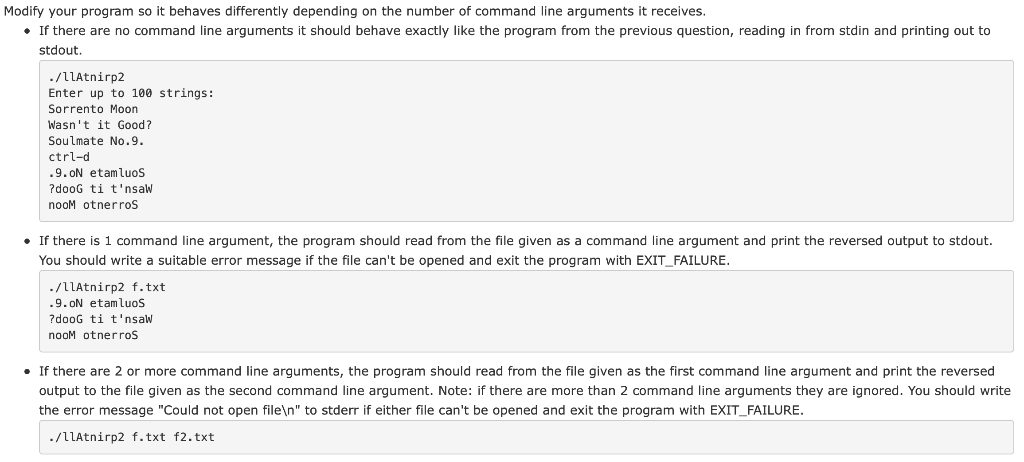
Modify your program so it behaves differently depending on the number of command line arguments it receives If there are no command line arguments it should behave exactly like the program from the previous question, reading in from stdin and printing out to stdout /11Atnirp2 Enter up to 100 strings: Sorrento Moon Wasn't it Good? Soulmate No.9 ctrl-d 9.ON etamluoS ?dooG ti t'nsaw nooM otnerros If there is 1 command line argument, the program should read from the file given as a command line argument and print the reversed output to stdout. You should write a suitable error message if the file can't be opened and exit the program with EXIT_FAILURE ./1LAtnirp2 f.txt .9.ON etamluos ?dooG ti t'nsaw nooM otnerroS .If there are 2 or more command line arguments, the program should read from the file given as the first command line argument and print the reversed output to the file given as the second command line argument. Note: if there are more than 2 command line arguments they are ignored. You should write the error message "Could not open file " to stderr if either file can't be opened and exit the program with EXIT_FAILURE ./1lAtnirp2 f.txt f2.txt
Step by Step Solution
There are 3 Steps involved in it

Get step-by-step solutions from verified subject matter experts
 Study Help