







Question: I need help with how to run a python file from in a .sh file in raspbian linux, and get it to stay in the
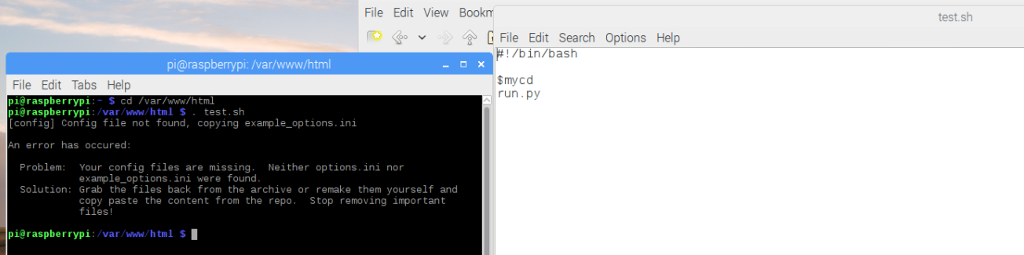
I need help with how to run a python file from in a .sh file in raspbian linux, and get it to stay in the directory with the python file because it is dependent on other files in that directory. I think its opening a childprocess to change directory and running the python file in the parent process.
ps. the mycd is an alias to the directory i want
im new to linux
File Edit View Bookm File Edit Search Options Help /bin/bash pi@raspberrypi: /var/www/html my cd File Edit Tabs Help run py pig raspberry pi cd /var/www/html. var/www/html test.sh raspberrypi [config) Config file not found, copying example options. ini error has occured: Problem Your config files are missing Neither options ini nor example options. ini were found. Solution: Grab the files back from the archive or remake them yourself and copy paste the content from the repo Stop removing important files! pieraspberrypi /var/www/html s I test sh
Step by Step Solution
There are 3 Steps involved in it

Get step-by-step solutions from verified subject matter experts
 Study Help