







Question: I need help with the following project. The main.cpp is given, and can not be changed. The bballin.txt is also given below, along with a
I need help with the following project. The main.cpp is given, and can not be changed. The bballin.txt is also given below, along with a sample of how to print.
main.cpp that is given:
#include#include "team.h" using namespace std; //------------------------------------------------------------------ // printLogo //------------------------------------------------------------------ void printLogo() { cout > choice; return (char)(toupper(choice[0])); // upper case of first character } // askMenuOption() //------------------------------------------------------------------ // main //------------------------------------------------------------------ int main() { team t; // create a team object char option; // menu option // print logo and read data from input file on startup printLogo(); t.read(); // repeat menu until eXit is selected do { option = askMenuOption(); switch (option) { case 'P': t.print(); break; case 'A': t.addGame(); break; case 'D': t.displayPlayer();break; case 'N': t.sortByName(); break; case 'J': t.sortByJersey(); break; case 'R': t.removePlayer(); break; case 'X': t.write(); break; default: cout Text file that is given:
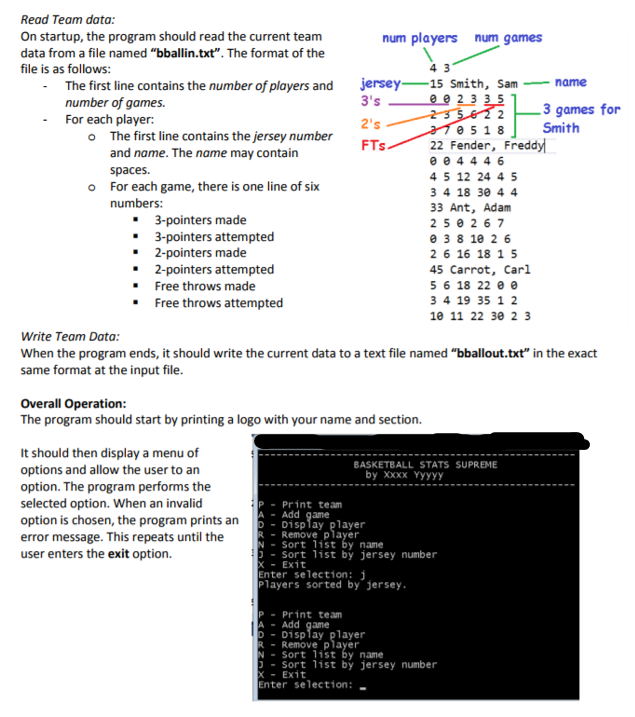
4 3 15 Smith, Sam 0 0 2 3 3 5 2 3 5 6 2 2 3 7 0 5 1 8 22 Fender, Freddy 0 0 4 4 4 6 4 5 12 24 4 5 3 4 18 30 4 4 33 Ant, Adam 2 5 0 2 6 7 0 3 8 10 2 6 2 6 16 18 1 5 45 Carrot, Carl 5 6 18 22 0 0 3 4 19 35 1 2 10 11 22 30 2 3Sample print that is given:
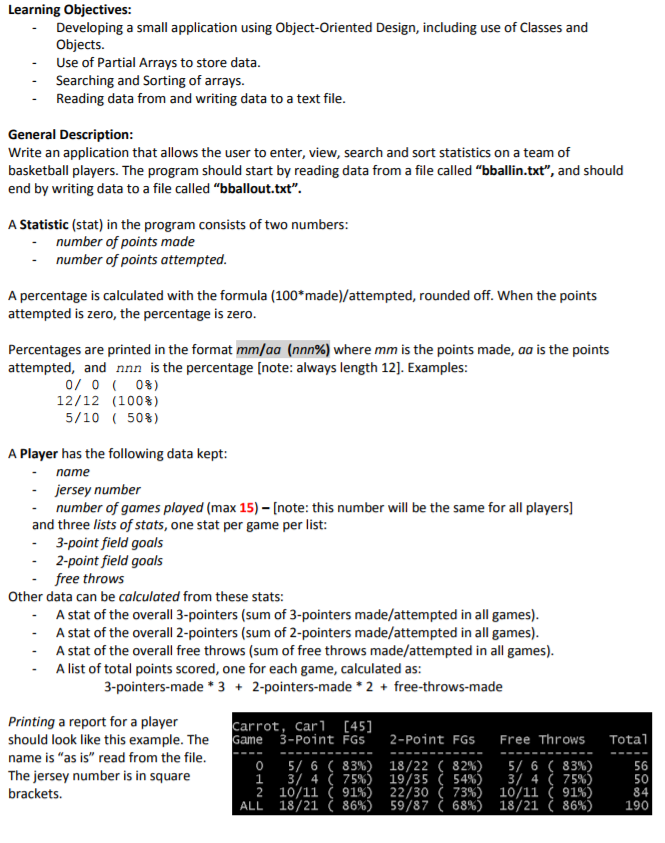
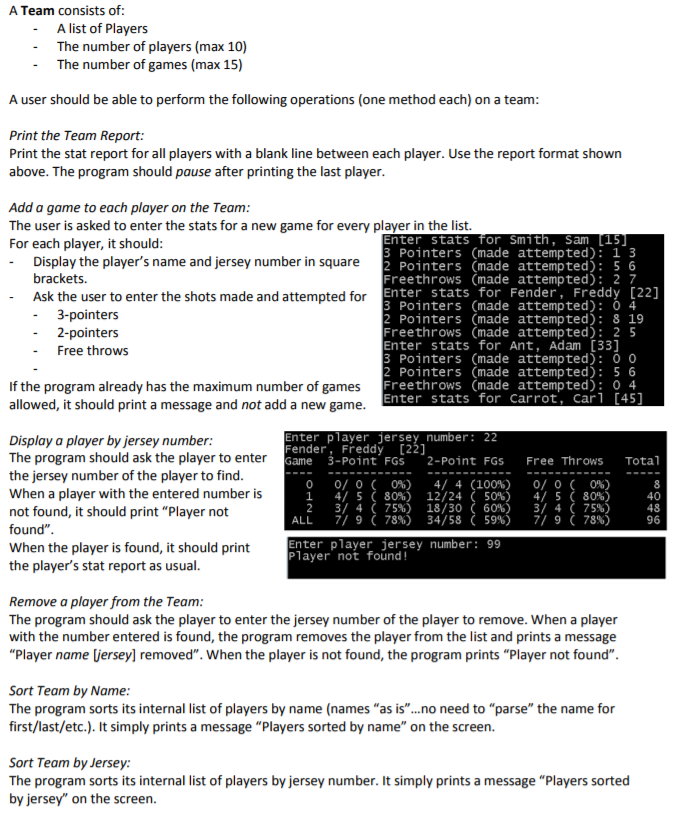
// This is an incomplete method to print the PLAYER REPORT // You are not required to use it, but you may find it helpful // The MM/AA (NNN%) is 12-characters long // ALL CAPS are used where you have to "plug in" your own names void PLAYER_CLASS_NAME::print() { cout Learning Objectives: Developing a small application using Object-Oriented Design, including use of Classes and Objects. Use of Partial Arrays to store data Searching and Sorting of arrays. Reading data from and writing data to a text file - General Description Write an application that allows the user to enter, view, search and sort statistics on a team of basketball players. The program should start by reading data from a file called "bballin.txt", and should end by writing data to a file called "bballout.txt". A Statistic (stat) in the program consists of two numbers - number of points made number of points attempted. A percentage is calculated with the formula (100 made)/attempted, rounded off. When the points attempted is zero, the percentage is zero Percentages are printed in the format mm/00 (nnn%) where mm is the points made, aa is the points attempted, and nnn is the percentage [note: always length 12]. Examples: 0/ 0 12/12 5/10 ( 0%) (100%) ( 50%) A Player has the following data kept -name jersey number number of games played (max 15) [note: this number will be the same for all players] and three lists of stats, one stat per game per list: - 3-point field goals - 2-point field goals free throws Other data can be calculated from these stats A stat of the overall 3-pointers (sum of 3-pointers made/attempted in all games) A stat of the overall 2-pointers (sum of 2-pointers made/attempted in all games) A stat of the overall free throws (sum of free throws made/attempted in all games) A list of total points scored, one for each game, calculated as: 3-pointers-made 3 2-pointers-made 2free-throws-made Printing a report for a player should look like this example. The name is "as is" read from the file The jersey number is in square brackets. arrot, Car1 [45] ame 3-Point FGs 2-Point FGs Free Throws Tota 0 5/ 6 ( 83%) 18/22 ( 82%) 5/ 6 ( 83%) 3/ 4 ( 75%) 19 35 ( 54%) 3/ 4 ( 75%) 2 10/11 (91%) 22/30( 73%) 10/11 (91%) ALL 18/21(86%) 59/87(68%) 18/21(86%) 56 50 190 Learning Objectives: Developing a small application using Object-Oriented Design, including use of Classes and Objects. Use of Partial Arrays to store data Searching and Sorting of arrays. Reading data from and writing data to a text file - General Description Write an application that allows the user to enter, view, search and sort statistics on a team of basketball players. The program should start by reading data from a file called "bballin.txt", and should end by writing data to a file called "bballout.txt". A Statistic (stat) in the program consists of two numbers - number of points made number of points attempted. A percentage is calculated with the formula (100 made)/attempted, rounded off. When the points attempted is zero, the percentage is zero Percentages are printed in the format mm/00 (nnn%) where mm is the points made, aa is the points attempted, and nnn is the percentage [note: always length 12]. Examples: 0/ 0 12/12 5/10 ( 0%) (100%) ( 50%) A Player has the following data kept -name jersey number number of games played (max 15) [note: this number will be the same for all players] and three lists of stats, one stat per game per list: - 3-point field goals - 2-point field goals free throws Other data can be calculated from these stats A stat of the overall 3-pointers (sum of 3-pointers made/attempted in all games) A stat of the overall 2-pointers (sum of 2-pointers made/attempted in all games) A stat of the overall free throws (sum of free throws made/attempted in all games) A list of total points scored, one for each game, calculated as: 3-pointers-made 3 2-pointers-made 2free-throws-made Printing a report for a player should look like this example. The name is "as is" read from the file The jersey number is in square brackets. arrot, Car1 [45] ame 3-Point FGs 2-Point FGs Free Throws Tota 0 5/ 6 ( 83%) 18/22 ( 82%) 5/ 6 ( 83%) 3/ 4 ( 75%) 19 35 ( 54%) 3/ 4 ( 75%) 2 10/11 (91%) 22/30( 73%) 10/11 (91%) ALL 18/21(86%) 59/87(68%) 18/21(86%) 56 50 190
Step by Step Solution
There are 3 Steps involved in it
1 Expert Approved Answer
Step: 1 Unlock

Question Has Been Solved by an Expert!
Get step-by-step solutions from verified subject matter experts
Step: 2 Unlock
Step: 3 Unlock
 Study Help