







Question: I need help with the ip addresses the subnet. Basically pc1:ip address is?? routers as well. I believe I know how to do the RIP
 I need help with the ip addresses the subnet. Basically pc1:ip address is?? routers as well. I believe I know how to do the RIP
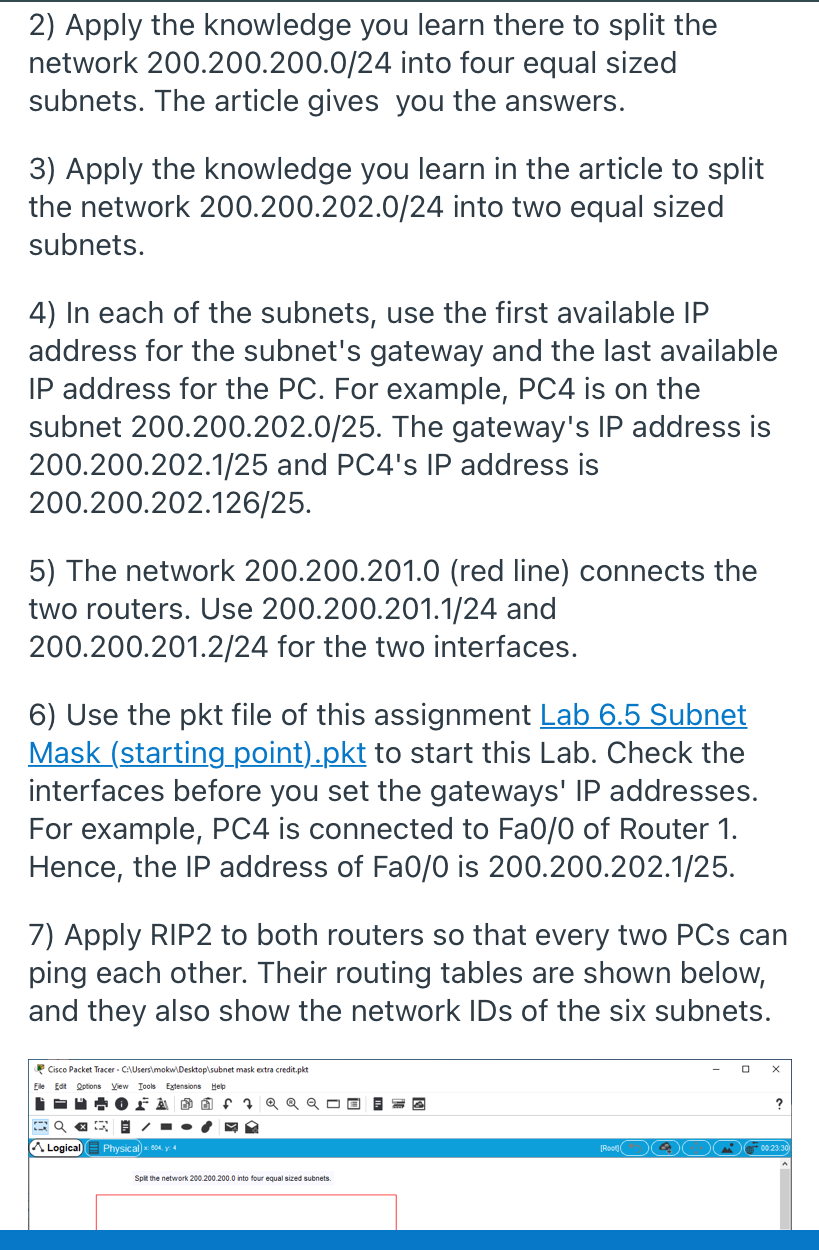
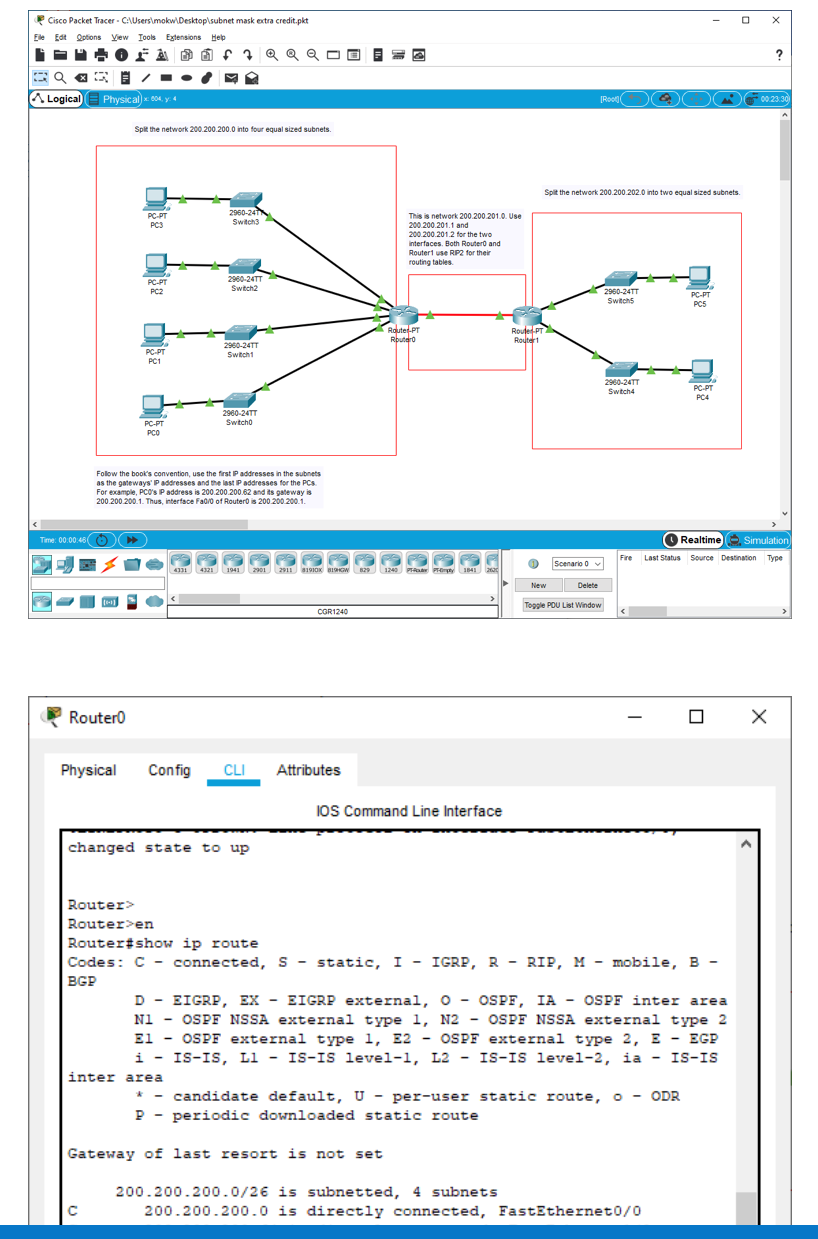
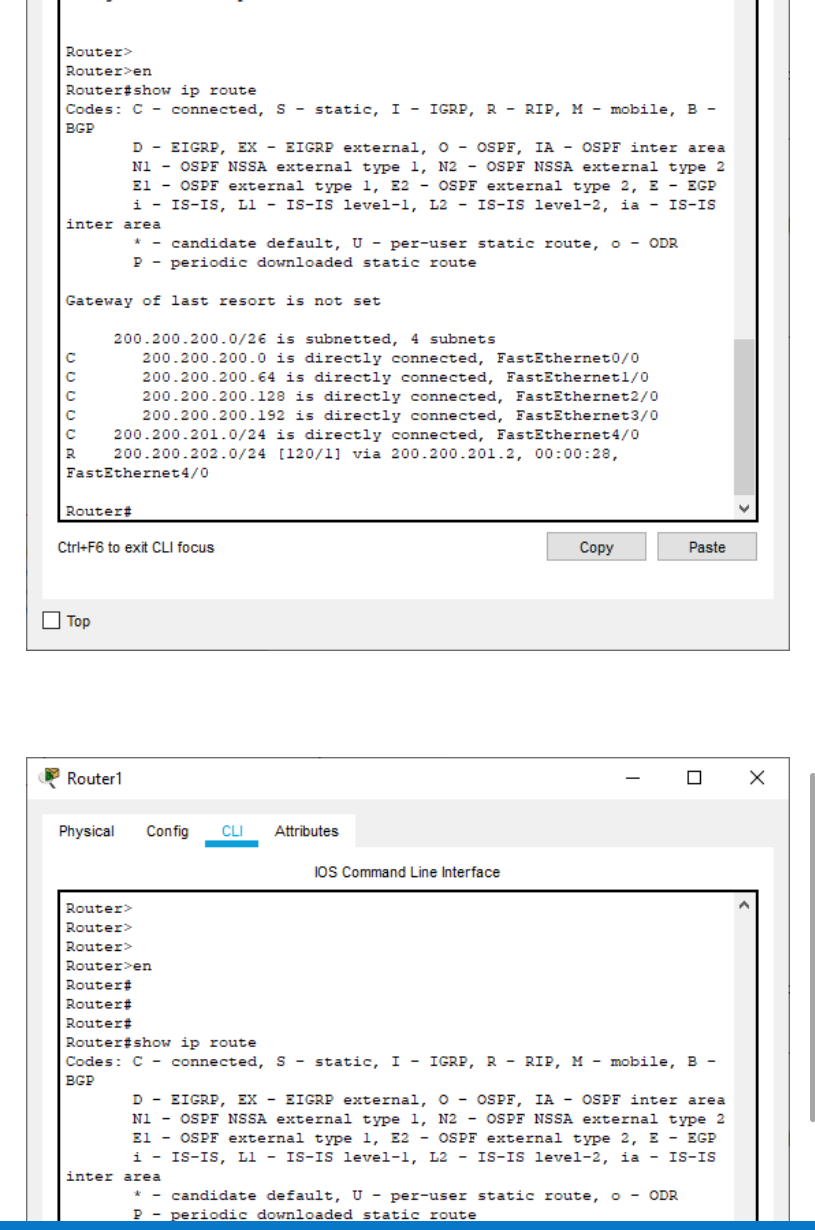
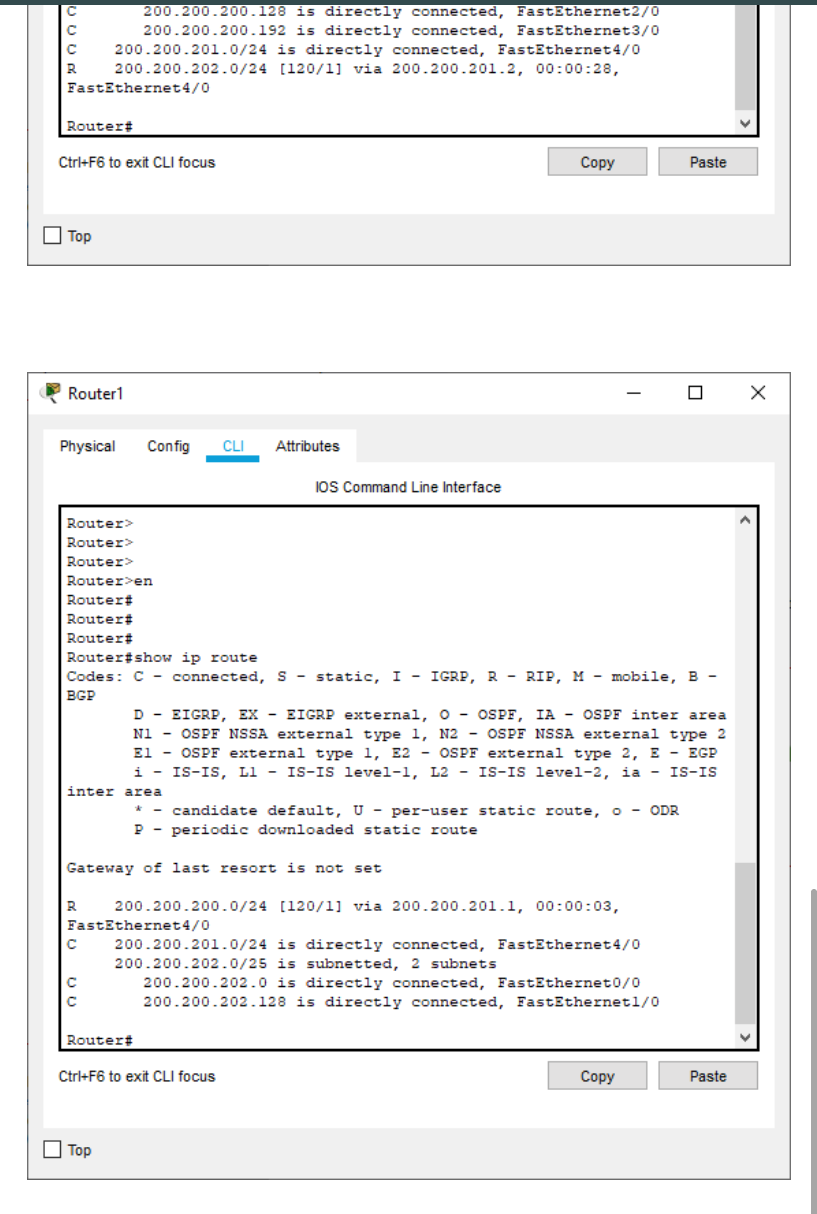
2) Apply the knowledge you learn there to split the network 200.200.200.0/24 into four equal sized subnets. The article gives you the answers. 3) Apply the knowledge you learn in the article to split the network 200.200.202.0/24 into two equal sized subnets. 4) In each of the subnets, use the first available IP address for the subnet's gateway and the last available IP address for the PC. For example, PC4 is on the subnet 200.200.202.0/25. The gateway's IP address is 200.200.202.1/25 and PC4's IP address is 200.200.202.126/25. 5) The network 200.200.201.0 (red line) connects the two routers. Use 200.200.201.1/24 and 200.200.201.2/24 for the two interfaces. 6) Use the pkt file of this assignment Lab 6.5 Subnet Mask (starting point).pkt to start this Lab. Check the interfaces before you set the gateways' IP addresses. For example, PC4 is connected to Fa0/0 of Router 1. Hence, the IP address of Fa0/0 is 200.200.202.1/25. 7) Apply RIP2 to both routers so that every two PCs can ping each other. Their routing tables are shown below, and they also show the network IDs of the six subnets. Cisco Packet Tracer CAUsers mokw Desktop subnet mask extra credit.pkt Eile Edit Options View Tools Estensions Help - 02 @f7@@@@= @ Q XF . ? Logical Physical x: 0044 [Rood 00.23.30 Spill the network 200.200.200.0 into four equal sized subnets. Cisco Packet Tracer. C:\Users mokw\Desktop\subnet mask extra credit.pkt Eile Edit Options View Tools Estensions Help OF7QQQ ? Logical Physical x64,4 TR000 00.23.30 Spile the network 200.200.200.0 into four equal sized subnets. Split the network 200.200.2020 into two equalized subnets. PC.PT PC3 2960-24 Switch This is network 200 200 201.0. Use 200.200.2011 and 200 200 201 2 for the two interfaces. Both Router and Router use RP2 for their routing tables PC-PT PC2 2960-24T Switch2 2960-24TT Switch PC-PT PC5 Route.pl Rbutero Roule.PT Router1 PC-PT PC1 2950-24TT Switch1 2980-24TY Switch PC-PT PC4 2960-24TT Switcho PC-PT PCO Follow the book's convention, use the first P addresses in the subnets as the gateways' P addresses and the last P addresses for the PCS For example, PCO's P address is 200.200.200.62 and its gateway is 200 200 2001. Thus, interface Fad/of Router is 200 200 200.1. Time: 00:00:48) Realtime Simulation Last Status Source Destination Type PIPIROIR 1240 114120 Scenario o Fire 431 4320 1941 291 2911 1910% BISHOW 29 New Delete Toggle POU List Window OGR1240 Routero Physical Config CLI Attributes IOS Command Line Interface changed state to up Router> Router>en Router#show ip route Codes: C - connected, S - static, I - IGRP, R - RIP, M - mobile, B- BGP D - EIGRP, EX - EIGRP external, O - OSPF, IA - OSPF inter area Nl - OSPF NSSA external type I, N2 - OSPF NSSA external type 2 El - OSPF external type 1, E2 - OSPF external type 2, 3 - EGP i - IS-IS, Ll - IS-IS level-1, L2 - IS-IS level-2, ia - IS-IS inter area * - candidate default, U - per-user static route, 0 - ODR P - periodic downloaded static route Gateway of last resort is not set 200.200.200.0/2 is subnetted, 4 subnets 200.200.200.0 is directly connected, FastEthernet0/0 Router Router>en Router#show ip route Codes: C - connected, S - static, I - IGRP, R - RIP, M - mobile, B- BGP D - EIGRP, EX - EIGRP external, O - OSPF, IA - OSPF inter area Nl - OSPF NSSA external type 1, N2 - OSPF NSSA external type 2 El - OSPF external type 1, E2 - OSPF external type 2, E - EGP i - IS-IS, Ll - IS-IS level-1, L2 - IS-IS level-2, ia - IS-IS inter area * - candidate default, U - per-user static route, O - ODR P - periodic downloaded static route Gateway of last resort is not set 200.200.200.0/26 is subnetted, 4 subnets 200.200.200.0 is directly connected, FastEthernet0/0 200.200.200.64 is directly connected, FastEthernetl/0 200.200.200.128 is directly connected, FastEthernet2/0 200.200.200.192 is directly connected, FastEthernet3/0 200.200.201.0/24 is directly connected, FastEthernet 4/0 R 200.200.202.0/24 [120/1] via 200.200.201.2, 00:00:28, FastEthernet4/0 Router Ctrl+F6 to exit CLI focus Copy Paste Top Router1 Physical Config CLI Attributes IOS Command Line Interface Router Router> Router> Routeren Router# Router# Router# Router#show ip route Codes: C - connected, S - static, I - IGRP, R - RIP, M - mobile, B- BGP D - EIGRP, EX - EIGRP external, O - OSPF, IA - OSPF inter area NI - OSPF NSSA external type I, N2 - OSPF NSSA external type 2 El - OSPF external type 1, E2 - OSPF external type 2, 3 - EGP i - IS-IS, Ll - IS-IS level-1, L2 - IS-IS level-2, ia - IS-IS inter area * - candidate default, U - per-user static route, o - ODR P - periodic downloaded static route 200.200.200.128 is directly connected, FastEthernet 270 200.200.200.192 is directly connected, FastEthernet3/0 200.200.201.0/24 is directly connected, FastEthernet4/0 200.200.202.0/24 [120/1] via 200.200.201.2, 00:00:28, FastEthernet4/0 Router Ctrl+F6 to exit CLI focus Copy Paste Top Router1 Physical Config CLI Attributes IOS Command Line Interface Router> Router> Router> Router>en Router# Router Router# Router#show ip route Codes: C - connected, S - static, I - IGRP, R - RIP, M - mobile, B- BGP D - EIGRP, EX - EIGRP external, O - OSPF, IA - OSPF inter area NI - OSPF NSSA external type I, N2 - OSPF NSSA external type 2 El - OSPF external type 1, E2 - OSPF external type 2, 3 - EGP i - IS-IS, Ll - IS-IS level-1, L2 - IS-IS level-2, ia - IS-IS inter area * - candidate default, U - per-user static route, - ODR P - periodic downloaded static route Gateway of last resort is not set R 200.200.200.0/24 (120/1] via 200.200.201.1, 00:00:03, FastEthernet4/0 200.200.201.0/24 is directly connected, FastEthernet4/0 200.200.202.0/25 is subnetted, 2 subnets 200.200.202.0 is directly connected, FastEthernet0/0 200.200.202.128 is directly connected, FastEthernet 1/0 Router# Ctrl+F6 to exit CLI focus Copy Paste
Step by Step Solution
There are 3 Steps involved in it

Get step-by-step solutions from verified subject matter experts
 Study Help