







Question: I need help with the zip and unzip methods in c program. Thank you zip is a compression utility. The actual Unix zip utility supports
I need help with the zip and unzip methods in c program. Thank you
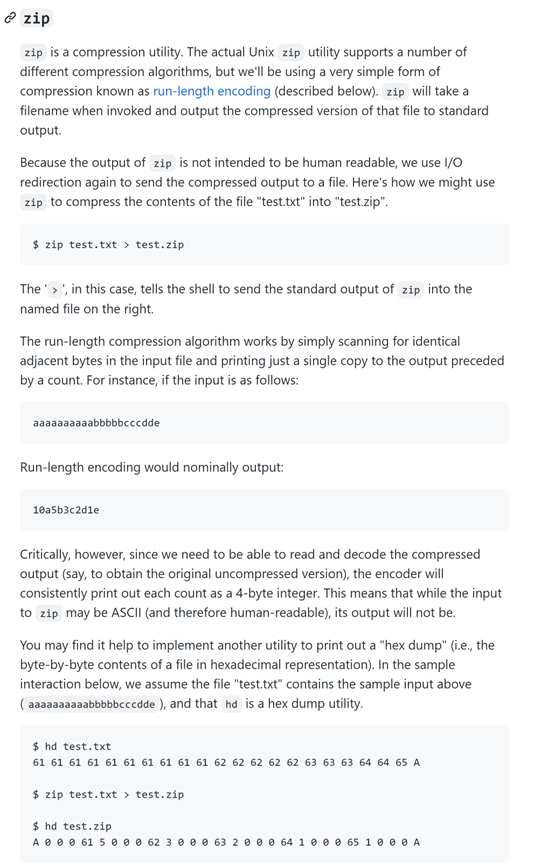
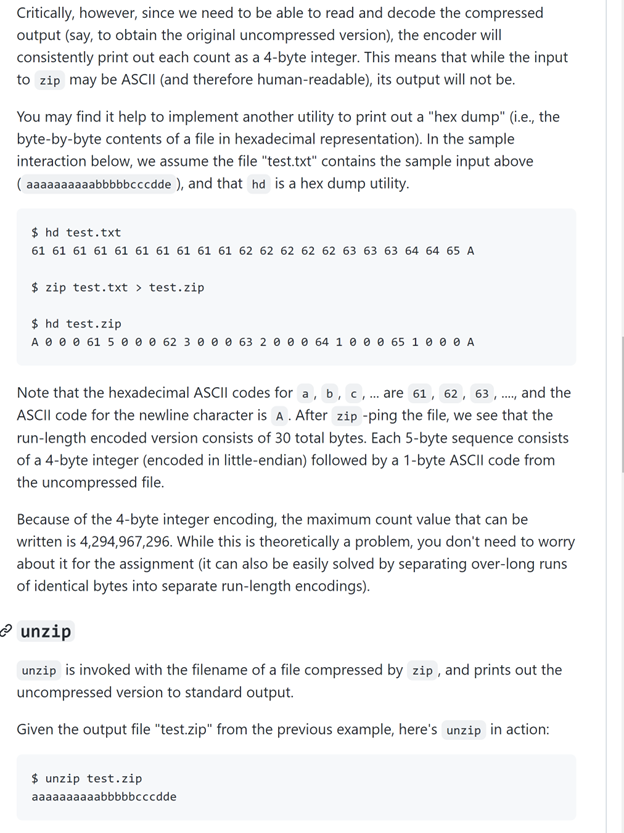
zip is a compression utility. The actual Unix zip utility supports a number of different compression algorithms, but we'll be using a very simple form of compression known as run-length encoding (described below). zip will take a filename when invoked and output the compressed version of that file to standard output. Because the output of zip is not intended to be human readable, we use I/O redirection again to send the compressed output to a file. Here's how we might use zip to compress the contents of the file "test.txt" into "test.zip". The ' > ', in this case, tells the shell to send the standard output of into the named file on the right. The run-length compression algorithm works by simply scanning for identical adjacent bytes in the input file and printing just a single copy to the output preceded by a count. For instance, if the input is as follows: Run-length encoding would nominally output: Critically, however, since we need to be able to read and decode the compressed output (say, to obtain the original uncompressed version), the encoder will consistently print out each count as a 4-byte integer. This means that while the input to may be ASCII (and therefore human-readable), its output will not be. You may find it help to implement another utility to print out a "hex dump" (i.e., the byte-by-byte contents of a file in hexadecimal representation). In the sample interaction below, we assume the file "test.txt" contains the sample input above (aaaaaaaaabbbbbcccdde ), and that hd is a hex dump utility. Critically, however, since we need to be able to read and decode the compressed output (say, to obtain the original uncompressed version), the encoder will consistently print out each count as a 4-byte integer. This means that while the input to zip may be ASCII (and therefore human-readable), its output will not be. You may find it help to implement another utility to print out a "hex dump" (i.e., the byte-by-byte contents of a file in hexadecimal representation). In the sample interaction below, we assume the file "test.txt" contains the sample input above , and that hd is a hex dump utility. Note that the hexadecimal ASCII codes for a,b,c, are 61,62,63,., and the ASCll code for the newline character is A. After zip -ping the file, we see that the run-length encoded version consists of 30 total bytes. Each 5 -byte sequence consists of a 4-byte integer (encoded in little-endian) followed by a 1-byte ASCII code from the uncompressed file. Because of the 4-byte integer encoding, the maximum count value that can be written is 4,294,967,296. While this is theoretically a problem, you don't need to worry about it for the assignment (it can also be easily solved by separating over-long runs of identical bytes into separate run-length encodings). unzip is invoked with the filename of a file compressed by, and prints out the uncompressed version to standard output. Given the output file "test.zip" from the previous example, here's in action
Step by Step Solution
There are 3 Steps involved in it

Get step-by-step solutions from verified subject matter experts
 Study Help