







Question: i need help with this 2. In ceil B17, caleulate the aumber of delivery days for the order asing a looikp functioe and the data
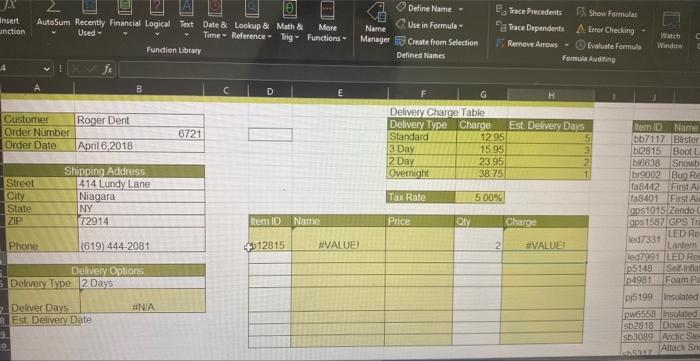
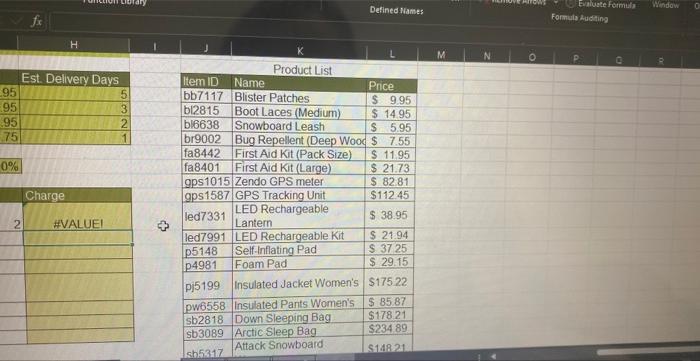
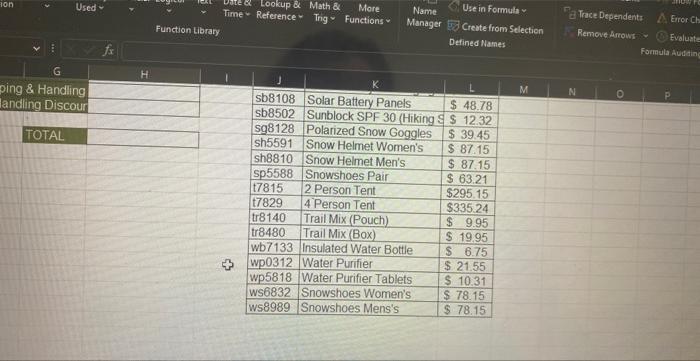
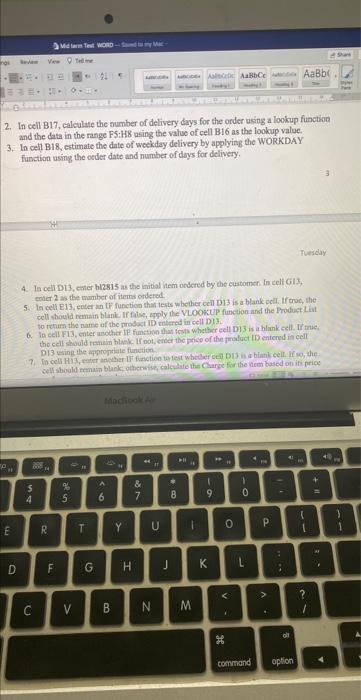
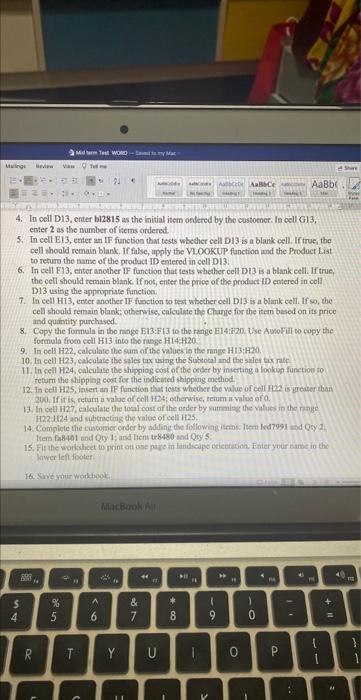
2. In ceil B17, caleulate the aumber of delivery days for the order asing a looikp functioe and the data in the range F5:H8 asing the value of cell B16 as the lookup value. 3. In ceti B18, estimate the date of weekday delivery by applying the WORKDAY function using the order date and number of dinys for delivery. 4. In cellD13, enter hl2815 as the initial htem ondered by the sustomen fn cell Gil3, coiter 2 as the mamber of items orderol: 5. Is cell E13, enter an LF function that ievs webter ceil D13 is a blank coll. If troc, she cell should ramain blank. If fatse, spply the VLOOKUP finction and the Product Liat 6. In cell F13, enter another tf function that fosts whether eell D3 3 is a hlank cell. If taie. Di3 using the iqpogriale function 4. In cell D13, enter bl2815 as the iaitial item ordered by the custoener. In cell 613 , enter 2 as the number of items ordered. 5. In cell E13, eetier an IF fanction that tests whether cell DI3 is a blank cell. If true, the cell thoald remain blank. If false, apply the VLOOKUP function and the Product List to refurs the name of the prodact ID eniered in cell DI3. 6. In cell FI3, enter another IF function that tests whether cell Di3 is a blank eell. If true, the cell should remain blank. If not, enter the price of the product ID enterod in coll D13 using the appropriate function. 7. In cell H13, enter another IF function to test whether oell DI3 is a blank cell. If so, the cell shoald remain blank, otherwise, caleulste the Chatie for the item besed on its price and quaintity purchased. 8. Capy the fonnula in tho range Fi13:Fi3 to the range Hi4:F20 Use AusoFill to copy the. formula from cell HI3 into the rasge H14:H20. 9. In oell H22, calculate the sun af the valoes is the mine Hi 3 ; 20 . 10. In cell H23, calcalate the sales tax uring the Subtotal and the sales tax rate- 11. In cell H24, calculise the shippiog cost of 7 be order by inserting a lookine furction to refurn the shipping coet for the indicuted shipping method. 12. in eett H2S, iniert an IF function that teats whether the value of eell H2e is greater than 200. If it is, eeturn a valoe af cell H24; etherwise, setum a value of 0 . 13. In cell 1127, calculate the toal cast of the order by cumnisg the values in the range H22.1124 and vibincting the value of cell 1i2.5. 14. Compicie the customer onder by adhine the following isemi: luem krd7993 and Qcy 2 t. tiem faB401 and Qty 1: and licnt tr8480 and Qey's. liwer left footer. 2. In ceil B17, caleulate the aumber of delivery days for the order asing a looikp functioe and the data in the range F5:H8 asing the value of cell B16 as the lookup value. 3. In ceti B18, estimate the date of weekday delivery by applying the WORKDAY function using the order date and number of dinys for delivery. 4. In cellD13, enter hl2815 as the initial htem ondered by the sustomen fn cell Gil3, coiter 2 as the mamber of items orderol: 5. Is cell E13, enter an LF function that ievs webter ceil D13 is a blank coll. If troc, she cell should ramain blank. If fatse, spply the VLOOKUP finction and the Product Liat 6. In cell F13, enter another tf function that fosts whether eell D3 3 is a hlank cell. If taie. Di3 using the iqpogriale function 4. In cell D13, enter bl2815 as the iaitial item ordered by the custoener. In cell 613 , enter 2 as the number of items ordered. 5. In cell E13, eetier an IF fanction that tests whether cell DI3 is a blank cell. If true, the cell thoald remain blank. If false, apply the VLOOKUP function and the Product List to refurs the name of the prodact ID eniered in cell DI3. 6. In cell FI3, enter another IF function that tests whether cell Di3 is a blank eell. If true, the cell should remain blank. If not, enter the price of the product ID enterod in coll D13 using the appropriate function. 7. In cell H13, enter another IF function to test whether oell DI3 is a blank cell. If so, the cell shoald remain blank, otherwise, caleulste the Chatie for the item besed on its price and quaintity purchased. 8. Capy the fonnula in tho range Fi13:Fi3 to the range Hi4:F20 Use AusoFill to copy the. formula from cell HI3 into the rasge H14:H20. 9. In oell H22, calculate the sun af the valoes is the mine Hi 3 ; 20 . 10. In cell H23, calcalate the sales tax uring the Subtotal and the sales tax rate- 11. In cell H24, calculise the shippiog cost of 7 be order by inserting a lookine furction to refurn the shipping coet for the indicuted shipping method. 12. in eett H2S, iniert an IF function that teats whether the value of eell H2e is greater than 200. If it is, eeturn a valoe af cell H24; etherwise, setum a value of 0 . 13. In cell 1127, calculate the toal cast of the order by cumnisg the values in the range H22.1124 and vibincting the value of cell 1i2.5. 14. Compicie the customer onder by adhine the following isemi: luem krd7993 and Qcy 2 t. tiem faB401 and Qty 1: and licnt tr8480 and Qey's. liwer left footer
Step by Step Solution
There are 3 Steps involved in it

Get step-by-step solutions from verified subject matter experts
 Study Help