







Question: I need help with this Android application, please. You will still create a Login application. However, the UI design of this application will be very
I need help with this Android application, please.
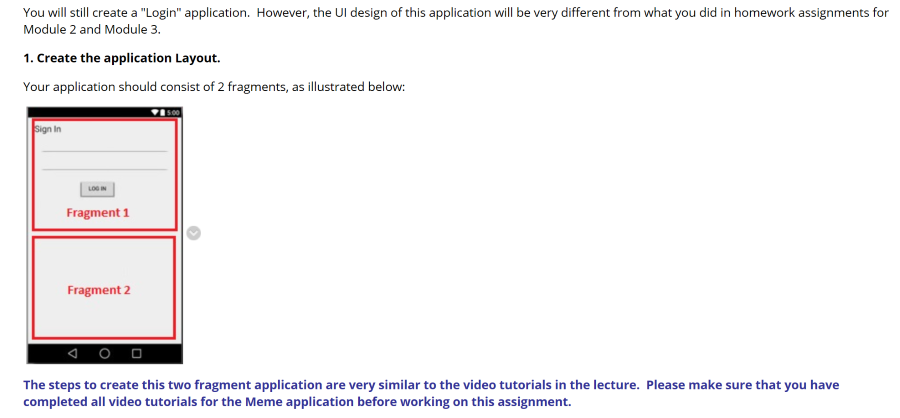
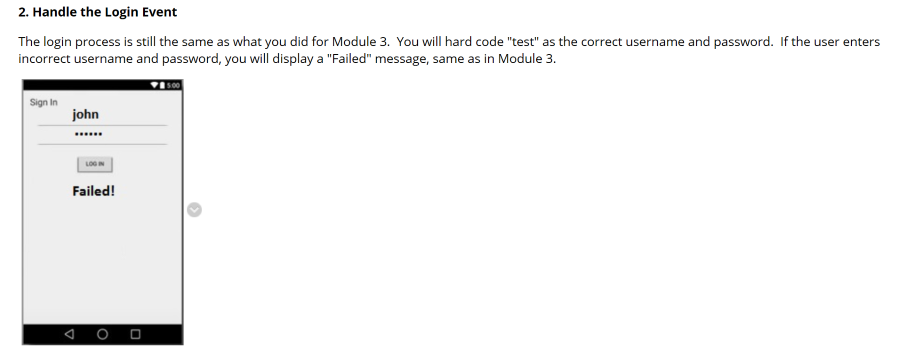
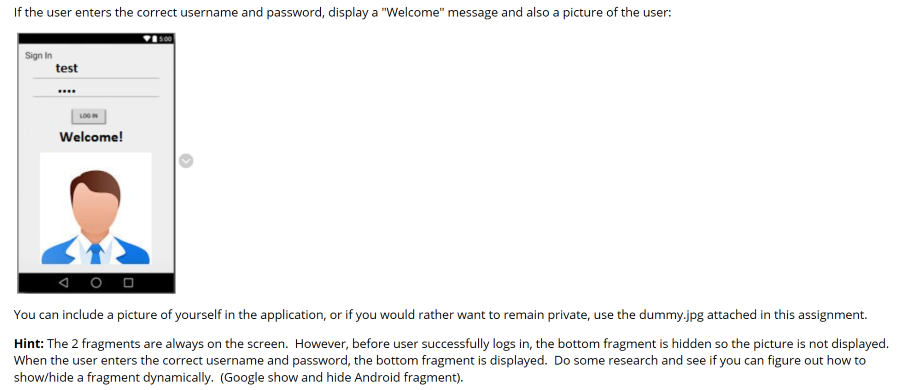
You will still create a "Login" application. However, the UI design of this application will be very different from what you did in homework assignments for Module 2 and Module 3. 1. Create the application Layout. Your application should consist of 2 fragments, as illustrated below: Sign In LOON Fragment 1 Fragment 2 The steps to create this two fragment application are very similar to the video tutorials in the lecture. Please make sure that you have completed all video tutorials for the Meme application before working on this assignment. 2. Handle the Login Event The login process is still the same as what you did for Module 3. You will hard code "test" as the correct username and password. If the user enters incorrect username and password, you will display a "Failed" message, same as in Module 3. Sign In john LOON Failed! If the user enters the correct username and password, display a "Welcome" message and also a picture of the user: 500 Sign In test LON Welcome! You can include a picture of yourself in the application, or if you would rather want to remain private, use the dummy.jpg attached in this assignment. Hint: The 2 fragments are always on the screen. However, before user successfully logs in, the bottom fragment is hidden so the picture is not displayed. When the user enters the correct username and password, the bottom fragment is displayed. Do some research and see if you can figure out how to show/hide a fragment dynamically. (Google show and hide Android fragment). You will still create a "Login" application. However, the UI design of this application will be very different from what you did in homework assignments for Module 2 and Module 3. 1. Create the application Layout. Your application should consist of 2 fragments, as illustrated below: Sign In LOON Fragment 1 Fragment 2 The steps to create this two fragment application are very similar to the video tutorials in the lecture. Please make sure that you have completed all video tutorials for the Meme application before working on this assignment. 2. Handle the Login Event The login process is still the same as what you did for Module 3. You will hard code "test" as the correct username and password. If the user enters incorrect username and password, you will display a "Failed" message, same as in Module 3. Sign In john LOON Failed! If the user enters the correct username and password, display a "Welcome" message and also a picture of the user: 500 Sign In test LON Welcome! You can include a picture of yourself in the application, or if you would rather want to remain private, use the dummy.jpg attached in this assignment. Hint: The 2 fragments are always on the screen. However, before user successfully logs in, the bottom fragment is hidden so the picture is not displayed. When the user enters the correct username and password, the bottom fragment is displayed. Do some research and see if you can figure out how to show/hide a fragment dynamically. (Google show and hide Android fragment)
Step by Step Solution
There are 3 Steps involved in it

Get step-by-step solutions from verified subject matter experts
 Study Help