







Question: I need help with this problem! This lab has three shell programs to create and review: one called svi.sh, another called uon.sh, and the command_menu
I need help with this problem!
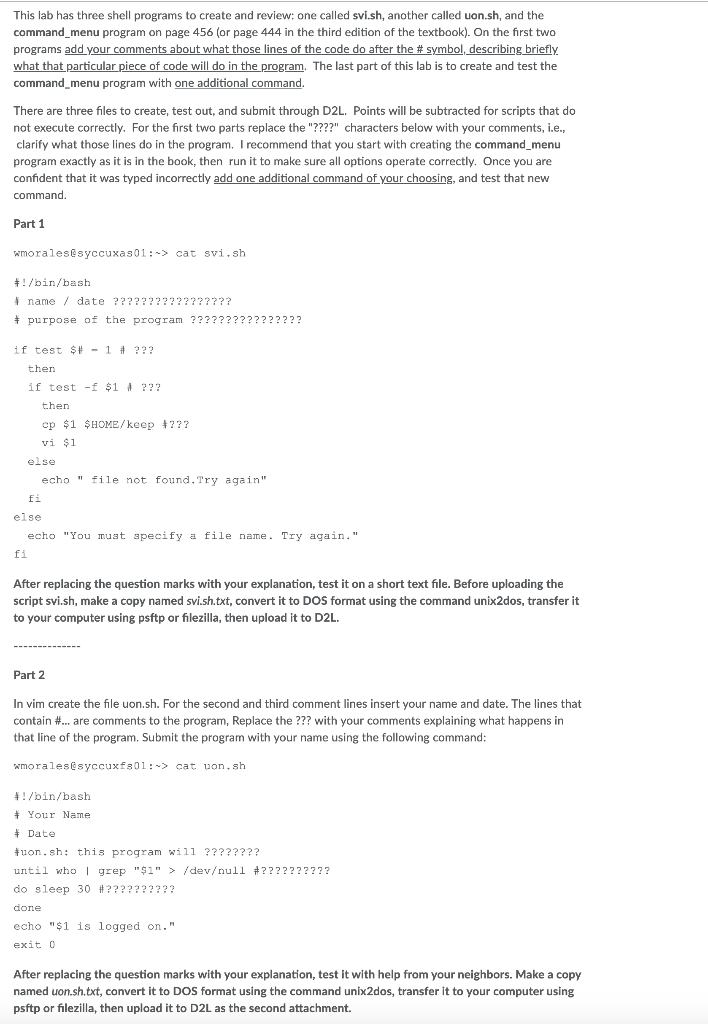
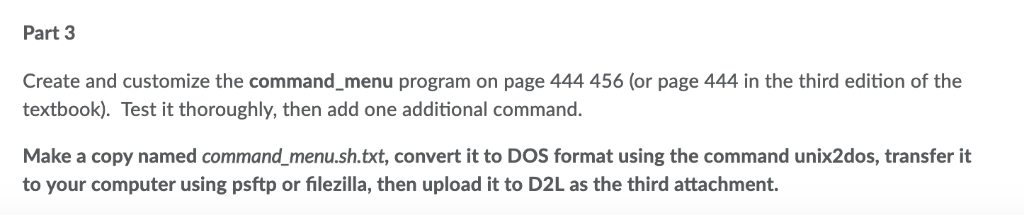
This lab has three shell programs to create and review: one called svi.sh, another called uon.sh, and the command_menu program on page 456 (or page 444 in the third edition of the textbook). On the first two programs add your comments about what those lines of the code do after the # symbol describing briefly what that particular piece of code will do in the program, The last part of this lab is to create and test the command menu program with one additional command There are three files to create, test out, and submit through D2L. Points will be subtracted for scripts that do not execute correctly. For the first two parts replace the "????" characters below with your comments, i.e., clarify what those lines do in the program. I recommend that you start with creating the command_menu program exactly as it is in the book, then run it to make sure all options operate correctly. Once you are confident that it was typed incorrectly add one additional command of your choosing, and test that new command. Part 1 wmorales@syccuxas01:> cat svi.sh /bin/bash i name date ???22??2???????? purpose of the program ???????????????? if test $#-1 ??? then if test-f $1 22 then cp $1 vi $1 $HOME/keep ?? else echo " file not found.Try again" Ei else echo "You must specify a file name. Try again." fi After replacing the question marks with your explanation, test it on a short text file. Before uploading the script svi.sh, make a copy named svi.sh.txt, convert it to DOS format using the command unix2dos, transfer it to your computer using psftp or filezilla, then upload it to D2L Part 2 In vim create the file uon.sh. For the second and third comment lines insert your name and date. The lines that contain # are comments to the program, Replace the m with your comments explaining what happens in that line of the program. Submit the program with your name using the following command wmoralesesyccuxfs0l:-> cat uon.sh /bin/bash Your Name Date on.sh: this programwi11 ???????? until who | grep "$1" > /devull #?????????? do sleep 30 done echo "$1 is logged on." exit C After replacing the question marks with your explanation, test it with help from your neighbors. Make a copy named uon.sh.txt, convert it to DOS format using the command unix2dos, transfer it to your computer using psftp or filezilla, then upload it to D2L as the second attachment. Part 3 Create and customize the command_menu program on page 444 456 (or page 444 in the third edition of the textbook). Test it thoroughly, then add one additional command. Make a copy named command menu.sh.txt, convert it to DOS format using the command unix2dos, transfer it to your computer using psftp or filezilla, then upload it to D2L as the third attachment. This lab has three shell programs to create and review: one called svi.sh, another called uon.sh, and the command_menu program on page 456 (or page 444 in the third edition of the textbook). On the first two programs add your comments about what those lines of the code do after the # symbol describing briefly what that particular piece of code will do in the program, The last part of this lab is to create and test the command menu program with one additional command There are three files to create, test out, and submit through D2L. Points will be subtracted for scripts that do not execute correctly. For the first two parts replace the "????" characters below with your comments, i.e., clarify what those lines do in the program. I recommend that you start with creating the command_menu program exactly as it is in the book, then run it to make sure all options operate correctly. Once you are confident that it was typed incorrectly add one additional command of your choosing, and test that new command. Part 1 wmorales@syccuxas01:> cat svi.sh /bin/bash i name date ???22??2???????? purpose of the program ???????????????? if test $#-1 ??? then if test-f $1 22 then cp $1 vi $1 $HOME/keep ?? else echo " file not found.Try again" Ei else echo "You must specify a file name. Try again." fi After replacing the question marks with your explanation, test it on a short text file. Before uploading the script svi.sh, make a copy named svi.sh.txt, convert it to DOS format using the command unix2dos, transfer it to your computer using psftp or filezilla, then upload it to D2L Part 2 In vim create the file uon.sh. For the second and third comment lines insert your name and date. The lines that contain # are comments to the program, Replace the m with your comments explaining what happens in that line of the program. Submit the program with your name using the following command wmoralesesyccuxfs0l:-> cat uon.sh /bin/bash Your Name Date on.sh: this programwi11 ???????? until who | grep "$1" > /devull #?????????? do sleep 30 done echo "$1 is logged on." exit C After replacing the question marks with your explanation, test it with help from your neighbors. Make a copy named uon.sh.txt, convert it to DOS format using the command unix2dos, transfer it to your computer using psftp or filezilla, then upload it to D2L as the second attachment. Part 3 Create and customize the command_menu program on page 444 456 (or page 444 in the third edition of the textbook). Test it thoroughly, then add one additional command. Make a copy named command menu.sh.txt, convert it to DOS format using the command unix2dos, transfer it to your computer using psftp or filezilla, then upload it to D2L as the third attachment
Step by Step Solution
There are 3 Steps involved in it

Get step-by-step solutions from verified subject matter experts
 Study Help