







Question: I need help with using the import pandas library to use the data from csv file to use as the username and password for the
I need help with using the import pandas library to use the data from csv file to use as the username and password for the login function of the program
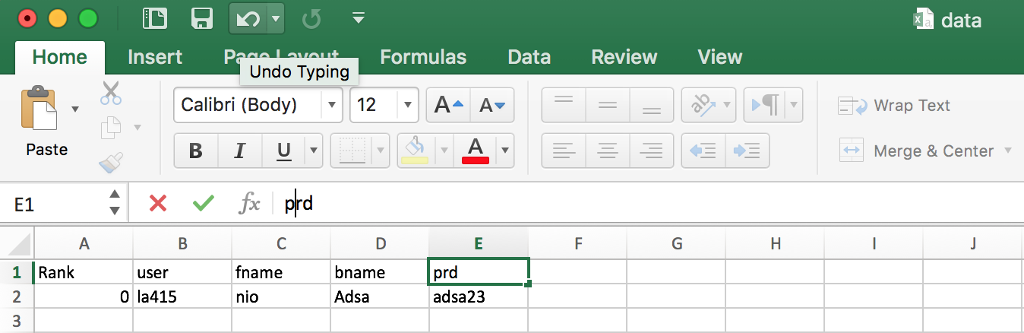
Python-appJar:
from appJar import gui import pandas
# create the GUI & set a title app = gui("Login Form")
def press(btnName): if btnName == "Cancel": app.stop() return namesfr = pandas.read_csv("data.csv") ****
if app.getEntry("userEnt") == usern: ***** if app.getEntry("passEnt") == password: ****** app.infoBox("Success", "Congratulations, you are logged in!") app.stop() else: app.errorBox("Failed login", "Invalid password") else: app.errorBox("Failed login", "Invalid username")
# add labels & entries # in the correct row & column app.addLabel("userLab", "Username:", 0, 0) app.addEntry("userEnt", 0, 1) app.addLabel("passLab", "Password:", 1, 0) app.addSecretEntry("passEnt", 1, 1)
# changed this line to call a function app.addButtons( ["Submit", "Cancel"], press, colspan=2)
# add some enhancements app.setFocus("userEnt") app.enableEnter(press)
app.stopgui() app.destroygui("Main Menu") # start the GUI app.go()
def press(btn): if btn == "Exit": app.stop() elif btn == "Create New User": app.infoBox("b1","Create an account if one does not exist") elif btn == "Login": app.infoBox("b1","Login with your username and password") elif btn == "View All": app.infoBox("b1","View all available books in the database") elif btn == "Search": app.infoBox("b1","Search for desired books based on criteria") elif btn == "My Books": app.infoBox("b1","View saved books in your account") else: print('Pick a valid option')
""" The code below defines the gui, adding buttons, labels, images, color, etc.
QUIZ ITEM: Make changes to the title (line 37), image (line 39), and button names (lines 42-46)
"""
app=gui("Main Menu","500x500")
#Replace "Blank Team" with your team name in line 41
app.addLabel("title", "Welcome to Library Team's Main Menu") app.setLabelBg("title", "orange")
app.addButton("Create New User", press) app.addButton("Login", press) app.addButton("View All", press) app.addButton("Search", press) app.addButton("My Books", press) app.addButton("Exit",press) app.go() #displays the gui
data Home Insert PaLaFormulas Data Review View Undo Typing Calibri (Body) 12AA Paste B IU Merge & Center E1 1 Rank fname nio bname prd Adsa user 0 la415 adsa23 data Home Insert PaLaFormulas Data Review View Undo Typing Calibri (Body) 12AA Paste B IU Merge & Center E1 1 Rank fname nio bname prd Adsa user 0 la415 adsa23
Step by Step Solution
There are 3 Steps involved in it

Get step-by-step solutions from verified subject matter experts
 Study Help