







Question: I need help with writing a program using these five notes. With the frequency for A being 440, G being 195.998, F being 174.614, (octave
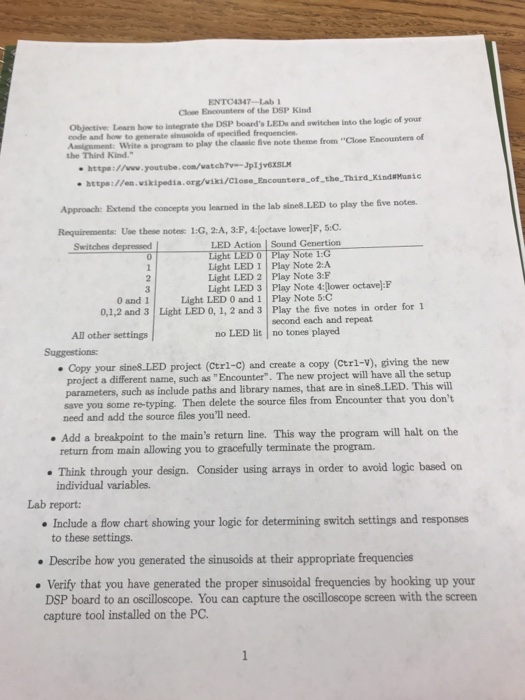 I need help with writing a program using these five notes. With the frequency for A being 440, G being 195.998, F being 174.614, (octave lower) F being 87.307, C being 130.813. By changing this previous code.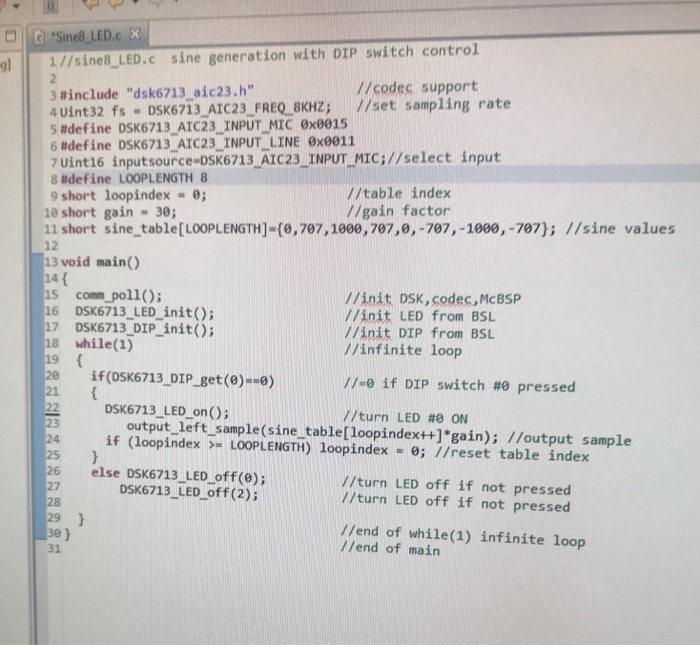
Close Encounters of the DSP Kind Objective Learn how to integrate the DSP board's LEDs and witches into the logie of your code and how to generate sinusoids of specified frequencies Aigament White a program to play the elassie five note theme from "Close Encounters of the Third Kind. httpe:1/ww.youtube.com/watch-JpIjv6XSL ttp:/en.wikipedia .org/viki/Close Encounters of the Third KindMunic Approach: Extend the concepts you learned in the lab sines.LED to play the five notes. Requirements: Use these notes:1:G, 2:A, 3:F,octave lower]F, 5:C Switches depressed LED Action | Sound Genertion ote Light LED I Play Note 2:A Light LED 2 Play Note 3:F Light LED 3 Play Note 4:(lower octave):F Light LED 0 and 1 Play Note 5:C 0 and 1 0,1,2 and 3 Light LED 0, 1, 2 and 3 Play the five notes in order for 1 second each and repeat All other settings no LED lit no tones played Copy your sine8LED project (Ctrl-C) and create a copy (Ctrl-V), giving the new project a different name, such as "Encounter". The new project will have all the setup parameters, such as include paths and library names, that are in sine8 LED. This will save you some re-typing. Then delete the source files from Encounter that you don't .Add a breakpoint to the main's return line. This way the program will halt on the Think through your design. Consider using arrays in order to avoid logic based on Include a flow chart showing your logic for determining switch settings and responses need and add the source files you'll need. return from main allowing you to gracefully terminate the program. individual variables. Lab report to these settings Describe how you generated the sinusoids at their appropriate frequencies Verify that you have generated the proper sinusoidal frequencies by hooking up your DSP board to an oscilloscope. You can capture the oscilloscope screen with the screen capture tool installed on the PC
Step by Step Solution
There are 3 Steps involved in it

Get step-by-step solutions from verified subject matter experts
 Study Help