







Question: I need help writing a JAVA GUI program that does the following: I don't know if this is helpful, but this is a template for
I need help writing a JAVA GUI program that does the following:
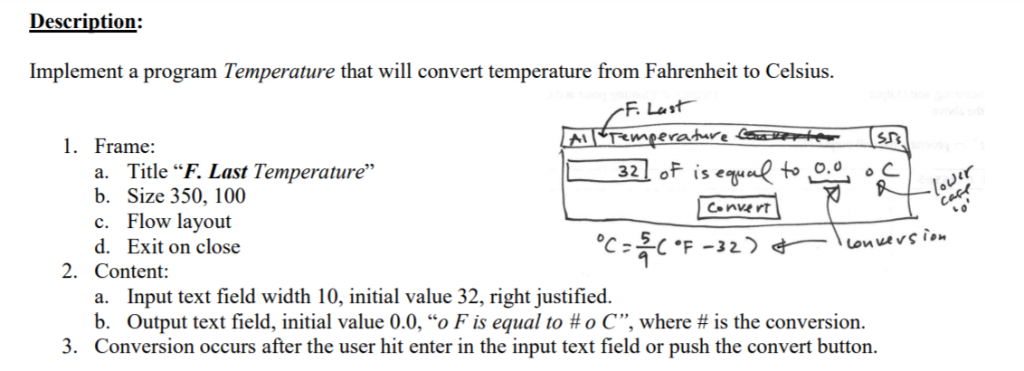
I don't know if this is helpful, but this is a template for a similar program.
import java.awt.*; import java.awt.event.*; import javax.swing.*; class Coder implements ActionListener { private JTextField jtfPlaintext; private JTextField jtfCiphertext; Coder() { // Create a new JFrame container. JFrame jfrm = new JFrame("A Simple Code Machine"); // Specify FlowLayout for the layout manager. jfrm.setLayout(new FlowLayout()); // Give the frame an initial size. jfrm.setSize(340, 120); // Terminate the program when the user closes the application. jfrm.setDefaultCloseOperation(JFrame.EXIT_ON_CLOSE); // Create two labels. JLabel jlabPlaintext = new JLabel(" Plain Text: "); JLabel jlabCiphertext = new JLabel("Cipher Text: "); // Create two text field instances. jtfPlaintext = new JTextField(20); jtfCiphertext = new JTextField(20); // Set the action commands for the text fields. jtfPlaintext.setActionCommand("Encode"); jtfCiphertext.setActionCommand("Decode"); // Add action listeners for the text fields. jtfPlaintext.addActionListener(this); jtfCiphertext.addActionListener(this); // Add the text fields and labels to the content pane. jfrm.add(jlabPlaintext); jfrm.add(jtfPlaintext); jfrm.add(jlabCiphertext); jfrm.add(jtfCiphertext); // Create push button instances. JButton jbtnEncode = new JButton("Encode"); JButton jbtnDecode = new JButton("Decode"); JButton jbtnReset = new JButton("Reset"); // Add action listeners for the buttons. jbtnEncode.addActionListener(this); jbtnDecode.addActionListener(this); jbtnReset.addActionListener(this); // Add the buttons to the content pane. jfrm.add(jbtnEncode); jfrm.add(jbtnDecode); jfrm.add(jbtnReset); // Display the frame. jfrm.setVisible(true); } // Handle action events. public void actionPerformed(ActionEvent ae) { StringBuilder str; // If action command is "Encode" then encode the string. switch (ae.getActionCommand()) { case "Encode": // Obtain the plain text and put it into a StringBuilder. str = new StringBuilder(jtfPlaintext.getText()); // Add 1 to each character. for (int i = 0; i Description: Implement a program Temperature that will convert temperature from Fahrenheit to Celsius. 1. Frame: a. Title F. Last Temperature" b. Size 350, 100 c. Flow layout d. Exit on close 32 I of ise F32 2. Content: Input text field width 10, initial value 32, right justified. Output text field, initial value 00, "o F is equal to # o C", where # is the conversion. a. b. . Conversion occurs after the user hit enter in the input text field or push the convert button Step by Step Solution
There are 3 Steps involved in it
1 Expert Approved Answer
Step: 1 Unlock

Question Has Been Solved by an Expert!
Get step-by-step solutions from verified subject matter experts
Step: 2 Unlock
Step: 3 Unlock
 Study Help