







Question: I need help writing the code fore step 3. I am using MPLAB X IDE and PICSimLab. Here is the code I have so far.
I need help writing the code fore step 3. I am using MPLAB X IDE and PICSimLab.
Here is the code I have so far.
#include
#pragma config WDT = OFF
#define _XTAL_FREQ 16000000
#include "lcd.h"
int i;
void adc_init(void)
{ ADCON0 = 0b00000001;
ADCON1 = 0b00000000;
ADCON2 = 0b10001000;
TRISA = 0b00000001;
}
int adc_read(void) { ADCON0bits.GODONE = 1;
while(ADCON0bits.GODONE == 1);
i = ADRES;
return i; }
void main(void) {
TRISD = 0x00;
adc_init();
lcd_init();
lcd_str("Hello World");
while(1) {
i = adc_read();
LATD = i;
lcd_dat();
__delay_ms(100);
}
}
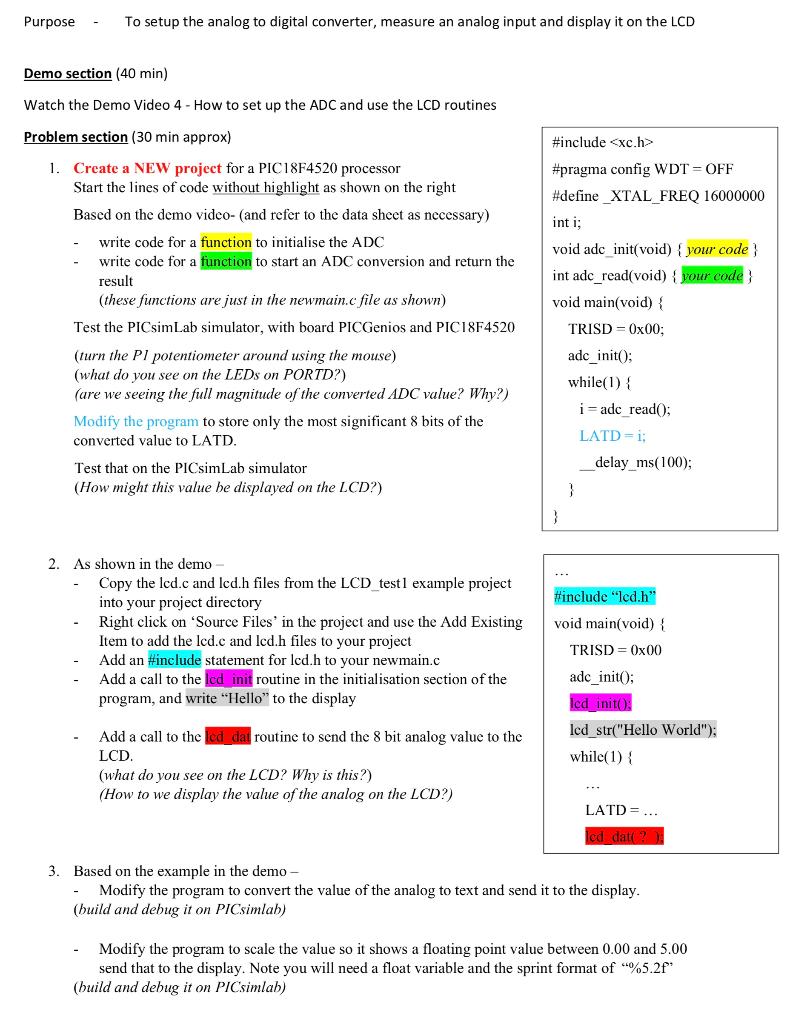
Purpose To setup the analog to digital converter, measure an analog input and display it on the LCD Demo section (40 min) Watch the Demo Video 4 - How to set up the ADC and use the LCD routines Problem section (30 min approx) 1. Create a NEW project for a PIC18F4520 processor Start the lines of code without highlight as shown on the right Based on the demo video- and refer to the data sheet as necessary) write code for a function to initialise the ADC write code for a function to start an ADC conversion and return the result (these functions are just in the newmain.c file as shown) Test the PICsimLab simulator, with board PICGenios and PIC18F4520 (turn the P1 potentiometer around using the mouse) (what do you see on the LEDs on PORTD?) (are we seeing the full magnitude of the converted ADC value? Why?) Modify the program to store only the most significant 8 bits of the converted value to LATD. Test that on the PICsimLab simulator (How might this value he displayed on the LCD?) #include
Step by Step Solution
There are 3 Steps involved in it

Get step-by-step solutions from verified subject matter experts
 Study Help