







Question: I Need help writing the LetterCounter class. /* * This class counts the occurrences of a letter in lines of English text. * Users may
I Need help writing the LetterCounter class.
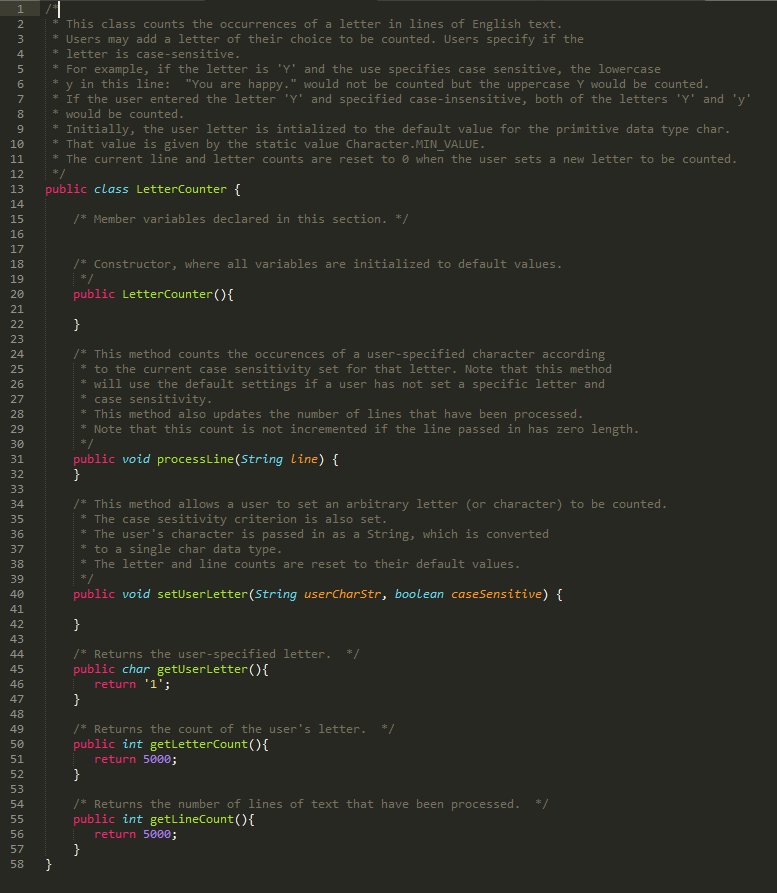
/* * This class counts the occurrences of a letter in lines of English text. * Users may add a letter of their choice to be counted. Users specify if the * letter is case-sensitive. * For example, if the letter is 'Y' and the use specifies case sensitive, the lowercase * y in this line: "You are happy." would not be counted but the uppercase Y would be counted. * If the user entered the letter 'Y' and specified case-insensitive, both of the letters 'Y' and 'y' * would be counted. * Initially, the user letter is intialized to the default value for the primitive data type char. * That value is given by the static value Character.MIN_VALUE. * The current line and letter counts are reset to 0 when the user sets a new letter to be counted. */ public class LetterCounter { /* Member variables declared in this section. */
private String word; private boolean caseSensitive; private int lines;
/* Constructor, where all variables are initialized to default values. */ public LetterCounter(){ word = ""; caseSensitive = false; lines = 0; } /* This method counts the occurences of a user-specified character according * to the current case sensitivity set for that letter. Note that this method * will use the default settings if a user has not set a specific letter and * case sensitivity. * This method also updates the number of lines that have been processed. * Note that this count is not incremented if the line passed in has zero length. */ public void processLine(String line) { } /* This method allows a user to set an arbitrary letter (or character) to be counted. * The case sesitivity criterion is also set. * The user's character is passed in as a String, which is converted * to a single char data type. * The letter and line counts are reset to their default values. */ public void setUserLetter(String userCharStr, boolean caseSensitive) { }
/* Returns the user-specified letter. */ public char getUserLetter(){ return '1'; } /* Returns the count of the user's letter. */ public int getLetterCount(){ return 5000; } /* Returns the number of lines of text that have been processed. */ public int getLineCount(){ return 5000; } }
------------------------------------------------------------------------------------------------------------------------------------
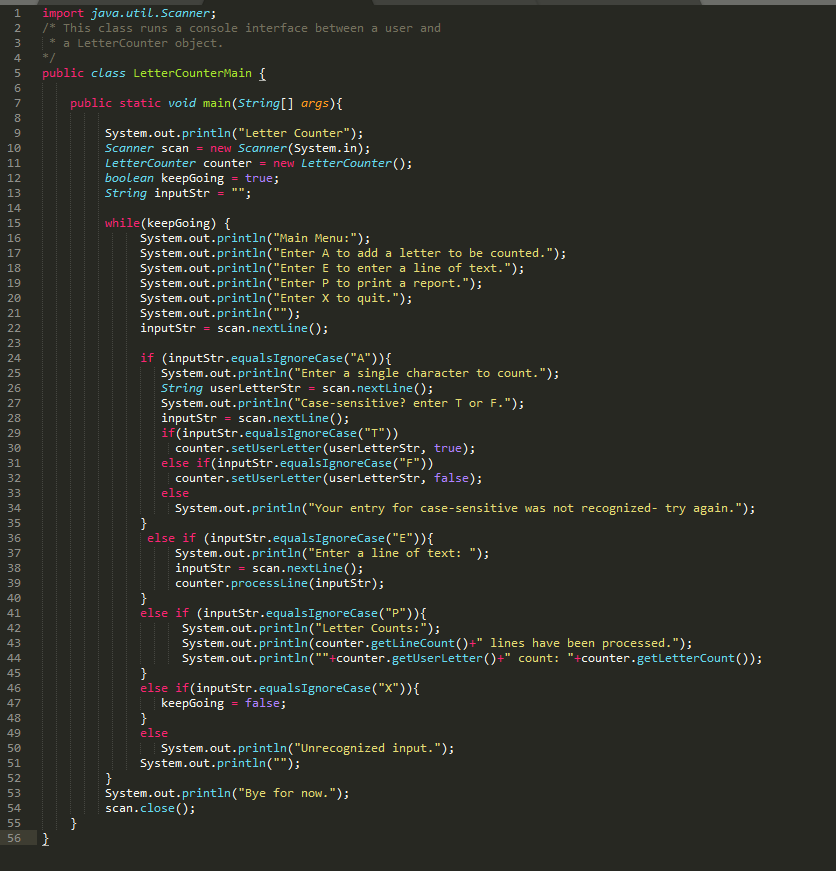
import java.util.Scanner; /* This class runs a console interface between a user and * a LetterCounter object. */ public class LetterCounterMain { public static void main(String[] args){ System.out.println("Letter Counter"); Scanner scan = new Scanner(System.in); LetterCounter counter = new LetterCounter(); boolean keepGoing = true; String inputStr = "";
while(keepGoing) { System.out.println("Main Menu:"); System.out.println("Enter A to add a letter to be counted."); System.out.println("Enter E to enter a line of text."); System.out.println("Enter P to print a report."); System.out.println("Enter X to quit."); System.out.println(""); inputStr = scan.nextLine(); if (inputStr.equalsIgnoreCase("A")){ System.out.println("Enter a single character to count."); String userLetterStr = scan.nextLine(); System.out.println("Case-sensitive? enter T or F."); inputStr = scan.nextLine(); if(inputStr.equalsIgnoreCase("T")) counter.setUserLetter(userLetterStr, true); else if(inputStr.equalsIgnoreCase("F")) counter.setUserLetter(userLetterStr, false); else System.out.println("Your entry for case-sensitive was not recognized- try again."); } else if (inputStr.equalsIgnoreCase("E")){ System.out.println("Enter a line of text: "); inputStr = scan.nextLine(); counter.processLine(inputStr); } else if (inputStr.equalsIgnoreCase("P")){ System.out.println("Letter Counts:"); System.out.println(counter.getLineCount()+" lines have been processed."); System.out.println(""+counter.getUserLetter()+" count: "+counter.getLetterCount()); } else if(inputStr.equalsIgnoreCase("X")){ keepGoing = false; } else System.out.println("Unrecognized input."); System.out.println(""); } System.out.println("Bye for now."); scan.close(); } }
This class counts the occurrences of a letter in lines of English text. 3 Users may add a letter of their choice to be counted. Users specify if the 4 letter is case-sensitive. 5 For example, if the letter is 'Y and the use specifies case sensitive, the lowercase 6 y in this line: "You are happy." would not be counted but the uppercase Y would be counted 7If the user entered the letter Y' and specified case-insensitive, both of the letters Y' and 'y 8 would be counted. 9 Initially, the user letter is intialized to the default value for the primitive data type char 10 That value is given by the static value Character.MIN VALUE 11 The current line and letter counts are reset to 0 when the user sets a new letter to be counted. 12/ 13 public class LetterCounter f 14 15 Member variables declared in this section. 16 17 18 Constructor, where all variables are initialized to default values 19 20 21 public LetterCounter() 23 24 /* This method counts the occurences of a user-specified character according 26 27 28 29 30 to the current case sensitivity set for that letter. Note that this method will use the default settings if a user has not set a specific letter and case sensitivity This method also updates the number of lines that have been processed. : Note that this count is not incremented if the line passed in has zero length public void processLine(String Line) { 32 34 This method allows a user to set an arbitrary letter (or character) to be counted The case sesitivity criterion is also set 35 36 37 * to a single char data type. * The letter and line counts are reset to their default values. 39 40 etUserLetter (String userCharstr, boolean caseSensitive) public void s 42 43 45 public char getUserLetter) /Returns the user-specified letter.* 46 return '1'; 48 49 Returns the count of the user's letter 50 public int getLetterCount)f return 5000; 51 52 53 54 Returns the number of lines of text that have been processed.*/ public int getLineCountO return 5800 56 57 58
Step by Step Solution
There are 3 Steps involved in it

Get step-by-step solutions from verified subject matter experts
 Study Help