



Question: I need instructions and formulas on how to complete these tasks in Excel. In the Survey worksheet, enter a conditional function in cell M3 to
I need instructions and formulas on how to complete these tasks in Excel.
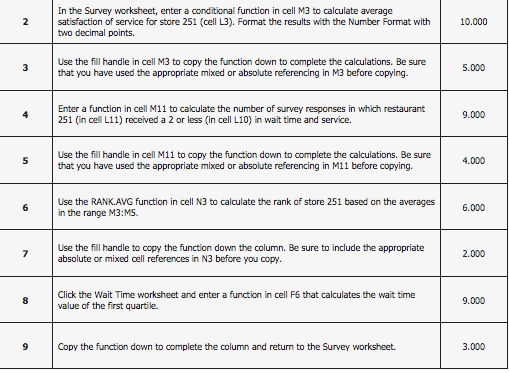
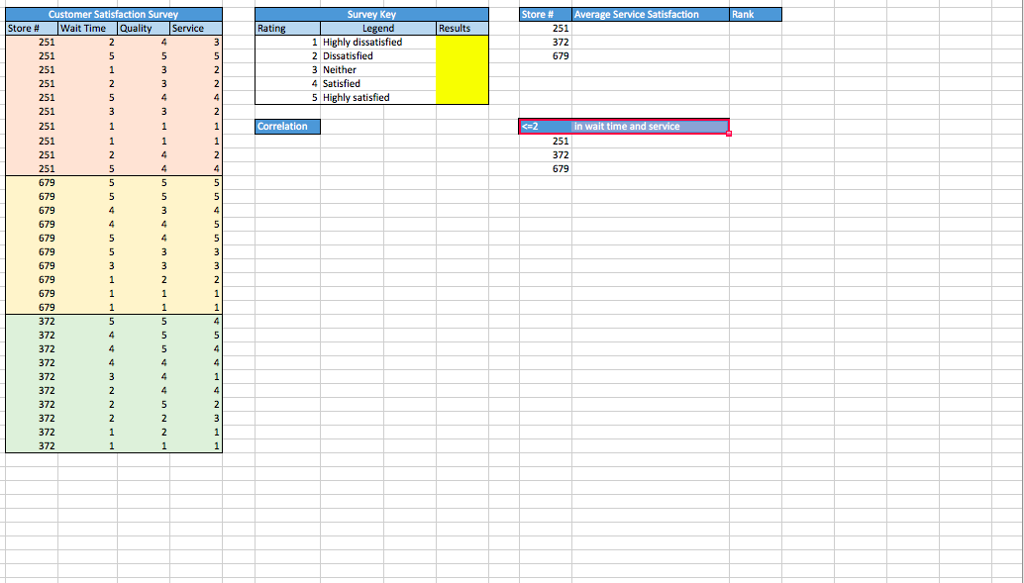
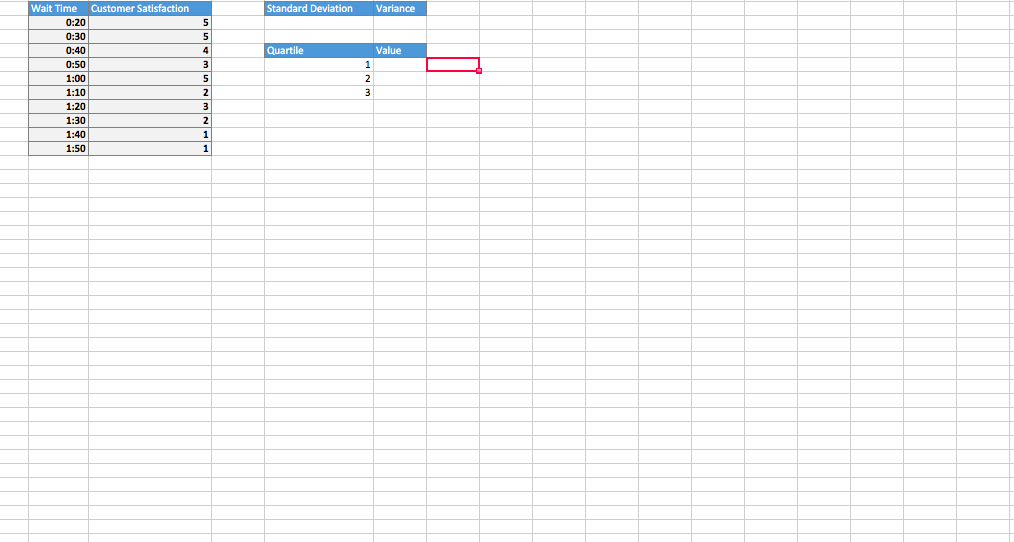
In the Survey worksheet, enter a conditional function in cell M3 to calculate average satisfaction of service for store 251 (cell L3). Format the results with the Number Format with two decimal points 10.000 Use the fill handle in cell M3 to copy the function down to complete the calculations. Be sure that you have used the appropriate mixed or absolute referencing in M3 before copying. 5.000 Enter a function in cell M11 to calculate the number of survey responses in which restaurant 251 (in cell L11) received a 2 or less (in cell L10) in wait time and service. 9.000 Use the fill handle in cell M11 to copy the function down to complete the calculations. Be sure that you have used the appropriate mixed or absolute referencing in M11 before copying. 4.000 Use the RANK.AVG function in cell N3 to calculate the rank of store 251 based on the averages in the range M3:MS. 6.000 Use the fill handle to copy the function down the column. Be sure to include the appropriate absolute or mixed cell references in N3 before 2.000 you copy Click the Wait Time worksheet and enter a function in cell F6 that calculates the wait time value of the first quartile. 9.000 Copy the function down to complete the column and return to the Survey worksheet. 3.000 In the Survey worksheet, enter a conditional function in cell M3 to calculate average satisfaction of service for store 251 (cell L3). Format the results with the Number Format with two decimal points 10.000 Use the fill handle in cell M3 to copy the function down to complete the calculations. Be sure that you have used the appropriate mixed or absolute referencing in M3 before copying. 5.000 Enter a function in cell M11 to calculate the number of survey responses in which restaurant 251 (in cell L11) received a 2 or less (in cell L10) in wait time and service. 9.000 Use the fill handle in cell M11 to copy the function down to complete the calculations. Be sure that you have used the appropriate mixed or absolute referencing in M11 before copying. 4.000 Use the RANK.AVG function in cell N3 to calculate the rank of store 251 based on the averages in the range M3:MS. 6.000 Use the fill handle to copy the function down the column. Be sure to include the appropriate absolute or mixed cell references in N3 before 2.000 you copy Click the Wait Time worksheet and enter a function in cell F6 that calculates the wait time value of the first quartile. 9.000 Copy the function down to complete the column and return to the Survey worksheet. 3.000
Step by Step Solution
There are 3 Steps involved in it

Get step-by-step solutions from verified subject matter experts