







Question: I need only a c code as instructed above and same output as shown. Hint: You need to implement alternative/multiple selection to map the month
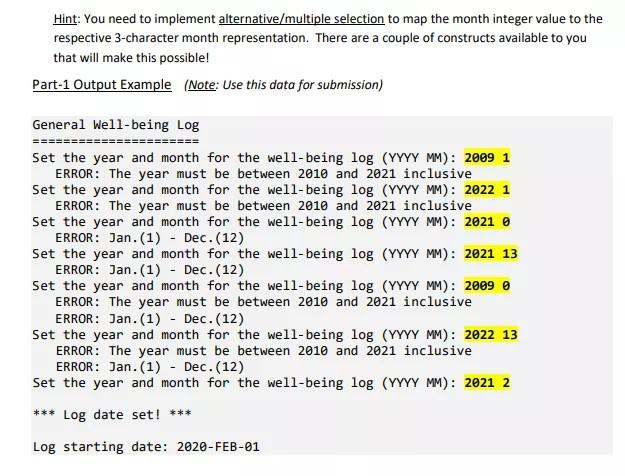
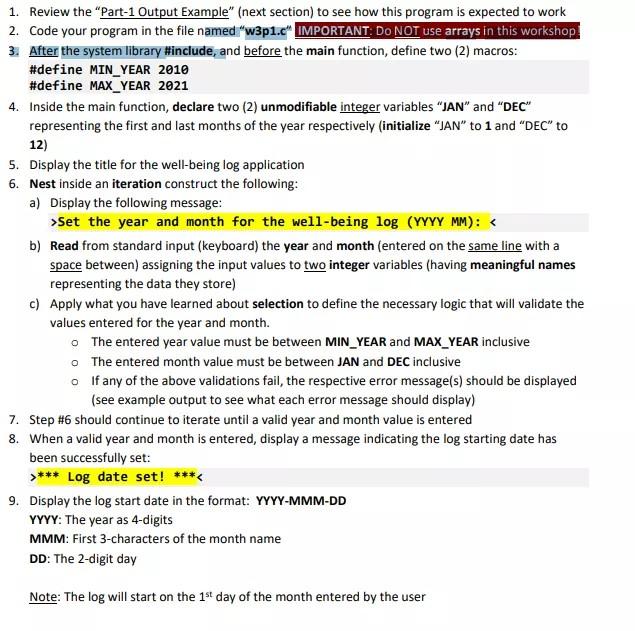
I need only a c code as instructed above and same output as shown.
Hint: You need to implement alternative/multiple selection to map the month integer value to the respective 3-character month representation. There are a couple of constructs available to you that will make this possible! Part-1 Output Example (Note: Use this data for submission) ======== General Well-being Log ========== Set the year and month for the well-being log (YYYY MM): 2009 1 ERROR: The year must be between 2010 and 2021 inclusive Set the year and month for the well-being log (YYYY MM): 2022 1 ERROR: The year must be between 2010 and 2021 inclusive Set the year and month for the well-being log (YYYY MM): 2021 ERROR: Jan.(1) Dec. (12) Set the year and month for the well-being log (YYYY MM): 2021 13 ERROR: Jan.(1) - Dec. (12) Set the year and month for the well-being log (YYYY MM): 2009 ERROR: The year must be between 2010 and 2021 inclusive ERROR: Jan.(1) - Dec. (12) Set the year and month for the well-being log (YYYY MM): 2022 13 ERROR: The year must be between 2010 and 2021 inclusive ERROR: Jan.(1) - Dec. (12) Set the year and month for the well-being log (YYYY MM): 2021 2 *** Log date set! *** Log starting date: 2020-FEB-01 1. Review the "Part-1 Output Example" (next section) to see how this program is expected to work 2. Code your program in the file named "w3p1.c" IMPORTANT. DO NOT use arrays in this workshop 3. After the system library #include, and before the main function, define two (2) macros: #define MIN_YEAR 2010 #define MAX YEAR 2021 4. Inside the main function, declare two (2) unmodifiable integer variables JAN and DEC" representing the first and last months of the year respectively (initialize JAN to 1 and DEC" to 12) 5. Display the title for the well-being log application 6. Nest inside an iteration construct the following: a) Display the following message: >Set the year and month for the well-being log (YYYY MM): *** Log date set! 9. Display the log start date in the format: YYYY-MMM-DD YYYY: The year as 4-digits MMM: First 3-characters of the month name DD: The 2-digit day Note: The log will start on the 1st day of the month entered by the user
Step by Step Solution
There are 3 Steps involved in it

Get step-by-step solutions from verified subject matter experts
 Study Help