







Question: I need some help creating HTML and javaScript using this JS traditional method. a. JavaScript traditional method - create a function that is called on
I need some help creating HTML and javaScript using this JS traditional method.

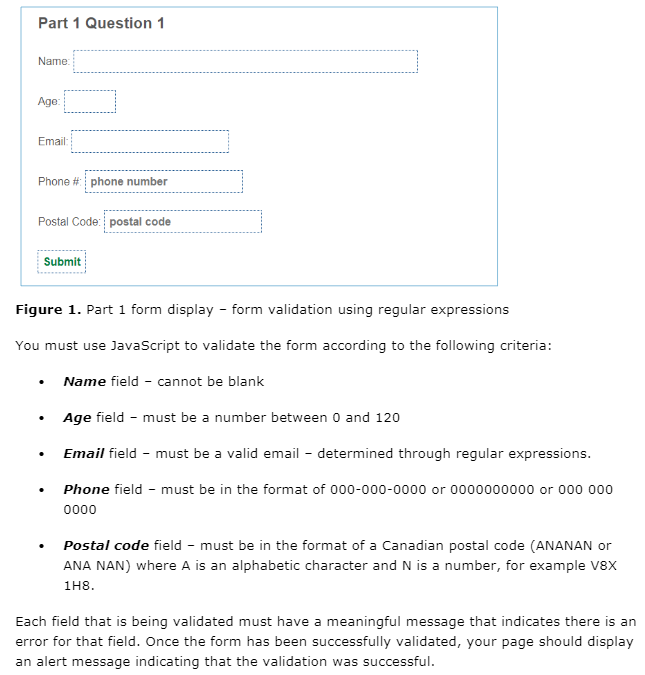
a. JavaScript traditional method - create a function that is called on submission of the form, validate each individual element in the form sequentially (using regular expressions where needed). Part 1 Question 1 Name: Age: Email: Phone# phone number Postal Code: postal code Submit Figure 1. Part 1 form display - form validation using regular expressions You must use JavaScript to validate the form according to the following criteria: Name field - cannot be blank Age field - must be a number between 0 and 120 Email field must be a valid email - determined through regular expressions. Phone field - must be in the format of 000-000-0000 or 0000000000 or 000 000 0000 Postal code field - must be in the format of a Canadian postal code (ANANAN or ANA NAN) where A is an alphabetic character and N is a number, for example V8X 118. Each field that is being validated must have a meaningful message that indicates there is an error for that field. Once the form has been successfully validated, your page should display an alert message indicating that the validation was successful
Step by Step Solution
There are 3 Steps involved in it

Get step-by-step solutions from verified subject matter experts
 Study Help