







Question: I need the code in PHP language and HTML for this project. I can not ask it as one question! I DO NOT NEED any
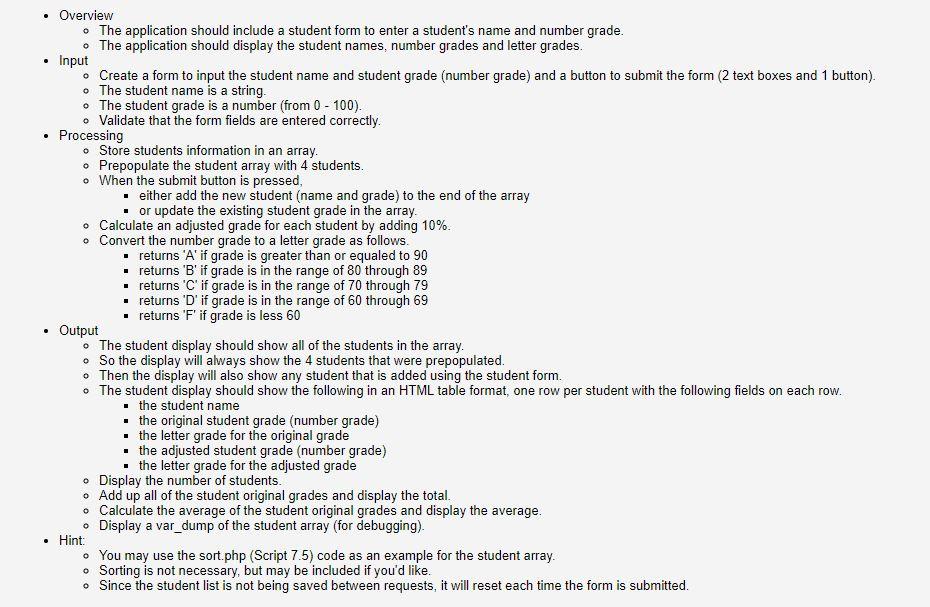
I need the code in PHP language and HTML for this project. I can not ask it as one question! I DO NOT NEED any JAVASCRIPT. It is basically a PHP programming language project.
Thanks
. Overview The application should include a student form to enter a student's name and number grade. The application should display the student names, number grades and letter grades. Input Create a form to input the student name and student grade (number grade) and a button to submit the form (2 text boxes and 1 button). o The student name is a string. . The student grade is a number (from 0 - 100). Validate that the form fields are entered correctly. Processing Store students information in an array. Prepopulate the student array with 4 students. . When the submit button is pressed, either add the new student (name and grade) to the end of the array or update the existing student grade in the array. Calculate an adjusted grade for each student by adding 10%. o Convert the number grade to a letter grade as follows. returns 'A' if grade is greater than or equaled to 90 returns 'B' if grade is in the range of 80 through 89 returns 'C' if grade is in the range of 70 through 79 returns 'D' if grade is in the range of 60 through 69 returns 'F' if grade is less 60 Output The student display should show all of the students in the array. . So the display will always show the 4 students that were prepopulated. . Then the display will also show any student that is added using the student form. The student display should show the following in an HTML table format, one row per student with the following fields on each row. the student name the original student grade (number grade) the letter grade for the original grade the adjusted student grade (number grade) the letter grade for the adjusted grade Display the number of students. Add up all of the student original grades and display the total. Calculate the average of the student original grades and display the average. Display a var_dump of the student array (for debugging). Hint: . You may use the sort.php (Script 7.5) code as an example for the student array. Sorting is not necessary, but may be included if you'd like. . Since the student list is not being saved between requests, it will reset each time the form is submitted. . Overview The application should include a student form to enter a student's name and number grade. The application should display the student names, number grades and letter grades. Input Create a form to input the student name and student grade (number grade) and a button to submit the form (2 text boxes and 1 button). o The student name is a string. . The student grade is a number (from 0 - 100). Validate that the form fields are entered correctly. Processing Store students information in an array. Prepopulate the student array with 4 students. . When the submit button is pressed, either add the new student (name and grade) to the end of the array or update the existing student grade in the array. Calculate an adjusted grade for each student by adding 10%. o Convert the number grade to a letter grade as follows. returns 'A' if grade is greater than or equaled to 90 returns 'B' if grade is in the range of 80 through 89 returns 'C' if grade is in the range of 70 through 79 returns 'D' if grade is in the range of 60 through 69 returns 'F' if grade is less 60 Output The student display should show all of the students in the array. . So the display will always show the 4 students that were prepopulated. . Then the display will also show any student that is added using the student form. The student display should show the following in an HTML table format, one row per student with the following fields on each row. the student name the original student grade (number grade) the letter grade for the original grade the adjusted student grade (number grade) the letter grade for the adjusted grade Display the number of students. Add up all of the student original grades and display the total. Calculate the average of the student original grades and display the average. Display a var_dump of the student array (for debugging). Hint: . You may use the sort.php (Script 7.5) code as an example for the student array. Sorting is not necessary, but may be included if you'd like. . Since the student list is not being saved between requests, it will reset each time the form is submitted
Step by Step Solution
There are 3 Steps involved in it

Get step-by-step solutions from verified subject matter experts
 Study Help