







Question: I need these functions please! G H K M N P Order Days Delivery Price 1 2 3 4 Total $0 $ $ Delivery information
I need these functions please! 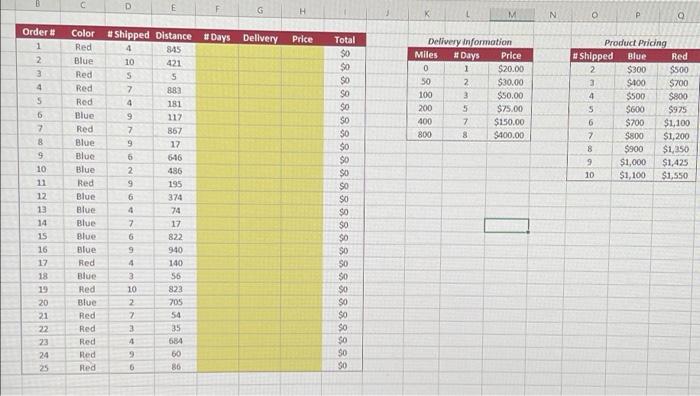
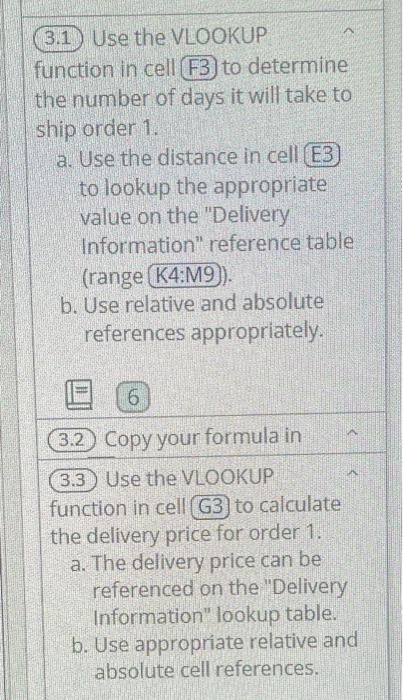
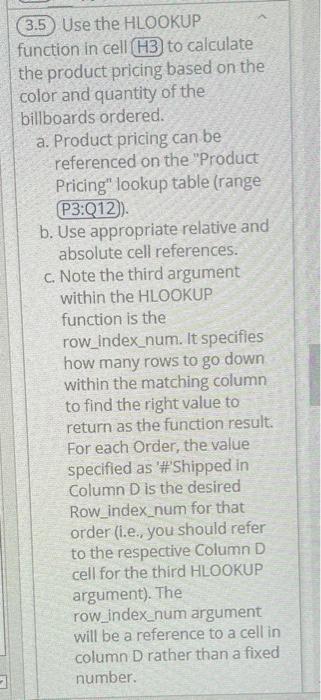
G H K M N P Order Days Delivery Price 1 2 3 4 Total $0 $ $ Delivery information Miles #Days Price 1 $20.00 50 2 $30.00 3 $50.00 200 5 $75.00 400 7 $150.00 8 $400.00 5 $ SO 8 8 8 8 80 Product Pricing Shipped Blue Red 2 $300 $500 3 $400 $700 4 $500 $800 5 $600 $975 6 $700 $1,100 7 $800 $1,200 8 $900 $1,250 9 $1,000 $1,425 10 $1,100 $1,550 5 6 7 8 $0 $ 10 1 12 13 14 Color #Shipped Distance Red 4 845 Blue 10 421 Red S 5 Red 7 883 Red 4 181 Blue 9 117 Red 867 Blue 9 17 Blue 6 646 Blue 486 Red 9 195 Blue 6 374 Blue 74 Blue 7 17 Blue 822 Blue 940 Red 4 140 Blue 3 56 Red 10 823 Blue 2 705 Red 2 54 Red 3 35 Red 684 Red 9 60 Red 6 86 NGONO $0 SO 8888888888888888888888888 15 5 wakumbn& 16 $0 $ 17 18 19 20 21 22 SNN $ $0 24 25 3.1 Use the VLOOKUP function in cell (F3) to determine the number of days it will take to ship order 1. a. Use the distance in cell E3 to lookup the appropriate value on the "Delivery Information" reference table (range K4: M9). b. Use relative and absolute references appropriately. 6 3.2) Copy your formula in 3.3 Use the VLOOKUP function in cell (G3 to calculate the delivery price for order 1. a. The delivery price can be referenced on the "Delivery Information" lookup table. b. Use appropriate relative and absolute cell references. 3.5) Use the HLOOKUP function in cell H3 to calculate the product pricing based on the color and quantity of the billboards ordered. a. Product pricing can be referenced on the "Product Pricing" lookup table (range P3:Q12). b. Use appropriate relative and absolute cell references. c. Note the third argument within the HLOOKUP function is the row_index_num. It specifies how many rows to go down within the matching column to find the right value to return as the function result. For each Order, the value specified as '#'Shipped in Column D is the desired Row_index_num for that order (i.e., you should refer to the respective Column D cell for the third HLOOKUP argument). The row_index_num argument will be a reference to a cell in column D rather than a fixed number
Step by Step Solution
There are 3 Steps involved in it
1 Expert Approved Answer
Step: 1 Unlock

Question Has Been Solved by an Expert!
Get step-by-step solutions from verified subject matter experts
Step: 2 Unlock
Step: 3 Unlock
 Study Help