







Question: I need this code to display the UI in the picture i attached. It needs to look exactly like the picture and im stuck. Im
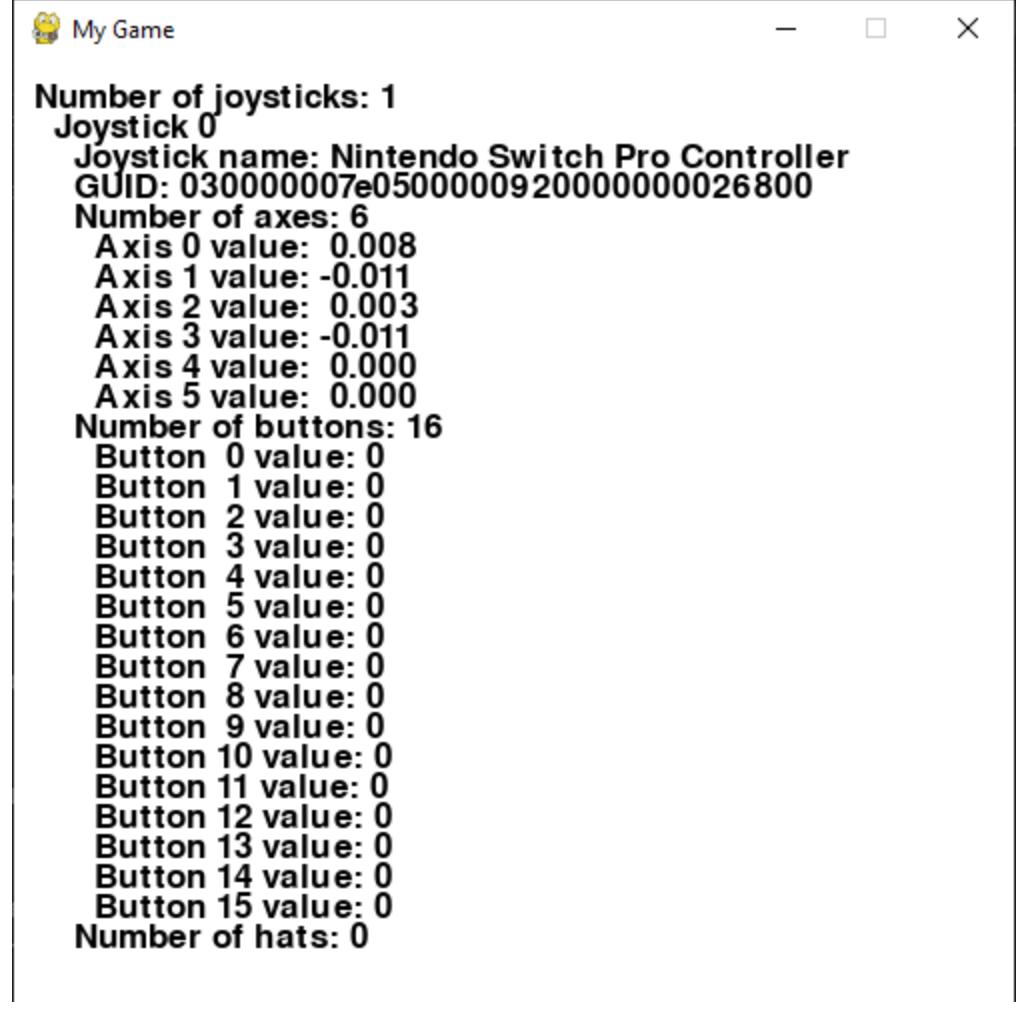
I need this code to display the UI in the picture i attached. It needs to look exactly like the picture and im stuck. Im including my code. pygame. Number of joysticks:
Joystick
Joystick name: Nintendo Switch Pro Controller
GUID:
Number of axes:
Axis value:
Axis value:
Axis value:
Axis value:
Axis value:
Axis value:
Number of buttons:
Button value:
Button value:
Button value:
Button value:
Button value:
Button value:
Button value:
Button value:
Button value:
Button value:
Button value:
Button value:
Button value:
Button value:
Button value:
Button value:
Number of hats: import pygame
import random
# Initialize Pygame
pygame.init
# Screen dimensions
WIDTH, HEIGHT
screen pygame.display.setmodeWIDTH HEIGHT
clock pygame.time.Clock
# Load sound
clicksound pygame.mixer.Soundcollisionmp
# Ball class
class Ball:
def initself x y radius, mass, color:
self.location x y
self.vector
self.acceleration # Fix syntax error here
self.radius radius
self.mass mass
self.color color
def addForceself force:
fx fy force
self.acceleration fx self.mass
self.acceleration fy self.mass
def updateself:
# Update motion
self.vector self.acceleration
self.vector self.acceleration
self.location self.vector
self.location self.vector
self.acceleration # Reset acceleration
# Boundary collision
if self.location or self.location WIDTH:
self.vector
if self.location or self.location HEIGHT:
self.vector
def drawself screen:
pygame.draw.circle
screen, self.color, intselflocation intselflocation self.radius
# Initialize balls
balls
for i in range:
radius random.randrange
x random.randrangeradius WIDTH radius
y random.randrangeradius HEIGHT radius
mass radius
color
random.randrange
random.randrange
random.randrange
ball Ballx y radius, mass, color
balls.appendball
# Initialize joystick
pygame.joystick.init
joystickcount pygame.joystick.getcount
if joystickcount :
joystick pygame.joystick.Joystick
joystick.init
printfNumber of joysticks: joystickcount
printfJoystick name: joystickgetname
printfGUID: joystickgetguid
printfNumber of axes: joystickgetnumaxes
printfNumber of buttons: joystickgetnumbuttons
printfNumber of hats: joystickgetnumhats
# Game loop
running True
gravityenabled True
while running:
for event in pygame.event.get:
if event.type pygame.QUIT:
running False
elif event.type pygame.JOYBUTTONDOWN: # Fix event type check here
# A button to reset ball position
if joystick.getbutton:
# A Button for ball in balls:
for ball in balls:
ball.location WIDTH HEIGHT
ball.vector
# LT Y Button to quit game
if joystick.getbutton and joystick.getbutton:
running False
# Read joystick axes for windforce application
leftwind joystick.getaxis if joystickcount else
upforce joystick.getaxis if joystickcount else
rightwind joystick.getaxis if joystickcount else
# Apply forces based on joystick input
for ball in balls:
if leftwind :
ball.addForce
if rightwind :
ball.addForce
# Clarify the intention of this line and adjust accordingly
screen.fill
for ball in balls:
ball.update
ball.drawscreen
pygame.display.flip
clock.tick
Step by Step Solution
There are 3 Steps involved in it
1 Expert Approved Answer
Step: 1 Unlock

Question Has Been Solved by an Expert!
Get step-by-step solutions from verified subject matter experts
Step: 2 Unlock
Step: 3 Unlock
 Study Help