







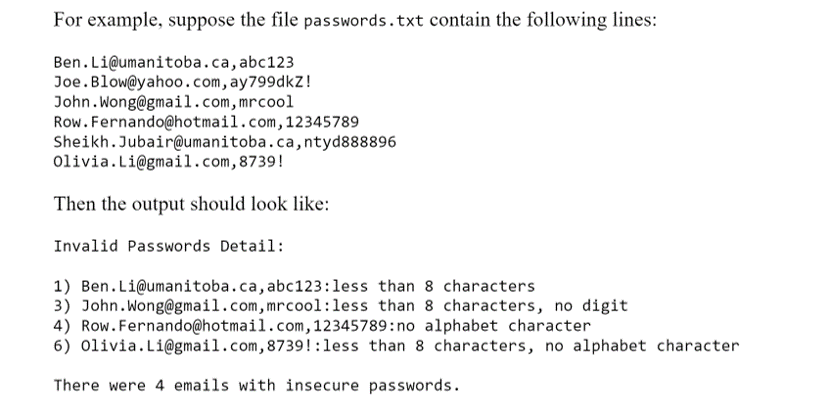
Question: I need this code to read this output. there is an issue with the digits part of the code. It creates an incorrect output This
I need this code to read this output. there is an issue with the digits part of the code. It creates an incorrect output
This is the CODE
def hasNumbers(s): temp=['1','2','3','4','5','6','7','8','9','0'] for i in temp: if i in s: return True return False def hasAlpha(s): cnt=0 for i in s: if i.isalpha(): cnt+=1 if cnt==0: return False else: return True
f=open("passwords.txt","r") l=list(f.readlines()) for i in range(len(l)): l[i]=l[i][:-1]
passw=[] temp=[]
for i in l: temp=i.split(",") passw.append(temp[1]) temp.clear() print("Invalid Password Detail:") print() flag1=False flag2=False flag3=False wrong=0
for i in range(len(passw)): res=[] res.append(str(i+1)+")"+l[i]+":") if len(passw[i])>=8: flag1=True else: res.append("less than 8 characters") if hasNumbers(passw[i]): flag2=True else: res.append("no digit") if hasAlpha(passw[i]): flag3=True else: res.append("no alphabet character") if len(res)>1: wrong+=1 print(res[0],end="") if len(res)>2: print(','.join(res[1:])) else: print(res[1]) print() print("There were "+str(wrong)+" emails with insecure passwords.")
For example, suppose the file passwords.txt contain the following lines: Ben. Li@umanitoba.ca, abc123 Joe. Blow@yahoo.com, ay799dkz! John. Wong@gmail.com, mrcool Row. Fernando@hotmail.com, 12345789 Sheikh. Jubair@umanitoba.ca, ntyd888896 Olivia. Li@gmail.com, 8739! Then the output should look like: Invalid Passwords Detail: 1) Ben. Li@umanitoba.ca, abc123: less than 8 characters 3) John. Wong@gmail.com, mrcool:less than 8 characters, no digit 4) Row. Fernando@hotmail.com, 12345789:no alphabet character 6) Olivia. Li@gmail.com, 8739!:less than 8 characters, no alphabet character There were 4 emails with insecure passwords
Step by Step Solution
There are 3 Steps involved in it

Get step-by-step solutions from verified subject matter experts
 Study Help