





Question: I need this recreated in Microsoft projects, as i did not get a downloadable link, if you could answer this question by putting it in
I need this recreated in Microsoft projects, as iI need this recreated in Microsoft projects, as iI need this recreated in Microsoft projects, as i

I need this recreated in Microsoft projects, as i did not get a downloadable link, if you could answer this question by putting it in projects and then giving me a link to be able to download it onto my computer. this would be much appreciated.
I have also posted the assignment as well as the information needed to finish it. Thanks in advance

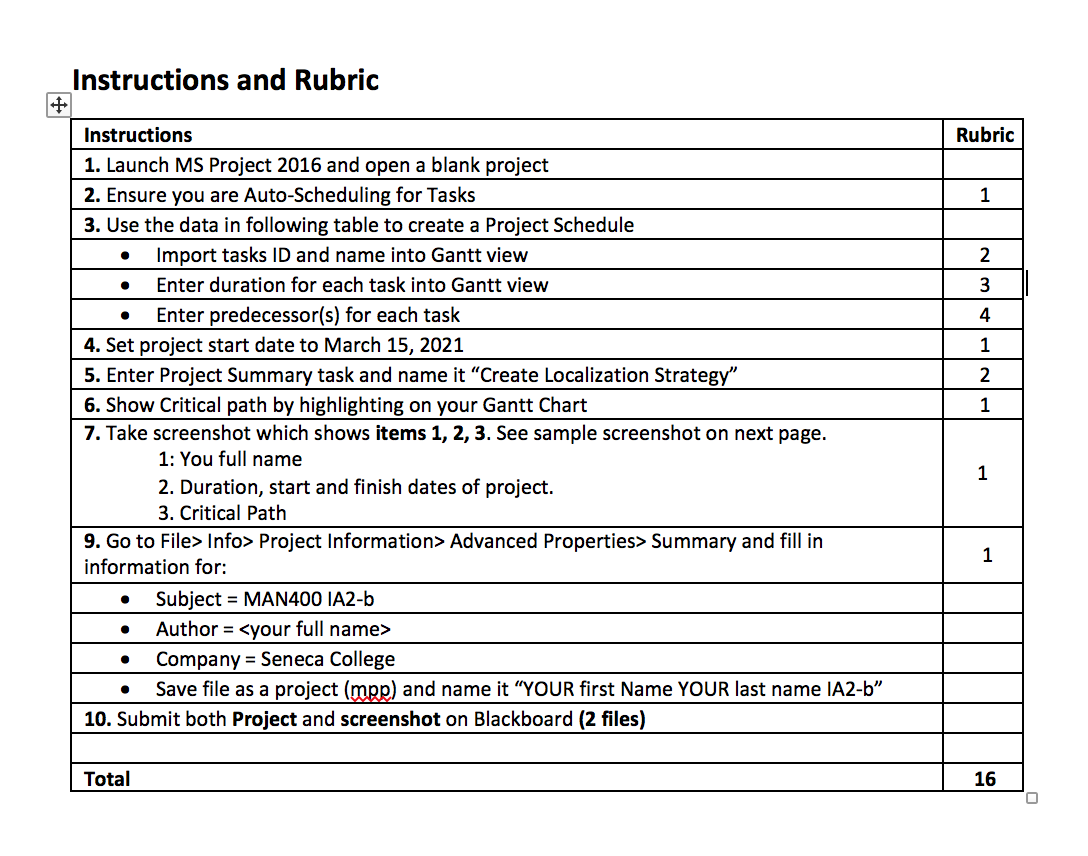
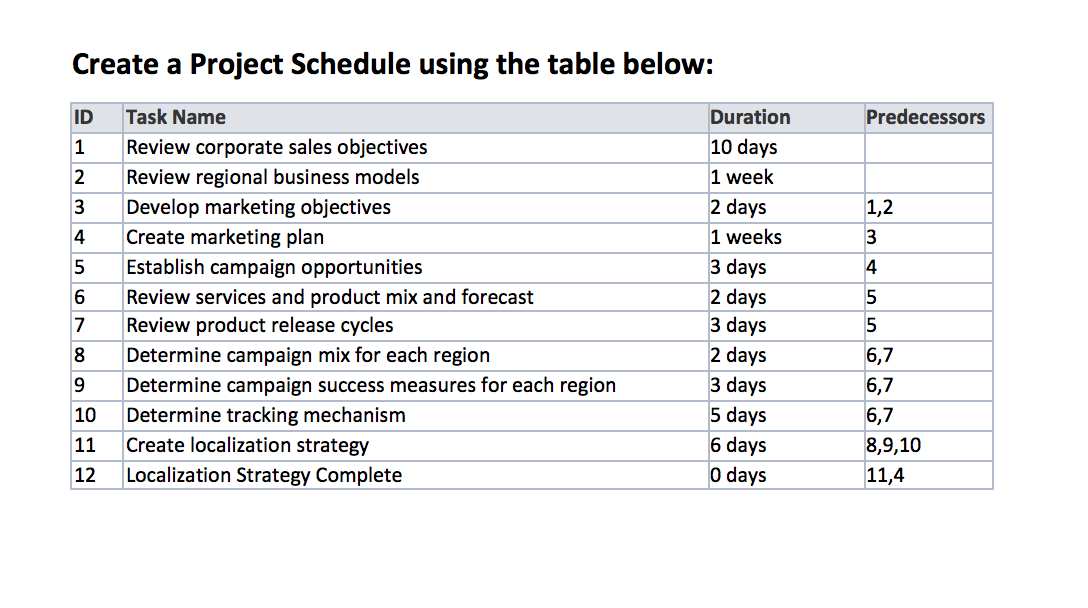
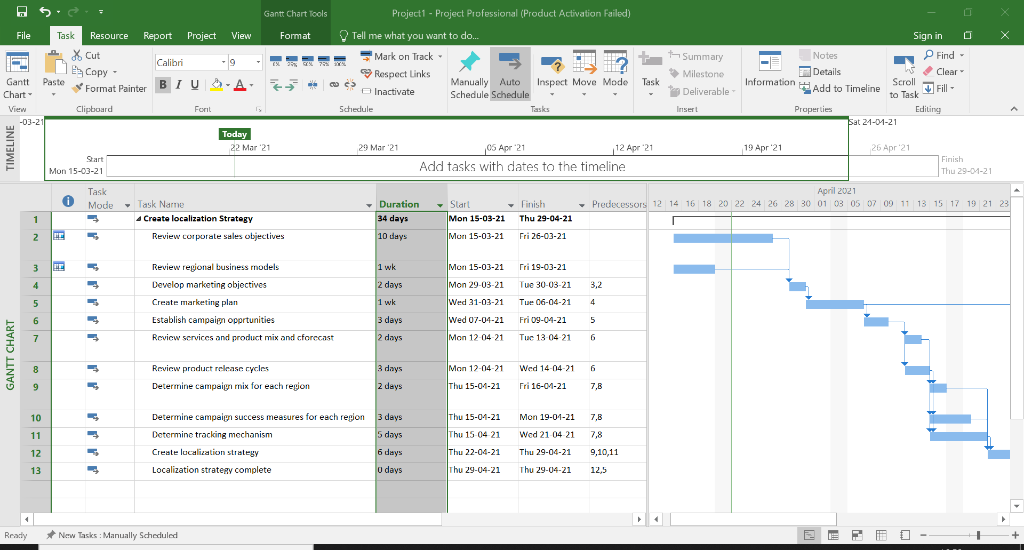
Instructions and Rubric Rubric 1 . 2 3 4 1 2. 1 Instructions 1. Launch MS Project 2016 and open a blank project 2. Ensure you are Auto-Scheduling for Tasks 3. Use the data in following table to create a Project Schedule Import tasks ID and name into Gantt view Enter duration for each task into Gantt view Enter predecessor(s) for each task 4. Set project start date to March 15, 2021 5. Enter Project Summary task and name it "Create Localization Strategy" 6. Show Critical path by highlighting on your Gantt Chart 7. Take screenshot which shows items 1, 2, 3. See sample screenshot on next page. 1: You full name 2. Duration, start and finish dates of project. 3. Critical Path 9. Go to File> Info> Project Information> Advanced Properties> Summary and fill in information for: Subject = MAN400 IA2-b Author = Company = Seneca College Save file as a project (mpp) and name it YOUR first Name YOUR last name IA2-b 10. Submit both Project and screenshot on Blackboard (2 files) 1 1 Total 16 Create a Project Schedule using the table below: ID Predecessors 1 2 3 1,2 4 3 5 4 6 Task Name Review corporate sales objectives Review regional business models Develop marketing objectives Create marketing plan Establish campaign opportunities Review services and product mix and forecast Review product release cycles Determine campaign mix for each region Determine campaign success measures for each region Determine tracking mechanism Create localization strategy Localization Strategy Complete Duration 10 days 1 week 2 days 1 weeks 3 days 2 days 3 days 2 days 3 days 5 days 6 days 0 days 5 7 5 8 9 10 6,7 6,7 6,7 8,9,10 11,4 11 12 Gantt Chart Tools Project 1 - Project Professional (Product Activation Failed) Tell me what you want to do. Mark on Track Respect Links Manually Auto Inspect Move Mode Inactivate Schedule Schedule Schedule Tasks th Summary Milestone File Task Resource Report Project View Format X Cut Calibri - 9 E, Copy Gantt Paste *Format Painter BIU A * Chart- View Clipboard Font -03-21 Today 22 Mar 21 Task Sign in Notes Find - Details Clear Information Scroll Add to Timeline Fill - Properties Editing Sat 21-01-21 Deliverable Insert to Task FW- 29 Mar 21 19 Apr '21 26 Apr 21 05 Apr 21 12 Apr 21 Add tasks with dates to the timeline Finish Thu 20-21. Mon 15-03-21 Task Mode Task Name Create localization Strategy Duration 34 days - Start Mon 15-03-21 April 2021 - Predecessors 12 14 16 18 20 22 24 26 28 30 01 03 05 07 09 11 13 15 17 19 21 23 1 Finish Thu 29-04-21 Fri 26-03-21 2 2 Review corporale sales objectives 10 days Mon 15-03-21 3 1 wk Mon 15-03-21 Fri 19-03-21 rrrrrrr 4 2 days Tue 30-03-21 3.2 5 Review regional business models Develop marketing objectives Create marketing plan Establish campaign oportunities Review services and product mix and cforecast 1 wk Tue 06-04-21 4 Mon 29-03-21 Wed 31-03-21 Wed 07-04-21 Mon 12 04 21 6 3 days Fri 09-04-21 5 7 2 days Tue 13-04 21 6 GANTT CHART 8 3 days Mon 12-04-21 Wed 14-04-21 6 Review product release cycles Determine campaign mix for each region 9 2 days Thu 15-04-21 Fri 16-01-21 7,8 10 3 days Thu 15-01-21 Mon 19-01-21 7,8 11 5 days Thu 11 04 21 7,8 Prir Determine campal success measures for each region Determine tracking mechanism Create localization strategy Localization strategy complete Wed 21 04 21 Thu 29-04-21 12 6 days Thu 22-01-21 9,10,11 13 U days Thu 21-01-21 Thu 2-04-21 12,5 Ready New Tasks: Manually Scheduled

Step by Step Solution

There are 3 Steps involved in it

1 Expert Approved Answer
Step: 1 Unlock blur-text-image

Question Has Been Solved by an Expert!

Get step-by-step solutions from verified subject matter experts

Step: 2 Unlock
Step: 3 Unlock

Students Have Also Explored These Related General Management Questions!