



Question: I need to build a movie scraper program in Perl using lynx feature. A sample output is given and the regexes to use. The website
I need to build a movie scraper program in Perl using lynx feature. A sample output is given and the regexes to use. The website to scrape the contents is from https://www.boxofficemojo.com/weekend/chart/ .
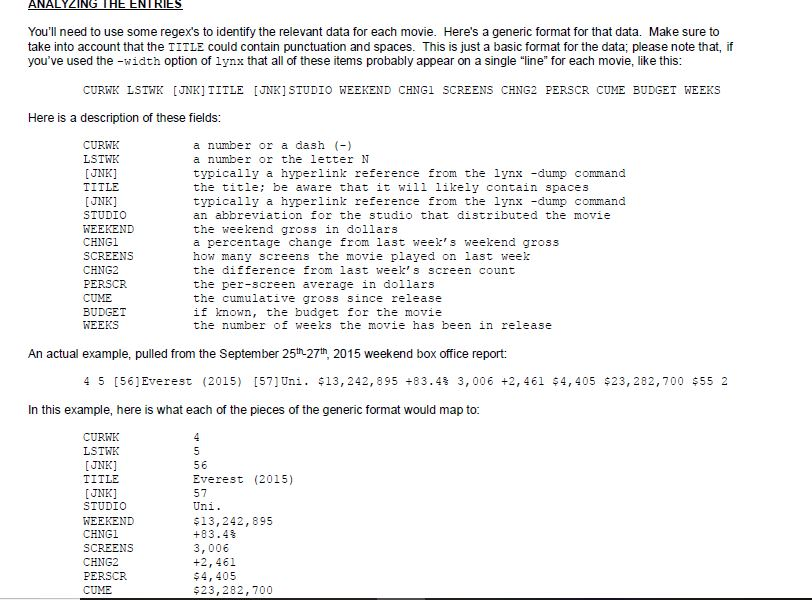
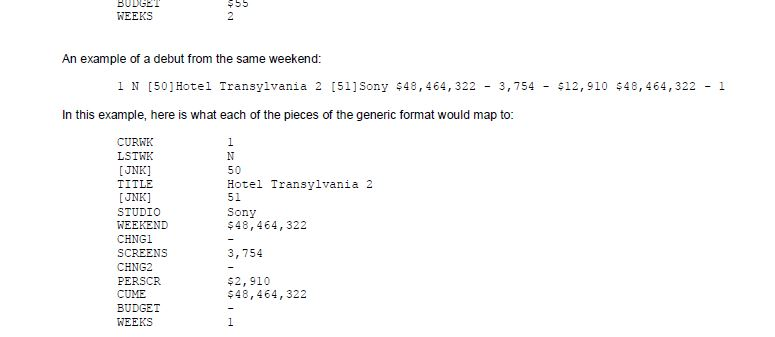
NALYZING THE ENT You'll need to use some regex's to identify the relevant data for each movie. Here's a generic format for that data. Make sure to take into account that the TITLE could contain punctuation and spaces. This is just a basic format for the data, please note that, if you've used the -width option of 1ynx that all of these items probably appear on a single "line" for each movie, like this CURWK LSTWE [JNK] TITLE IJNK] STUDIO WEEKEND CHNG1 SCREENS CHNG2 PERSCR CUME BUDGET WEEKS Here is a description of these fields: CURWK LSIWK JNK TITLE JNK] STUDIO WEEKEND CHNG1 SCREENS CHNG2 PERSCR CUME BUDGET WEEKS a number or a dash () a number or the letter N typically a hyperlink reference from the 1ynxdump command the title; be aware that it will likely contain spaces typically a hyperlink reference from the lyn -dump command an abbreviation for the studio that distributed the movie the weekend gross in dollars a percentage change from last week's weekend grossS how many screens the movie played on last week the difference from last week' s screen count the per-screen average in dollars the cumulative gross since release if known, the budget for the movie the number of weeks the movie has been in release An actual example, pulled from the September 25h 27th, 2015 weekend box office report: 4 5 [56]Everest (2015) [57]Uni. $13,242,895 +83.4% 3,006 +2,461 $4,405 $23,282,700 $55 2 In this example, here is what each of the pieces of the generic format would map to: CURKK LSTWK JNK] TITLE 56 Everest (2015) 57 JNK] STUDIO WEEKEND CHNGI SCREENS CHNG2 PERSCR CUME $13,242, 895 +83.4 3, 006 +2,461 $4, 405 $23,282,700 NALYZING THE ENT You'll need to use some regex's to identify the relevant data for each movie. Here's a generic format for that data. Make sure to take into account that the TITLE could contain punctuation and spaces. This is just a basic format for the data, please note that, if you've used the -width option of 1ynx that all of these items probably appear on a single "line" for each movie, like this CURWK LSTWE [JNK] TITLE IJNK] STUDIO WEEKEND CHNG1 SCREENS CHNG2 PERSCR CUME BUDGET WEEKS Here is a description of these fields: CURWK LSIWK JNK TITLE JNK] STUDIO WEEKEND CHNG1 SCREENS CHNG2 PERSCR CUME BUDGET WEEKS a number or a dash () a number or the letter N typically a hyperlink reference from the 1ynxdump command the title; be aware that it will likely contain spaces typically a hyperlink reference from the lyn -dump command an abbreviation for the studio that distributed the movie the weekend gross in dollars a percentage change from last week's weekend grossS how many screens the movie played on last week the difference from last week' s screen count the per-screen average in dollars the cumulative gross since release if known, the budget for the movie the number of weeks the movie has been in release An actual example, pulled from the September 25h 27th, 2015 weekend box office report: 4 5 [56]Everest (2015) [57]Uni. $13,242,895 +83.4% 3,006 +2,461 $4,405 $23,282,700 $55 2 In this example, here is what each of the pieces of the generic format would map to: CURKK LSTWK JNK] TITLE 56 Everest (2015) 57 JNK] STUDIO WEEKEND CHNGI SCREENS CHNG2 PERSCR CUME $13,242, 895 +83.4 3, 006 +2,461 $4, 405 $23,282,700
Step by Step Solution
There are 3 Steps involved in it

Get step-by-step solutions from verified subject matter experts