







Question: I need to do some change in my java GUI program so please help me, I want to change (customize order) to be as multiple
I need to do some change in my java GUI program so please help me, I want to change (customize order) to be as multiple choices so the user can chose more then one option
(same example in the picture) only 6 option please .and just add (Size o) lebel so the user can choose large or small (Already there just need the label).And i want to add Drink label so the user can choose Cola,Sprite, Mirinda and for each 3$ Extra)
Please i want to add logo at the top of program so please put any random logo and i will do some change in pic.
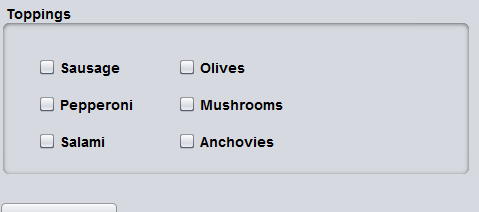
code id here
import java.awt.event.ActionEvent; import java.awt.event.ActionListener;
import javax.swing.*;
interface GUI { static final JFrame frame = new JFrame("Order"); static final JButton button = new JButton("Make an Order"); static final JLabel menu1 = new JLabel("Menu"); static final JLabel co = new JLabel("Customize Order: "); final String a[] = { "none","No Onions", "No cheese", "With Mainonese", "no ketchup", "no lettuce", "With tomatoes", "With pickle" }; static final JComboBox
//Implemented Inheritance public class Burger implements GUI { //Implemeted Encapsulation private static int totalAmount = 0;
public static void calculateTotal(String S,int a) { totalAmount=0; if(a>0) { totalAmount+=a; } for(int i=0;i public static void calculateTotal(String S,String co,int a) { totalAmount=0; if(a>0) { totalAmount+=a; } for(int i=0;i public static void main(String[] args) { button.setBounds(50, 30, 150, 30); frame.add(button); frame.setSize(300, 300); frame.setLayout(null); frame.setVisible(true); button.addActionListener(new ActionListener() { public void actionPerformed(ActionEvent e) { button.setBounds(0, 0, 0, 0); menu1.setBounds(100, 100, 200, 30); co.setBounds(100, 150, 200, 30); regular.setBounds(100, 200, 200, 30); large.setBounds(400, 200, 200, 30); menu.setBounds(400, 100, 200, 30); co1.setBounds(400, 150, 200, 30); total.setBounds(100, 250, 300, 30); totalA.setBounds(100, 300, 500, 30); makeP.setBounds(0,0,0,0); frame.add(totalA); frame.add(total); frame.add(co1); frame.add(menu1); frame.add(co); frame.add(regular); frame.add(eA); frame.add(large); frame.add(result); frame.add(menu); frame.add(last); frame.add(result); frame.add(makeP); frame.resize(700, 700); frame.revalidate(); frame.repaint(); regular.addActionListener(new ActionListener() { public void actionPerformed(ActionEvent e) { large.setSelected(false); } }); large.addActionListener(new ActionListener() { public void actionPerformed(ActionEvent e) { regular.setSelected(false); } }); total.addActionListener(new ActionListener() { public void actionPerformed(ActionEvent e) { String S=menu.getItemAt(menu.getSelectedIndex()); String co1Text = co1.getItemAt(co1.getSelectedIndex()); if(co1Text.equals("")||co1Text.equals(null)||co1Text.equals("none")) { if(regular.isSelected()) { calculateTotal(S,5); }else { calculateTotal(S,8); } }else { if(regular.isSelected()) { calculateTotal(S,co1Text,5); }else { calculateTotal(S,co1Text,8); } } totalA.setText("Total Amount: "+totalAmount); makeP.setBounds(100,400,300,30); eA.setBounds(100,350,200,30); result.setBounds(400,350,200,30); makeP.addActionListener(new ActionListener() { public void actionPerformed(ActionEvent e) { double z=Double.parseDouble(result.getText().toString()); if(z
Step by Step Solution
There are 3 Steps involved in it

Get step-by-step solutions from verified subject matter experts
 Study Help