







Question: I only need help with the highlighted instruction below. I know I need to create a new conditional formatting rule based on a formula. I
I only need help with the highlighted instruction below. I know I need to create a new conditional formatting rule based on a formula. I just don't know what that formula should be.
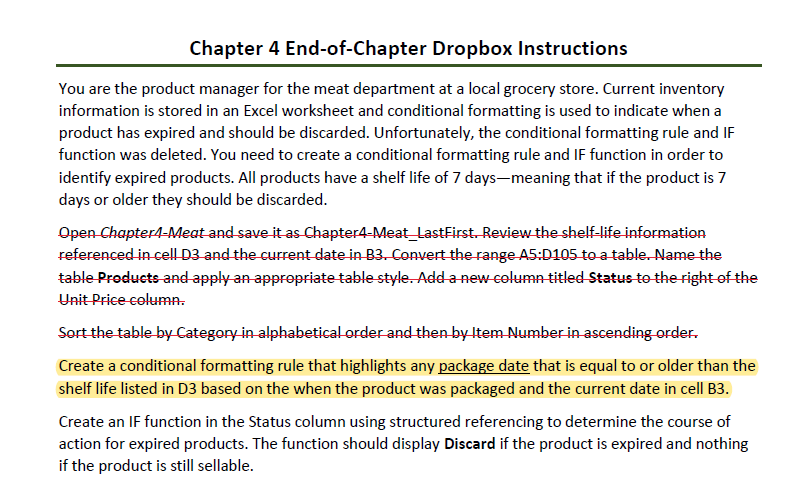
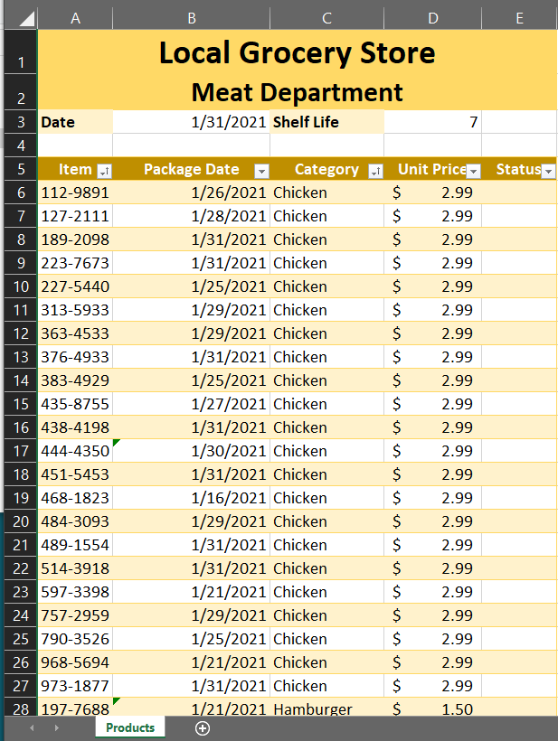
Chapter 4 End-of-Chapter Dropbox Instructions You are the product manager for the meat department at a local grocery store. Current inventory information is stored in an Excel worksheet and conditional formatting is used to indicate when a product has expired and should be discarded. Unfortunately, the conditional formatting rule and IF function was deleted. You need to create a conditional formatting rule and IF function in order to identify expired products. All products have a shelf life of 7 days-meaning that if the product is 7 days or older they should be discarded. Open Chapter4-Meat and save it as Chapter 4-Meat_LastFirst. Review the shelf-life information referenced in cell D3 and the current date in B3. Convert the range A5:0105 to a table. Name the table Products and apply an appropriate table style. Add a new column titled Status to the right of the Unit Price column. Sort the table by Category in alphabetical order and then by Item Aumber in ascending order. Create a conditional formatting rule that highlights any package date that is equal to or older than the shelf life listed in D3 based on the when the product was packaged and the current date in cell B3. Create an IF function in the Status column using structured referencing to determine the course of action for expired products. The function should display Discard if the product is expired and nothing if the product is still sellable. B C D E Local Grocery Store 1 2 Meat Department 3 Date 1/31/2021 Shelf Life 7 4 5 Item 1 Package Date Category - Unit Pricely Status 6 112-9891 1/26/2021 Chicken $ 2.99 7 127-2111 1/28/2021 Chicken $ 2.99 8 189-2098 1/31/2021 Chicken $ 2.99 9 223-7673 1/31/2021 Chicken $ 2.99 10 227-5440 1/25/2021 Chicken $ 2.99 11 313-5933 1/29/2021 Chicken $ 2.99 12 363-4533 1/29/2021 Chicken $ 2.99 13 376-4933 1/31/2021 Chicken $ 2.99 14 383-4929 1/25/2021 Chicken $ 2.99 15 435-8755 1/27/2021 Chicken $ 2.99 16 438-4198 1/31/2021 Chicken $ 2.99 17 444-4350 1/30/2021 Chicken $ 2.99 18 451-5453 1/31/2021 Chicken $ 2.99 19 468-1823 1/16/2021 Chicken $ 2.99 20 484-3093 1/29/2021 Chicken $ 2.99 21 489-1554 1/31/2021 Chicken $ 2.99 22 514-3918 1/31/2021 Chicken $ 2.99 23 597-3398 1/21/2021 Chicken $ 2.99 24 757-2959 1/29/2021 Chicken $ 2.99 25 790-3526 1/25/2021 Chicken $ 2.99 26 968-5694 1/21/2021 Chicken $ 2.99 27 973-1877 1/31/2021 Chicken $ 2.99 28 197-7688 1/21/2021 Hamburger $ 1.50 Products Chapter 4 End-of-Chapter Dropbox Instructions You are the product manager for the meat department at a local grocery store. Current inventory information is stored in an Excel worksheet and conditional formatting is used to indicate when a product has expired and should be discarded. Unfortunately, the conditional formatting rule and IF function was deleted. You need to create a conditional formatting rule and IF function in order to identify expired products. All products have a shelf life of 7 days-meaning that if the product is 7 days or older they should be discarded. Open Chapter4-Meat and save it as Chapter 4-Meat_LastFirst. Review the shelf-life information referenced in cell D3 and the current date in B3. Convert the range A5:0105 to a table. Name the table Products and apply an appropriate table style. Add a new column titled Status to the right of the Unit Price column. Sort the table by Category in alphabetical order and then by Item Aumber in ascending order. Create a conditional formatting rule that highlights any package date that is equal to or older than the shelf life listed in D3 based on the when the product was packaged and the current date in cell B3. Create an IF function in the Status column using structured referencing to determine the course of action for expired products. The function should display Discard if the product is expired and nothing if the product is still sellable. B C D E Local Grocery Store 1 2 Meat Department 3 Date 1/31/2021 Shelf Life 7 4 5 Item 1 Package Date Category - Unit Pricely Status 6 112-9891 1/26/2021 Chicken $ 2.99 7 127-2111 1/28/2021 Chicken $ 2.99 8 189-2098 1/31/2021 Chicken $ 2.99 9 223-7673 1/31/2021 Chicken $ 2.99 10 227-5440 1/25/2021 Chicken $ 2.99 11 313-5933 1/29/2021 Chicken $ 2.99 12 363-4533 1/29/2021 Chicken $ 2.99 13 376-4933 1/31/2021 Chicken $ 2.99 14 383-4929 1/25/2021 Chicken $ 2.99 15 435-8755 1/27/2021 Chicken $ 2.99 16 438-4198 1/31/2021 Chicken $ 2.99 17 444-4350 1/30/2021 Chicken $ 2.99 18 451-5453 1/31/2021 Chicken $ 2.99 19 468-1823 1/16/2021 Chicken $ 2.99 20 484-3093 1/29/2021 Chicken $ 2.99 21 489-1554 1/31/2021 Chicken $ 2.99 22 514-3918 1/31/2021 Chicken $ 2.99 23 597-3398 1/21/2021 Chicken $ 2.99 24 757-2959 1/29/2021 Chicken $ 2.99 25 790-3526 1/25/2021 Chicken $ 2.99 26 968-5694 1/21/2021 Chicken $ 2.99 27 973-1877 1/31/2021 Chicken $ 2.99 28 197-7688 1/21/2021 Hamburger $ 1.50 Products
Step by Step Solution
There are 3 Steps involved in it

Get step-by-step solutions from verified subject matter experts
 Study Help