







Question: I ONLY need the UML diagram for Java program, no code. Customer Order System provides the customer with the following services described as use cases.
I ONLY need the UML diagram for Java program, no code.
Customer Order System provides the customer with the following services described as use cases. Describe any assumptions you make.
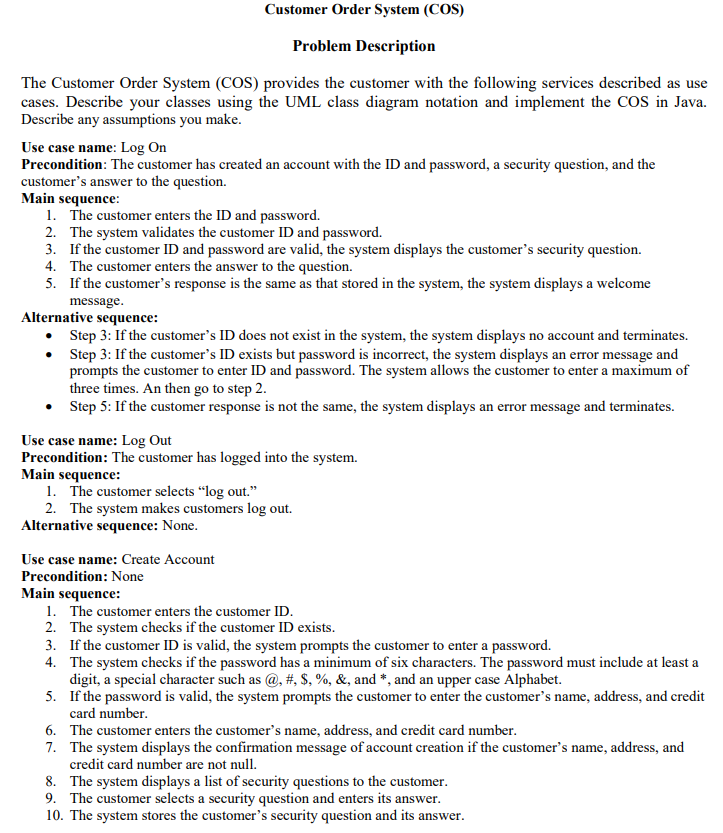
case: Log On
Precondition: The customer has created an account with the ID and password, a security question, and the customers answer to the question.
Main sequence: The customer enters the ID and password. The system validates the customer ID and password. If the customer ID and password are valid, the system displays the customers security question. The customer enters the answer to the question. If the customers response is the same as that stored in the system, the system displays a welcome message.
Alternative: Step : If the customers ID does not exist in the system, the system displays no account and terminates. Step : If the customers ID exists but password is incorrect, the system displays an error message and prompts the customer to enter ID and password. The system allows the customer to enter a maximum of three times. An then go to step Step : If the customer response is not the same, the system displays an error message and terminates.
case : Log Out
Precondition: The customer has logged into the system.
Main sequence: The customer selects log out. The system makes customers log out.
Alternative: None.
case: Create Account
Precondition: None
Main sequence: The customer enters the customer ID The system checks if the customer ID exists. If the customer ID is valid, the system prompts the customer to enter a password. The system checks if the password has a minimum of six characters. The password must include at least a digit, a special character such as @ # $ & and and an upper case Alphabet. If the password is valid, the system prompts the customer to enter the customers name, address, and credit card number. The customer enters the customers name, address, and credit card number. The system displays the confirmation message of account creation if the customers name, address, and credit card number are not null. The system displays a list of security questions to the customer. The customer selects a security question and enters its answer. The system stores the customers security question and its answer.
Alternative: Step : If the same ID exists in the system, the system displays an error message and requests a different ID from the customer. And then go to step Step : If the password is invalid, the system prompts the customer to enter another password. And then go to step Step : If the customers name, address, or credit card number is null, the system prompts the customer to enter the customers name, address, or credit card number again. And then go to step
case: Select Items.
Precondition: None.
Main sequence: The customer requests the product catalog to browse. The system displays the product names, descriptions, regular prices, and sales prices. The customer selects one or more products and quantities from the catalog. The system adds the selected products and quantities to a cart. The system displays the selected products, quantities, taxes, and the total price.
Alternative: Step : Customer selects no product and exits.
case: Make Order
Precondition: The customer has selected products to buy and logged into the system.
Main sequence: The customer places an order for the products selected. The system displays delivery methods: mail by charging a fee eg $ per order or instore pick up for free. The customer selects one of the delivery methods. The system displays the total, including the mailing fee or free pickup. The system retrieves the customers credit card from the customers account. The system requests a bank to charge the total amount using the customers credit card. If the bank approves the charge, the system receives a fourdigit authorization number from the bank. The system stores the customer order, containing the order date, customer ID product name, quantity, total, and authorization number. The system displays order confirmation to the customer.
Alternative: Step : The customer does not select a delivery method and exits. Step : If the bank denies the charge eg invalid credit card or over credit limit the system prompts the customer to enter another credit card number. The customer can either enter a new credit card number or exit. If the new card is valid, the bank charges it using the new credit card, and the system receives a fourdigit authorization number from the bank. The system updates its credit card number in the customers account
Case : View Order
Precondition: Customer has logged in
Main sequence: The customer requests all the customers order information.
The system displays each order with the customer order date, product names, quantities, and total
alt: none
Step by Step Solution
There are 3 Steps involved in it
1 Expert Approved Answer
Step: 1 Unlock

Question Has Been Solved by an Expert!
Get step-by-step solutions from verified subject matter experts
Step: 2 Unlock
Step: 3 Unlock
 Study Help