







Question: I receive the error: Error: File: globalmin.m Line: 5 Column: 15 The expression to the left of the equals sign is not a valid target
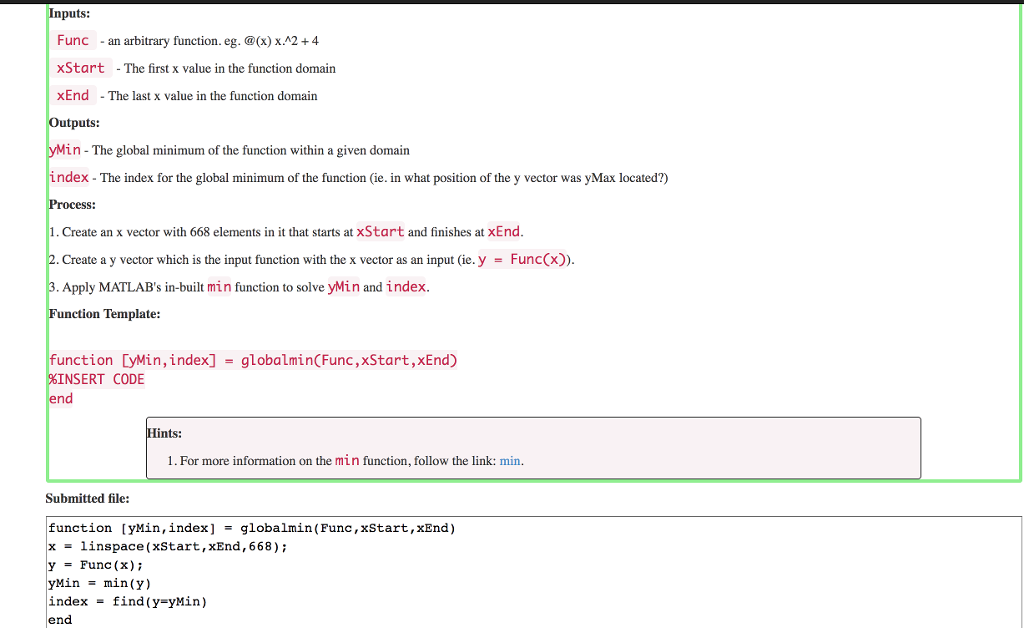
I receive the error: Error: File: globalmin.m Line: 5 Column: 15 The expression to the left of the equals sign is not a valid target for an assignment.
nputs: Func -an arbitrary function. eg. (x) x.A2+4 xStart -The first x value in the function domain xEnd -The last x value in the function domain Outputs: yMin - The global minimum of the function within a given domain index - The index for the global minimum of the function (ie. in what position of the y vector was yMax located?) Process: 1. Create an x vector with 668 elements in it that starts at xStart and finishes at xEnd 2. Create a y vector which is the input function with the x vector as an input (ie. y = Func(x). 3. Apply MATLAB's in-built min function to solve yMin and index. Function Template: function [ywin,index] - globalmin(Func,xStart,xEnd) NSERT CODE end Hints: 1. For more information on the min function, follow the link: min Submitted file: function [yMin, index] -globalmin(Func, xStart,xEnd) x-linspace (xStart,xEnd, 668) y = Func (x); yMin = min(y) index - find (y-yMin) end
Step by Step Solution
There are 3 Steps involved in it

Get step-by-step solutions from verified subject matter experts
 Study Help