







Question: why is MATLAB coming up with that error msg for line 88? Editor - GUI_optimisation_group.m GUIgroup.m J GUI-optimisation-group.m xl calc.m xl Matfile_data.m xl tasks.mxl task4.m
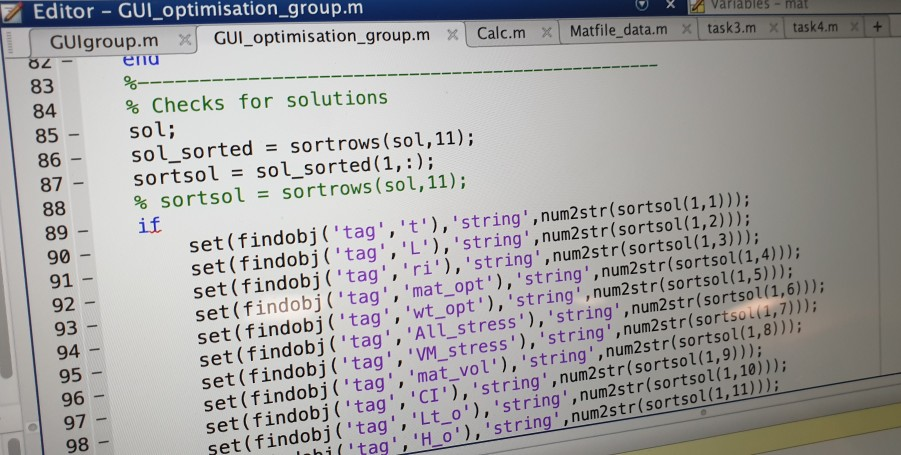
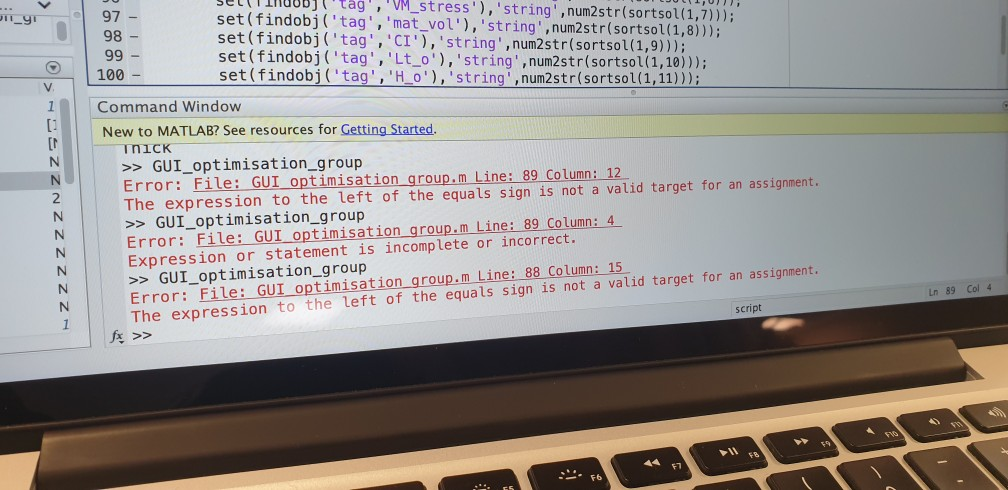
why is MATLAB coming up with that error msg for line 88?
Editor - GUI_optimisation_group.m GUIgroup.m J GUI-optimisation-group.m xl calc.m xl Matfile_data.m xl tasks.mxl task4.m Variables-mat ena 83 84 85 86- 87- % Checks for solutions sol; sol-sorted = sort rows (sol,11); sort sol=sol_sorted ( 1,:); % sort sol = sort rows (sol,11); 89 if 90 - 91 92 93 94 95 96 97- 98 set (findobj ('tag', 't'), 'string',num2str(sortsol(1,1))); set (findobj ('tag', 'L),'string', num2str(sortsol(1,2))); set(findobj ( 'tag', 'ri'), 'string',num2str(sortsol(1,3))); set(findobj 'tag', 'mat_opt'), 'string',num2str(sortsol(1,4))); ('tag', 'wt_opt'), 'string',num2str(sortsol(1,5))); ('tag', 'All_stress"), 'string',num2str(sortsol(1,6))) ', 'VM-stress'), 'string' ,num2str(sortsutu, 7))); set (findobj ortsol(1,8))) g', 'mat vol), 'string',num2str(s t (findobj 'tag', 'CI'), 'string', num2str(sortsol (1,9))); se dobj ('tag, 'Lt_o'), 'string', num2str(sortsol(1,10))); tag 'H o'),'string',num2str(sortsol(1,11))D 97 - 98 - 99 - 100 - eltTinuuBJt tag, M stress'), 'string',num2str(sortsol(1,7))); set(findobj ('tag, 'mat vol'), 'string,num2str(sortsol(1,8))); set (findobj ( 'tagCI'), 'string", num2str(sort sol(1,9))) ; set (findobj ('tag' , 'Lt_ o), 'string',num2str(sortsol(1,10))) set (findobj (tag, 'Ho') , 'string, num2str(sort sol( 1, 11))); 11 9 Command Window New to MATLAB? See resources for Getting Started. GUI_optimisation_group Error: File: GUI optimisation group.m Line: 89 Column: 12 The expression to the left of the equals sign is not a valid target for an assignment. >> GUI_optimisation_group Error: File: GUI optimisation group.m Line: 89 Column: 4 Expression or statement is incomplete or incorrect. 2 GUI_optimisation_group Error: File: GUI optimisation group.m Line: 88 Column: 15 The expression to the left of the equats sign 1s not a valid target for an a351igment Ln 89 Col 4 script 6 Editor - GUI_optimisation_group.m GUIgroup.m J GUI-optimisation-group.m xl calc.m xl Matfile_data.m xl tasks.mxl task4.m Variables-mat ena 83 84 85 86- 87- % Checks for solutions sol; sol-sorted = sort rows (sol,11); sort sol=sol_sorted ( 1,:); % sort sol = sort rows (sol,11); 89 if 90 - 91 92 93 94 95 96 97- 98 set (findobj ('tag', 't'), 'string',num2str(sortsol(1,1))); set (findobj ('tag', 'L),'string', num2str(sortsol(1,2))); set(findobj ( 'tag', 'ri'), 'string',num2str(sortsol(1,3))); set(findobj 'tag', 'mat_opt'), 'string',num2str(sortsol(1,4))); ('tag', 'wt_opt'), 'string',num2str(sortsol(1,5))); ('tag', 'All_stress"), 'string',num2str(sortsol(1,6))) ', 'VM-stress'), 'string' ,num2str(sortsutu, 7))); set (findobj ortsol(1,8))) g', 'mat vol), 'string',num2str(s t (findobj 'tag', 'CI'), 'string', num2str(sortsol (1,9))); se dobj ('tag, 'Lt_o'), 'string', num2str(sortsol(1,10))); tag 'H o'),'string',num2str(sortsol(1,11))D 97 - 98 - 99 - 100 - eltTinuuBJt tag, M stress'), 'string',num2str(sortsol(1,7))); set(findobj ('tag, 'mat vol'), 'string,num2str(sortsol(1,8))); set (findobj ( 'tagCI'), 'string", num2str(sort sol(1,9))) ; set (findobj ('tag' , 'Lt_ o), 'string',num2str(sortsol(1,10))) set (findobj (tag, 'Ho') , 'string, num2str(sort sol( 1, 11))); 11 9 Command Window New to MATLAB? See resources for Getting Started. GUI_optimisation_group Error: File: GUI optimisation group.m Line: 89 Column: 12 The expression to the left of the equals sign is not a valid target for an assignment. >> GUI_optimisation_group Error: File: GUI optimisation group.m Line: 89 Column: 4 Expression or statement is incomplete or incorrect. 2 GUI_optimisation_group Error: File: GUI optimisation group.m Line: 88 Column: 15 The expression to the left of the equats sign 1s not a valid target for an a351igment Ln 89 Col 4 script 6
Step by Step Solution
There are 3 Steps involved in it

Get step-by-step solutions from verified subject matter experts
 Study Help