







Question: I replaced the word Exam in my code with Test due to Chegg polices. CSS.css File: table { font-family: Times New Roman, Times, serif; border-collapse:
I replaced the word "Exam" in my code with "Test" due to Chegg polices.
CSS.css File:
table { font-family: "Times New Roman", Times, serif; border-collapse: collapse; width: 33%; text-align: center; }
td, th { border: 2px solid black; border-collapse: collapse; text-align: center; padding: 6px; }
tr:nth-child(even) { background-color: rgb(118, 233, 10); text-align: center; }
p,h2 { text-align: center; }
Javascript.js File:
function myFunction() { var lab = document.getElementById("labPoints").value;
var quiz = document.getElementById("quizPoints").value; var test = document.getElementById("testPoints").value;
var project = document.getElementById("projPoints").value;
var extrac = document.getElementById("extraPoints").value;
var part = document.getElementById("partPoints").value; var totalGrade = ((.3 * lab) + (.1 * quiz) + (.3 * test) + (.2 * project) + (.05 * extrac) + (.1 * part))/172.5 * 100; alert( "Your grade is a " + totalGrade.toFixed(2) + "%" + "Use the second table to determine your letter grade" ); }
function Assessment(asName, maxPoint, earnedPoint) { this.asName = asName; this.maxPoint = maxPoint; this.earnedPoint = earnedPoint; }
function createAssessments() { var lab = new Assessment(); lab.asName = "Lab Assignment"; lab.maxPoint = 250 lab.earnedPoint = parseInt(document.getElementById("labPoints").value); var newAssignment = new Assessment("New Assignment", 200, 50); var json1 = JSON.stringify(newAssignment); alert(json1); alert(newAssignment.asName);
var quiz = new Assessment(); quiz.asName = "Quiz"; quiz.maxPoint = 100; quiz.earnedPoint = parseInt(document.getElementById("quizPoints").value); var test = new Assessment(); test.asName = "Test"; test.maxPoint = 200; test.earnedPoint = parseInt(document.getElementById("examPoints").value); var project = new Assessment(); project.asName = "Project"; project.maxPoint = 100; project.earnedPoint = parseInt(document.getElementById("projPoints").value); var extrac = new Assessment(); extrac.asName = "Extra Credit"; extrac.maxPoint = 25; extrac.earnedPoint = parseInt(document.getElementById("extraPoints").value); var part = new Assessment(); part.asName = "Partcipation"; part.maxPoint = 75; part.earnedPoint = parseInt(document.getElementById("partPoints").value); var totalGrade = (((lab.earnedPoint + quiz.earnedPoint + test.earnedPoint + project.earnedPoint + extrac.earnedPoint + part.earnedPoint )/725)*100).toFixed(2); alert(totalGrade); var CourseGrade = new Array(); CourseGrade[0] = lab; CourseGrade[1] = quiz; CourseGrade[2] = test; CourseGrade[3] = project; CourseGrade[4] = extrac; CourseGrade[5] = part; alert("Working here" + CourseGrade[0].asName); var toJSON = JSON.stringify(CourseGrade); document.cookie = CourseGrade; alert("We made it to course grade " + CourseGrade);
var first = CourseGrade; alert(first); var jsonObject = JSON.stringify(lab); document.cookie = jsonObject; var jsobj = JSON.parse(jsonObject); var fromCookie = jsonObject; alert("inside the cookie " + fromCookie); alert("working in the array"); alert(CourseGrade[0]); document.getElementById("form1").reset(); } function setCookie() { var cookieName = document.getElementById("cookieName").value; var cookieValue = document.getElementById("cookieValue").value; var lab = document.getElementById("labPoints").value;
var quiz = document.getElementById("quizPoints").value; var test = document.getElementById("examPoints").value;
var project = document.getElementById("projPoints").value;
var extrac = document.getElementById("extraPoints").value;
var part = document.getElementById("partPoints").value;
document.cookie = cookieName + "=" + escape(cookieValue) + ";"; }
Lab04.html File:
Homework Assignment 04
Here you can calculate the grade you may receive in this course
Use this calculator and input the points you have earned for each category
Enter points received for Lab Assignments: Enter points received for Quizzes: Enter points received for Tests: Enter points received for Projects: Enter points received for Extra Credit: Enter points received for Partcipation:
Press submit to calculate your grade
Press save cookie to save the cookie
Use the first table to determine the total number of points you have received.
| Assessment | Number of Assessment | Max Points per Assessment | Total Points Possible |
|---|---|---|---|
| Lab assignment | 10 | 25 | 250 |
| Quiz | 10 | 10 | 100 |
| Test | 2 | 100 | 200 |
| Project | 1 | 100 | 100 |
| Extra credit | 1 | 25 | 25 |
| Participation | 15 | 5 | 75 |
Total earned % points = 30% of lab assignments + 10% of quizzes + 30% of tests + 20% of project + 5% of extra-credit + 10% of participation
The grade is determined using the table below.
| Earned % Points | Grade |
|---|---|
| 90 | A |
| 80 but | B |
| 70 but | C |
| 60 but | D |
| F |
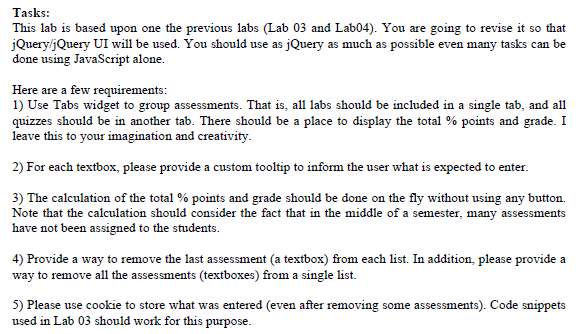
Tasks: This lab is based upon one the previous labs (Lab 03 and Lab04). You are going to revise it so that jQuery/jQuery UI will be used. You should use as jQuery as much as possible even many tasks can be done using JavaScript alone. Here are a few requirements: 1) Use Tabs widget to group assessments. That is, all labs should be included in a single tab, and all quizzes should be in another tab. There should be a place to display the total % points and grade. I leave this to your imagination and creativity. 2) For each textbox, please provide a custom tooltip to inform the user what is expected to enter. 3) The calculation of the total % points and grade should be done on the fly without using any button. Note that the calculation should consider the fact that in the middle of a semester, many assessments have not been assigned to the students. 4) Provide a way to remove the last assessment (a textbox) from each list. In addition, please provide a way to remove all the assessments (textboxes) from a single list. 5) Please use cookie to store what was entered (even after removing some assessments). Code snippets used in Lab 03 should work for this purpose. Tasks: This lab is based upon one the previous labs (Lab 03 and Lab04). You are going to revise it so that jQuery/jQuery UI will be used. You should use as jQuery as much as possible even many tasks can be done using JavaScript alone. Here are a few requirements: 1) Use Tabs widget to group assessments. That is, all labs should be included in a single tab, and all quizzes should be in another tab. There should be a place to display the total % points and grade. I leave this to your imagination and creativity. 2) For each textbox, please provide a custom tooltip to inform the user what is expected to enter. 3) The calculation of the total % points and grade should be done on the fly without using any button. Note that the calculation should consider the fact that in the middle of a semester, many assessments have not been assigned to the students. 4) Provide a way to remove the last assessment (a textbox) from each list. In addition, please provide a way to remove all the assessments (textboxes) from a single list. 5) Please use cookie to store what was entered (even after removing some assessments). Code snippets used in Lab 03 should work for this purpose
Step by Step Solution
There are 3 Steps involved in it

Get step-by-step solutions from verified subject matter experts
 Study Help