







Question: I. SETUP 1 . Please make sure that today s date is set to July 2 7 , 2 0 1 2 . 2 .
I. SETUP
Please make sure that todays date is set to July
Please set the project status date to July
Important: Click on File Options Schedule. Scroll down to Calculations options for this project. Please make: Actual costs are always calculated by Project, and Edits to actual costs will be spread to status date are both checked.
Important: Please make sure that leveling options are set to automatic leveling. It also helps to have tasks set to Automatic Scheduling. Remember to remove check boxes from leveling can adjust assignments and leveling can create splits if present.
II DATA ENTRY
Connor Gage had used management reserves to expedite Market testing. This task had its duration reduced from to days. There is an additional cost of $ incurred in reducing the duration of this activity. You are required to record the additional cost.
Enter the additional cost as a fixed cost in the Cost table Click on View Cost
Make sure there are no scheduling errors indicated by red underlining in Tasks Schedule view. Click on Tasks, View Schedule
Resolve any issues by rightclicking on the red underline and choosing autoschedule for the activities if necessary.
Sometimes, simply selecting all tasks in Task view and toggling Manual Scheduling and Auto Scheduling tasks helps remove red underline warnings.
From View Gantt Chart drop down Take a look at the Tracking Gantt Chart.
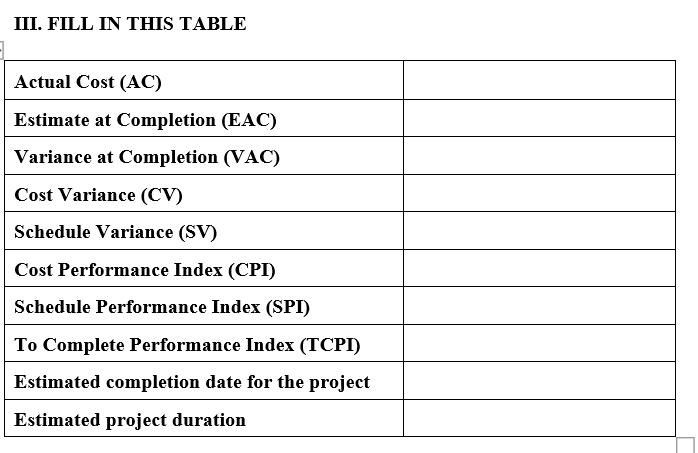
Using Earned Value Tables and Schedule Table, please complete the following table:
Step by Step Solution
There are 3 Steps involved in it
1 Expert Approved Answer
Step: 1 Unlock

Question Has Been Solved by an Expert!
Get step-by-step solutions from verified subject matter experts
Step: 2 Unlock
Step: 3 Unlock
 Study Help