







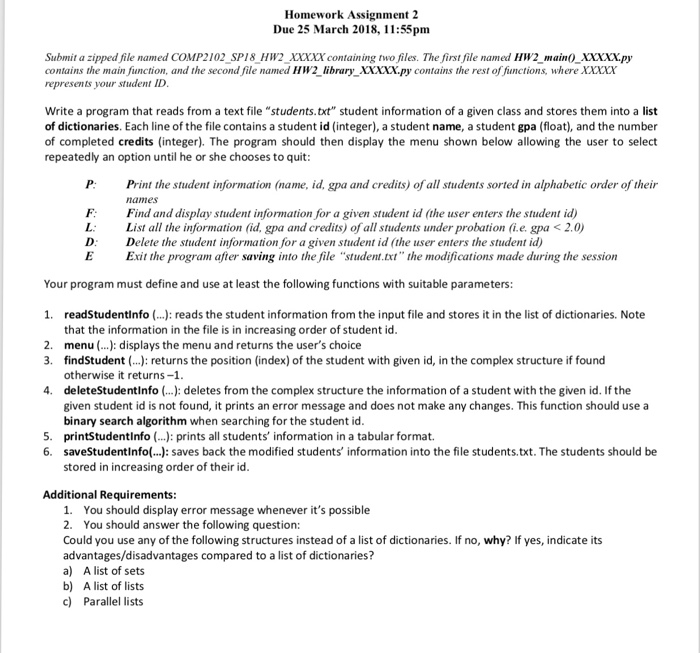
Question: I tried to solve this question but the program isn't working def menu(): print('%-5s%10s'%('P:','Print the student information (name, id, gpa and credits) of all students
I tried to solve this question but the program isn't working
def menu(): print('%-5s%10s'%('P:','Print the student information (name, id, gpa and credits) of all students sorted in alphabetic order of their names')) print('%-5s%10s'%('F:','Find and display student information for a given student id')) print('%-5s%10s'%('L:','List all the information (id, gpa and credits) of all students under probation (i.e. gpa
def readStudentInfo(): theList = [] try: from operator import itemgetter theList = [] with open('students.txt','r') as infile: for line in infile: dictionary = {} (ID,name,gpa,credit) = line.split(':') ID = int(ID) gpa = float(gpa) credit = int(credit) dictionary['ID'] = ID dictionary['Name'] = name dictionary['GPA'] = gpa dictionary['Credits'] = credit theList.append(dictionary) theList.sort(key= itemgetter('ID')) except IOError as error: print('Error:', error) return theList
def findStudent(ID,theList): first = 0 last = len(theList) - 1 found = False while first
elif theList[mid] > ID: last = mid - 1 else: first = mid + 1
return -1
def deleteStudentInfo(ID,theList): first = 0 last = len(theList) - 1 found = False while first
elif theList[mid] > ID: last = mid - 1 else: first = mid + 1 if found: theList.pop[mid] else: print('Student not found!') def printStudentInfo(theList): from operator import itemgetter # theList = [{'ID': 119395, 'Name': 'Mohammad Ahmad Mahmoud AlHajri', 'GPA': 2.88, 'Credits': 24}, {'ID': 120036, 'Name': 'Istabraq Mohammad Ali AlRuheili', 'GPA': 3.52, 'Credits': 33}, {'ID': 129325, 'Name': 'Aalaa Azhar Ahmad AlKindi', 'GPA': 3.0, 'Credits': 50}, {'ID': 194242, 'Name': 'Husam Abdullah Salam AlHadi', 'GPA': 1.88, 'Credits': 43}] print('%-10s%-35s%-20s%-20s'%('ID','Name','GPA','Credits')) print('%-10s%-35s%-20s%-20s'%('='*6,'='*30,'='*5,'='*8)) theList.sort(key= itemgetter('Name')) for i in theList: print('%-10s%-35s%-20s%-20s'%(i['ID'],i['Name'],i['GPA'],i['Credits']))
def saveStudentInfo(theList): with open('students.txt','w') as outfile: for student in theList: v = theList[student] outfile.write(str(student)+':') for va in v: outfile.write(str(va)+':') outfile.write(' ')
def main(): theList = readStudentInfo() menu() process = True while process: userInput = input('Your choice is: ') if userInput == 'P': printStudentInfo(theList) elif userInput == 'F': ID = int(input('Enter the ID: ')) index = findStudent(ID,theList) if index != -1: print('%-10s%-35s%-20s%-20s'%('ID','Name','GPA','Credits')) print('%-10s%-35s%-20s%-20s'%('='*6,'='*30,'='*5,'='*8)) print('%-10s%-35s%-20s%-20s'%(theList[index])['ID'],(theList[index])['Name'],(theList[index])['GPA'],(theList[index])['Credits']) else: print('There is no student with the given ID, try again!')
elif userInput == 'L': propStu = [] for i in theList: if theList['GPA']
Homework Assignment 2 Due 25 March 2018, 11:55pmm Submit a zipped file named COMP2102 SPI8 HW2 XXXXX containing two files. The first file named HW2 main XXXXXpy contains the main function, and the second file named HW2 library XXxxx.py contains the rest of fiunctions, where XXXx represents your student ID Write a program that reads from a text file "students.txt" student information of a given class and stores them into a list of dictionaries. Each line of the file contains a student id (integer), a student name, a student gpa (float), and the number of completed credits (integer). The program should then display the menu shown below allowing the user to select repeatedly an option until he or she chooses to quit P Print the student information (name, id, gpa and credits) of all students sorted in alphabetic order of their names F Find and display student information for a given student id (the user enters the student id) L List all the information (id, gpa and credits) of all students under probation (i.e. gpa
Step by Step Solution
There are 3 Steps involved in it

Get step-by-step solutions from verified subject matter experts
 Study Help