







Question: i try to install the java builder and java swing but it give me this message!! Note i removed what i did and went
i try to install the java builder and java swing but it give me this message!!
Note " i removed what i did and went to eclipse site and download the new vergion of the system and i face the same problem "
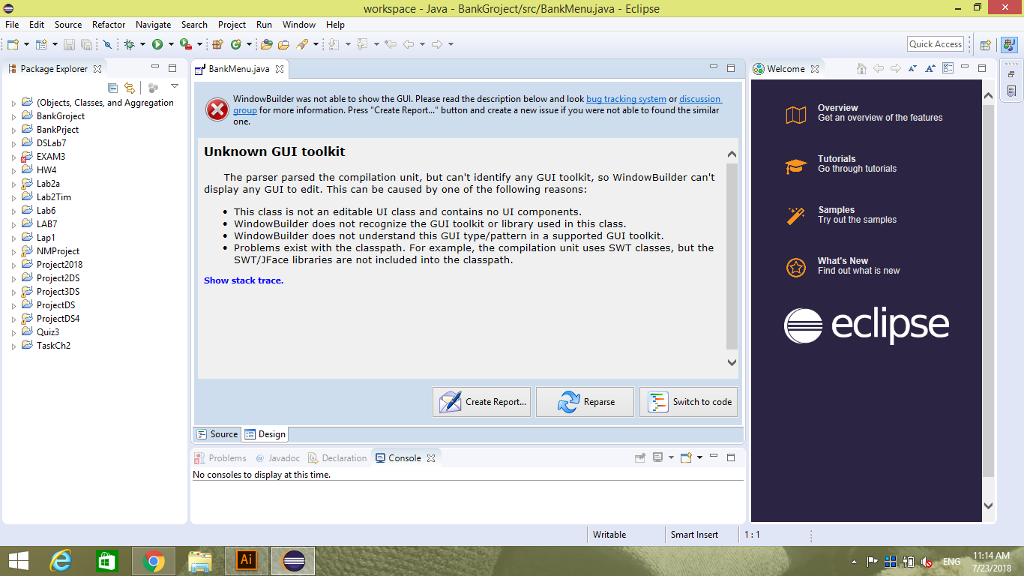
Could you let me know how i can fix that please!?
workspace - Java - BankGroject/src/BankMenujava - Eclipse File Edit Source Refactor Navigate Search Project Run Window Help Quick Access| . | Package Explorer X BankMenu java B ) Welcome X (Objects, Classes, and Aggregation BankGroject WindowBuilder was not able to show the GUI. Please read the description below and look bug tracking system or discussion group for more information. Press Create Repor... .button and create a new issue if you were not able to found the similar Get an overview of the features D BankPiject Unknown GUI toolkit EXAM3 Tutorials Go through tutorials The parser parsed the compilation unit, but can't identify any GUI toolkit, so WindowBuilder can't Lab2a Lab2Tim Lab6 LAB7 Lapl display any GUI to edit. This can be caused by one of the following reasons: This class is not an editable UI class and contains no UI components. Samples Try out the samples WindowBuilder does not recognize the GUI toolkit or library used in this class WindowBuilder does not understand this GUI type/pattern in a supported GUI toolkit. * Problems exist with the classpath. For example, the compilation unit uses SWT classes, but the Project2013 SWT/JFace libraries are not included into the classpath. What's New Find out what is new bProject2DS Show stack trace. Project3DS bProjectDS DProjectDSA eclipse ? TaskCh2 d Create Report.. Reparse Switch to code Source Design Problems lavadocDeclaration Console 11:14 18
Step by Step Solution
There are 3 Steps involved in it

Get step-by-step solutions from verified subject matter experts
 Study Help