







Question: I try to write MATLAB code for De Launay triangulation. It is incomplete. Result needs to match Matlab s built - in function. Some of
I try to write MATLAB code for De Launay triangulation. It is incomplete. Result needs to match Matlabs builtin function. Some of my original points are not included in the triangle formation. I need someone to help me fix the actual code. I have looked over it myself for errors & illogical mistakes for over weeks. I posted once, and someone gave general tips for fixing code but it did not help me Using that, I tried again for another week, but I have the same issue. Please help me fix the code, which I attach in the photo because I am unable to paste or attach files.
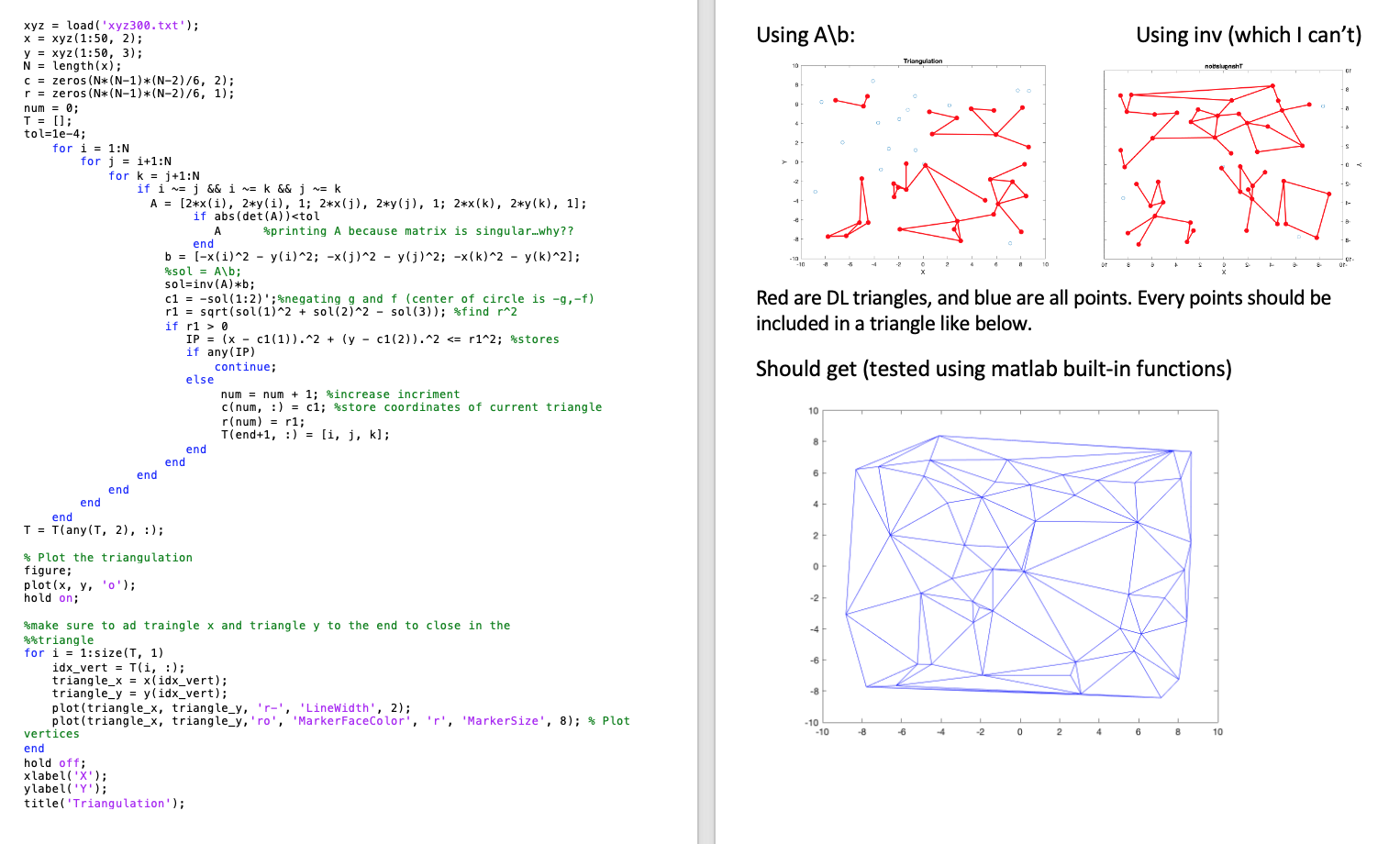
In attached image, I include result from MATLABs builtin De Launay function blue I am not supposed to use any builtin function except to test, but I found that using invAb instead of Ab produces slightly better result but still incomplete results so the general issue remains. I have attached all figures from my results using both backslash and invAb red and I know my solution output should be like the other blue triangulation image on the bottom, where the sum of all areas is equal to the sum of a polygon. Mine is not even properly enclosed.
I am testing on dataset of points, but I cannot attach data to this post. Instead, I paste data here for first rows, so you can test with the same data by simply pasting this matrix into MATLAB. See the that data, as matrix xy below.
Please see the attached image for my code and results red top vsthe correct result bottom in blue Please, help me to get a proper code for the correct results. I have written so you can copypaste the following and it should run already. I cannot attach files.
clear
xy
;
;
;
;
;
;
;
;
;
;
;
;
;
;
;
;
;
;
;
;
;
;
;
;
;
;
;
;
;
;
;
;
;
;
;
;
;
;
;
;
;
;
;
;
;
;
;
;
;
x xy:;
y xy:;
N lengthx;
c zerosNNN;
r zerosNNN;
num ;
T ;
tole;
for i :N
for j i:N
for k j:N
if i ~ j && i ~ k && j ~ k
A xiyi; xjyj; xkyk;
if absdetA
IP x cy c r; stores
if anyIP
continue;
else
num num ; increase incriment
cnum :) c; store coordinates of current triangle
rnum r;
Tend :) i j k;
end
end
end
end
end
end
T TanyT :;
Plot the triangulation
figure;
plotx yo;
hold on;
make sure to ad traingle x and triangle y to the end to close in the
triangle
for i :sizeT
idxvert Ti :;
trianglex xidxvert;
triangley yidxvert;
plottrianglex triangleyr 'LineWidth', ;
plottrianglex triangleyro 'MarkerFaceColor', r 'MarkerSize', ; Plot vertices
end
hold off;
xlabelX;
ylabelY;
titleTriangulation;
Please help me fix actual code itself to get correct triangulation that matches result from using Delaunay function built in MATLAB. I need to consider every possible ijk combination of points. All points should be included in triangles, but mine does not include all. I did the tolerance to try to see why my matrix is singular. IDK that this is causing it to skip some points though. My results are close, so it should not require many changes.
Algorithm: Start with N points. Select points ijk so I not equal j not equal k Draw circle passes through ijk Check for points inside circle: If no points: store ijk triangle If points, go back to step THANK YOU IN ADVANCE!
Step by Step Solution
There are 3 Steps involved in it
1 Expert Approved Answer
Step: 1 Unlock

Question Has Been Solved by an Expert!
Get step-by-step solutions from verified subject matter experts
Step: 2 Unlock
Step: 3 Unlock
 Study Help