







Question: I understand how to change the project year back using the goal seek dialog box, but how do I add the models its asking? Please
I understand how to change the project year back using the goal seek dialog box, but how do I add the models its asking? Please Help ASAP.
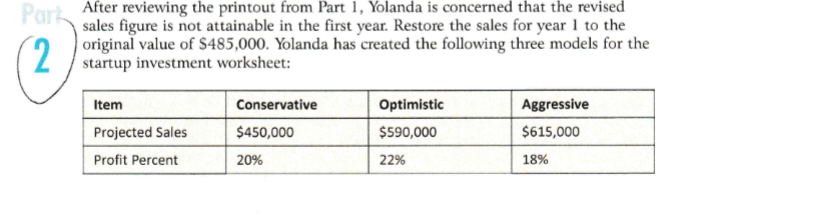
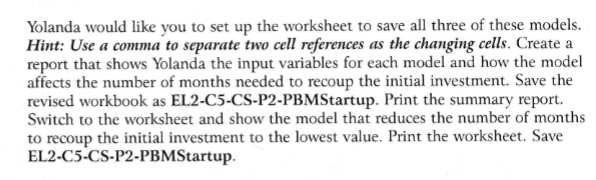
After reviewing the printout from Part 1 , Yolanda is concerned that the revised sales figure is not attainable in the first year. Restore the sales for year 1 to the original value of $485,000. Yolanda has created the following three models for the startup investment worksheet: Yolanda would like you to set up the worksheet to save all three of these models. Hint: Use a comma to separate two cell references as the changing cells. Create a report that shows Yolanda the input variables for each model and how the model affects the number of months needed to recoup the initial investment. Save the revised workbook as EL2-C5-CS-P2-PBMStartup. Print the summary report. Switch to the worksheet and show the model that reduces the number of months to recoup the initial investment to the lowest value. Print the worksheet. Save EL2-C5-CS-P2-PBMStartup
Step by Step Solution
There are 3 Steps involved in it

Get step-by-step solutions from verified subject matter experts
 Study Help