







Question: I was given this homework, It's my first time using LTSA, even though my teacher provided us with some slides the syntax of LTSA is
I was given this homework, It's my first time using LTSA, even though my teacher provided us with some slides the syntax of LTSA is very new to me and I have a very little idea of how to approach this problem:
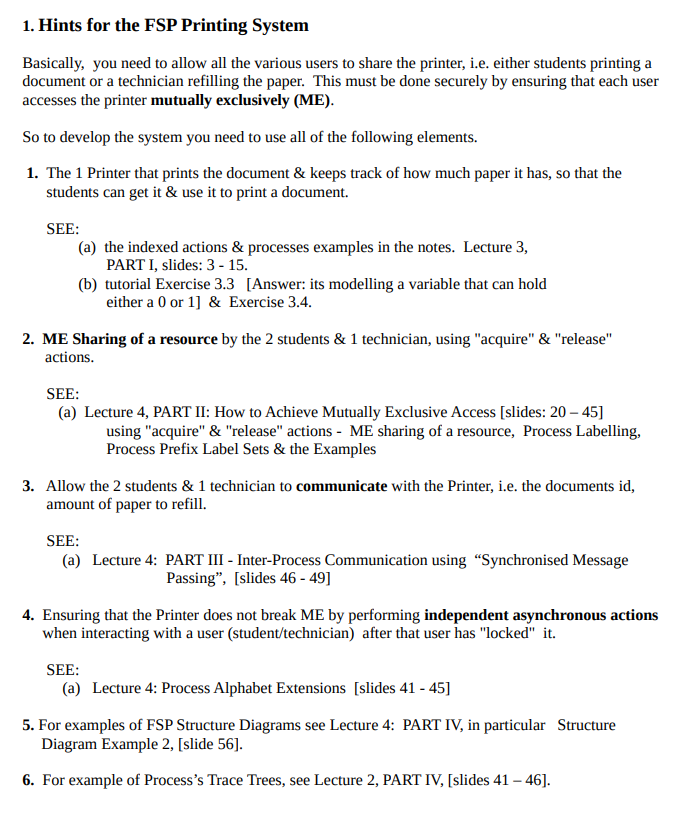
1. Hints for the FSP Printing System Basically, you need to allow all the various users to share the printer, i.e. either students printing a document or a technician refilling the paper. This must be done securely by ensuring that each user accesses the printer mutually exclusively (ME). So to develop the system you need to use all of the following elements. 1. The 1 Printer that prints the document & keep track of how much paper it has, so that the students can get it & use it to print a document. SEE: (a) the indexed actions & processes examples in the notes. Lecture 3, PART I, slides: 3 - 15. (b) tutorial Exercise 3.3 [Answer: its modelling a variable that can hold either a 0 or 1] & Exercise 3.4. 2. ME Sharing of a resource by the 2 students & 1 technician, using "acquire" & "release" actions. SEE: (a) Lecture 4, PART II: How to Achieve Mutually Exclusive Access [slides: 20 45] using "acquire" & "release" actions - ME sharing of a resource, Process Labelling, Process Prefix Label Sets & the Examples 3. Allow the 2 students & 1 technician to communicate with the Printer, i.e. the documents id, amount of paper to refill. SEE: (a) Lecture 4: PART III - Inter-Process Communication using Synchronised Message Passing, [slides 46 - 49] 4. Ensuring that the Printer does not break ME by performing independent asynchronous actions when interacting with a user (student/technician) after that user has "locked" it. SEE: (a) Lecture 4: Process Alphabet Extensions [slides 41 - 45] 5. For examples of FSP Structure Diagrams see Lecture 4: PART IV, in particular Structure Diagram Example 2, [slide 56). 6. For example of Process's Trace Trees, see Lecture 2, PART IV, [slides 41 - 46). 1. Hints for the FSP Printing System Basically, you need to allow all the various users to share the printer, i.e. either students printing a document or a technician refilling the paper. This must be done securely by ensuring that each user accesses the printer mutually exclusively (ME). So to develop the system you need to use all of the following elements. 1. The 1 Printer that prints the document & keep track of how much paper it has, so that the students can get it & use it to print a document. SEE: (a) the indexed actions & processes examples in the notes. Lecture 3, PART I, slides: 3 - 15. (b) tutorial Exercise 3.3 [Answer: its modelling a variable that can hold either a 0 or 1] & Exercise 3.4. 2. ME Sharing of a resource by the 2 students & 1 technician, using "acquire" & "release" actions. SEE: (a) Lecture 4, PART II: How to Achieve Mutually Exclusive Access [slides: 20 45] using "acquire" & "release" actions - ME sharing of a resource, Process Labelling, Process Prefix Label Sets & the Examples 3. Allow the 2 students & 1 technician to communicate with the Printer, i.e. the documents id, amount of paper to refill. SEE: (a) Lecture 4: PART III - Inter-Process Communication using Synchronised Message Passing, [slides 46 - 49] 4. Ensuring that the Printer does not break ME by performing independent asynchronous actions when interacting with a user (student/technician) after that user has "locked" it. SEE: (a) Lecture 4: Process Alphabet Extensions [slides 41 - 45] 5. For examples of FSP Structure Diagrams see Lecture 4: PART IV, in particular Structure Diagram Example 2, [slide 56). 6. For example of Process's Trace Trees, see Lecture 2, PART IV, [slides 41 - 46)
Step by Step Solution
There are 3 Steps involved in it

Get step-by-step solutions from verified subject matter experts
 Study Help