







Question: I will post the guidelines below! OUTPUT should look something like must be written in Java! please help! will upvote if working! Directions: Create your
 I will post the guidelines below!
OUTPUT should look something like
must be written in Java! please help! will upvote if working!
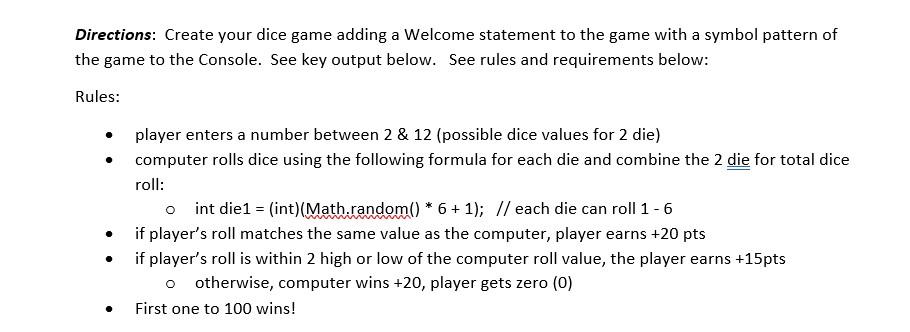
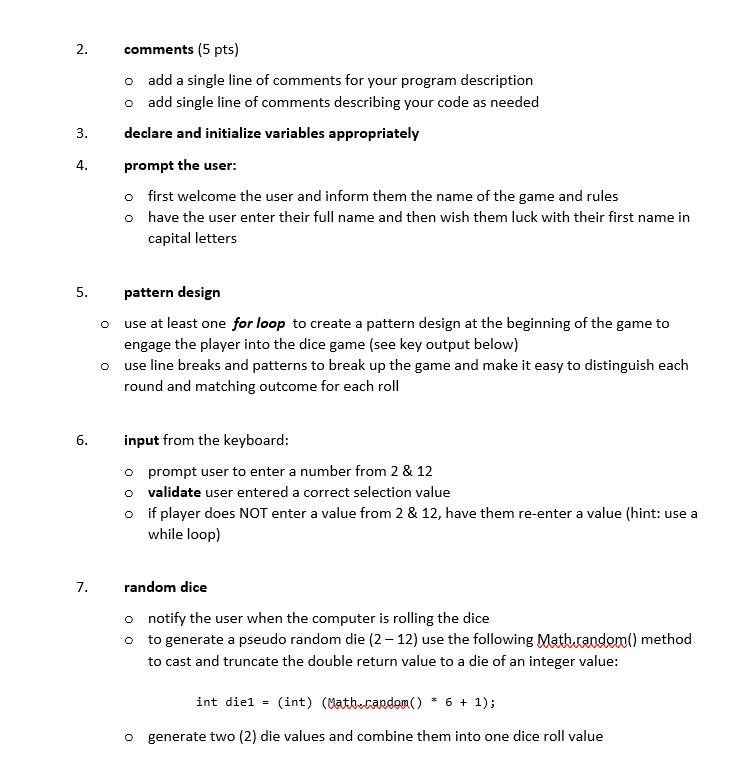
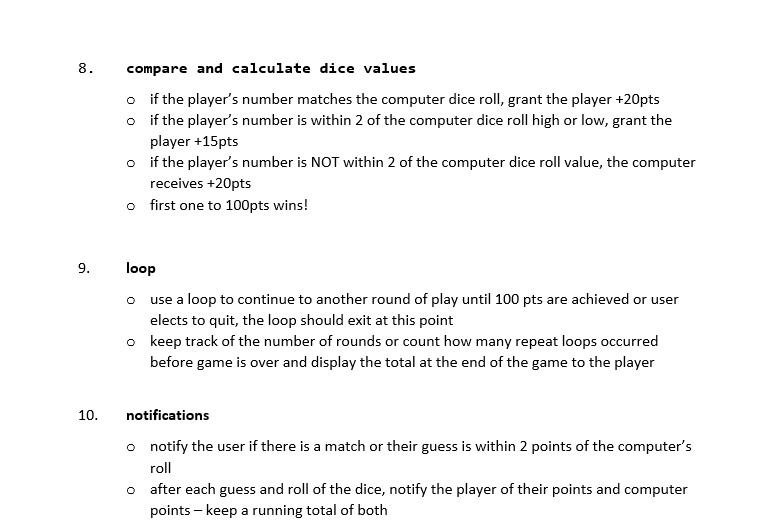
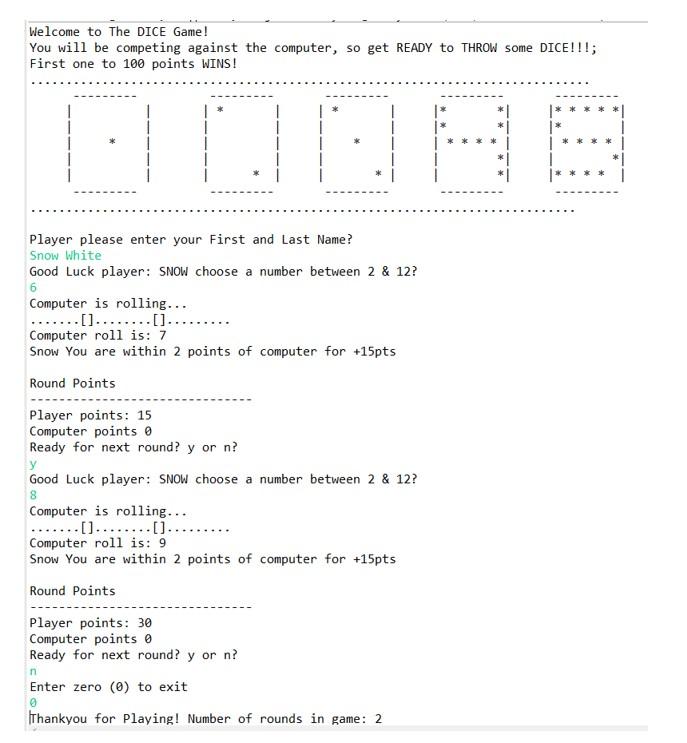
Directions: Create your dice game adding a Welcome statement to the game with a symbol pattern of the game to the Console. See key output below. See rules and requirements below: Rules: - player enters a number between 2&12 (possible dice values for 2 die) - computer rolls dice using the following formula for each die and combine the 2 die for total dice roll: - int die1 = (int)(Math .random ()6+1);// each die can roll 16 - if player's roll matches the same value as the computer, player earns +20 pts - if player's roll is within 2 high or low of the computer roll value, the player earns +15pts - otherwise, computer wins +20, player gets zero (0) - First one to 100 wins! 2. comments ( 5 pts) add a single line of comments for your program description - add single line of comments describing your code as needed 3. declare and initialize variables appropriately 4. prompt the user: - first welcome the user and inform them the name of the game and rules - have the user enter their full name and then wish them luck with their first name in capital letters 5. pattern design - use at least one for loop to create a pattern design at the beginning of the game to engage the player into the dice game (see key output below) - use line breaks and patterns to break up the game and make it easy to distinguish each round and matching outcome for each roll 6. input from the keyboard: prompt user to enter a number from 2 \& 12 validate user entered a correct selection value if player does NOT enter a value from 2 \& 12, have them re-enter a value (hint: use a while loop) 7. random dice notify the user when the computer is rolling the dice to generate a pseudo random die (212) use the following Math randem() method to cast and truncate the double return value to a die of an integer value: int die1 = (int) (Math random ()6+1); 8. compare and calculate dice values if the player's number matches the computer dice roll, grant the player +20pts if the player's number is within 2 of the computer dice roll high or low, grant the player +15pts if the player's number is NOT within 2 of the computer dice roll value, the computer receives +20pts - first one to 100pts wins! 9. loop - use a loop to continue to another round of play until 100 pts are achieved or user elects to quit, the loop should exit at this point keep track of the number of rounds or count how many repeat loops occurred before game is over and display the total at the end of the game to the player 10. notifications notify the user if there is a match or their guess is within 2 points of the computer's roll after each guess and roll of the dice, notify the player of their points and computer points keep a running total of both Welcome to The DICE Game! You will be competing against the computer, so get READY to THROW some DICE!!!; First one to 100 points WINS! Player please enter your First and Last Name? Snow White Good Luck player: SNOW choose a number between 2 \& 12 ? 6 Computer is rolling... ..[]..[].. Computer roll is: 7 Snow You are within 2 points of computer for +15 pts Round Points Player points: 15 Computer points 0 Ready for next round? y or n ? y Good Luck player: SNOW choose a number between 2 \& 12? 8 Computer is rolling... ..[]..[].. Computer roll is: 9 Snow You are within 2 points of computer for +15pts Round Points Player points: 30 Computer points Ready for next round? y or n ? Enter zero () to exit Thankyou for Playing! Number of rounds in game: 2
Step by Step Solution
There are 3 Steps involved in it

Get step-by-step solutions from verified subject matter experts
 Study Help