







Question: I will teach you how to create a new project from scratch in the class in the upcoming weeks. For now, just follow these steps.
I will teach you how to create a new project from scratch in the class in the upcoming weeks. For now, just follow these steps.
Download the program in section 3.2 from: Click here to download a zip file containing a 32-bit Visual Studio 2015 project
Do the following steps, in order:
Start Visual Studio.
To begin, open our sample Visual Studio project file by selecting File/Open/Project from the Visual Studio menu.
Navigate to your working folder where you unzipped our project file, and select the file named Project.sln.
Once the project has been opened, you will see the project name in the Solution Explorer window.
You should also see an assembly language source file in the project named AddTwo.asm
Double-click the file name to open it in the editor.
3. You should see the AddTwo assembly program in the editor window
4. Delete the two instruction there and then add your code in there:
| .386 .model flat,stdcall .stack 4096 ExitProcess proto,dwExitCode:dword .code main proc
;add your code here
invoke ExitProcess,0 main endp |
5. After you added your code, select Build Project (this will assemble and link your program) from the Build menu. Make sure there are no errors and the project was built successfully
To avoid having the same project folder name in one place, you can create a folder for every part of your assignment and past the project copy there:
C:>As3Part1>Project32_VS2015
Under Project32_VS2015 you will find .asm fiel, solutions files, etc
For part two of your assignment:
C:>As3Part2>Project32_VS2015
Under Project32_VS2015 you will find .asm fiel, solutions files, etc
For part three of your assignment:
C:>As3Part3>Project32_VS2015
Under Project32_VS2015 you will find .asm fiel, solutions files, etc
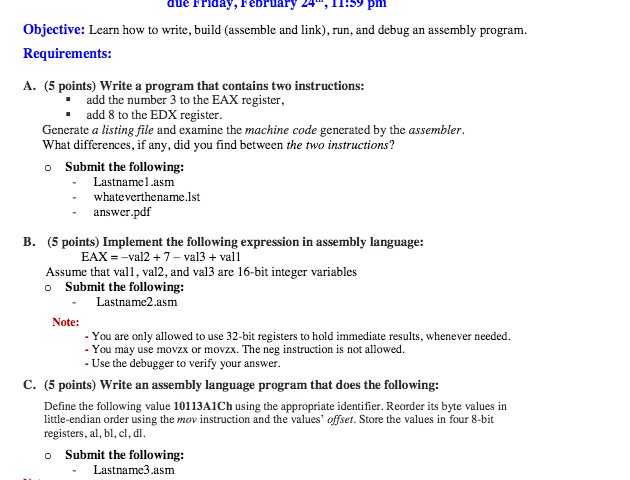
due Friday, February 24, pm Objective: Learn how to write, build (assemble and link), run, and debug an assembly program Requirements: A. (5 points) write a program that contains two instructions: add the number 3 to the EAX register, add 8 to the EDX register. Generate a listing file and examine the machine code generated by the assembler. What differences, if any, did you find between the two instructions? o Submit the following: Last namel .asm whateverthename lst answer B. (5 points Implement the following expression in assembly language: EAX val2 7 -val3 vall Assume that vall, val2, and val3 are 16-bit integer variables o Submit the following: Last name2.asm Note: You are only allowed to use 32-bit registers to hold immediate results, whenever needed. You may use movzx or movzx. The neg instruction is not allowed. Use the debugger to verify your answer. C. (5 points) write an assembly language program that does the following Define the following value 10113Aich using the appropriate identifier. Reorder its byte values in little-endian order using the mov instruction and the values' offset. Store the values in four 8-bit registers, al,bl, cl,dl. o Submit the following: Last name3 asm
Step by Step Solution
There are 3 Steps involved in it

Get step-by-step solutions from verified subject matter experts
 Study Help