





Question: i will up vote c++ add missing code for corrected acceleration data and evaluation of theta and calibration of the feather written in red //Code
i will up vote
c++
add missing code for corrected acceleration data and evaluation of theta and calibration of the feather written in red  i will up vote c++ add missing code for corrected acceleration
data and evaluation of theta and calibration of the feather written in
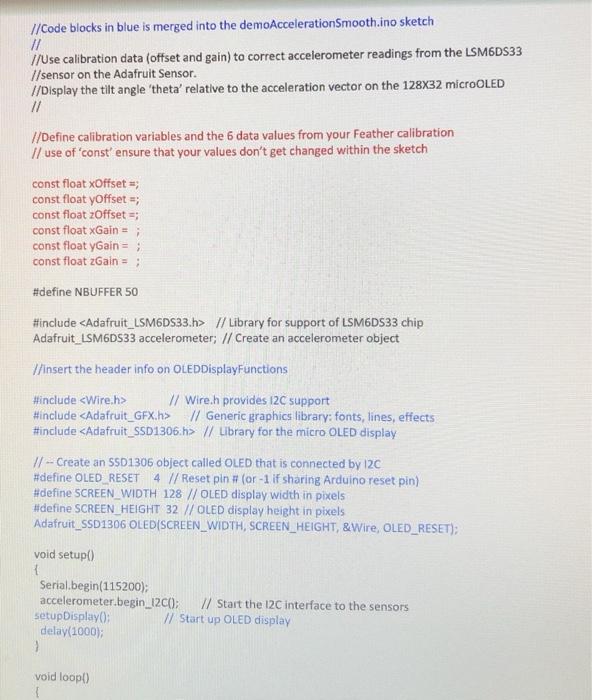
red //Code blocks in blue is merged into the demoAccelerationSmooth.ino sketch //
//Code blocks in blue is merged into the demoAccelerationSmooth.ino sketch
//
//Use calibration data (offset and gain) to correct accelerometer readings from the LSM6DS33 //sensor on the Adafruit Sensor.
//Display the tilt angle theta relative to the acceleration vector on the 128X32 microOLED
//
//Define calibration variables and the 6 data values from your Feather calibration
// use of const ensure that your values dont get changed within the sketch
const float xOffset =;
const float yOffset =;
const float zOffset =;
const float xGain = ;
const float yGain = ;
const float zGain = ;
#define NBUFFER 50
#include // Library for support of LSM6DS33 chip
Adafruit_LSM6DS33 accelerometer; // Create an accelerometer object
//insert the header info on OLEDDisplayFunctions
#include // Wire.h provides I2C support
#include // Generic graphics library: fonts, lines, effects
#include // Library for the micro OLED display
// -- Create an SSD1306 object called OLED that is connected by I2C
#define OLED_RESET 4 // Reset pin # (or -1 if sharing Arduino reset pin)
#define SCREEN_WIDTH 128 // OLED display width in pixels
#define SCREEN_HEIGHT 32 // OLED display height in pixels
Adafruit_SSD1306 OLED(SCREEN_WIDTH, SCREEN_HEIGHT, &Wire, OLED_RESET);
void setup()
{
Serial.begin(115200);
accelerometer.begin_I2C(); // Start the I2C interface to the sensors
setupDisplay(); // Start up OLED display
delay(1000);
}
void loop()
{
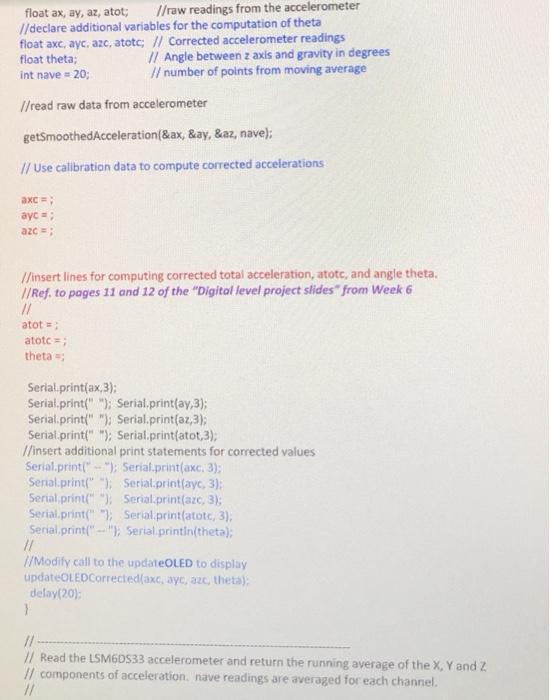
float ax, ay, az, atot; //raw readings from the accelerometer
//declare additional variables for the computation of theta
float axc, ayc, azc, atotc; // Corrected accelerometer readings
float theta; // Angle between z axis and gravity in degrees
int nave = 20; // number of points from moving average
//read raw data from accelerometer
getSmoothedAcceleration(&ax, &ay, &az, nave);
// Use calibration data to compute corrected accelerations
axc = ;
ayc = ;
azc = ;
//insert lines for computing corrected total acceleration, atotc, and angle theta.
//Ref. to pages 11 and 12 of the Digital level project slides from Week 6
//
atot = ;
atotc = ;
theta =;
Serial.print(ax,3);
Serial.print(" "); Serial.print(ay,3);
Serial.print(" "); Serial.print(az,3);
Serial.print(" "); Serial.print(atot,3);
//insert additional print statements for corrected values
Serial.print(" -- "); Serial.print(axc, 3);
Serial.print(" "); Serial.print(ayc, 3);
Serial.print(" "); Serial.print(azc, 3);
Serial.print(" "); Serial.print(atotc, 3);
Serial.print(" -- "); Serial.println(theta);
//
//Modify call to the updateOLED to display
updateOLEDCorrected(axc, ayc, azc, theta);
delay(20);
}
// -------------------------------------------------------------------------------
// Read the LSM6DS33 accelerometer and return the running average of the X, Y and Z
// components of acceleration. nave readings are averaged for each channel.
//
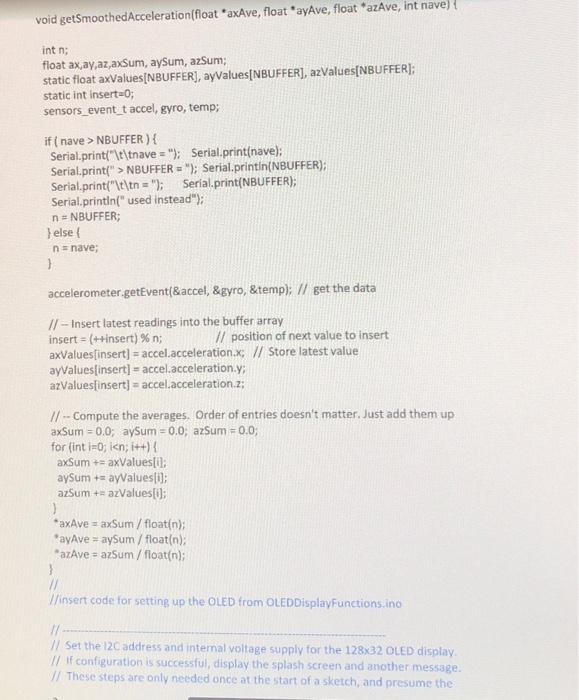
void getSmoothedAcceleration(float *axAve, float *ayAve, float *azAve, int nave) {
int n;
float ax,ay,az,axSum, aySum, azSum;
static float axValues[NBUFFER], ayValues[NBUFFER], azValues[NBUFFER];
static int insert=0;
sensors_event_t accel, gyro, temp;
if ( nave > NBUFFER ) {
Serial.print("\t\tnave = "); Serial.print(nave);
Serial.print(" > NBUFFER = "); Serial.println(NBUFFER);
Serial.print("\t\tn = "); Serial.print(NBUFFER);
Serial.println(" used instead");
n = NBUFFER;
} else {
n = nave;
}
accelerometer.getEvent(&accel, &gyro, &temp); // get the data
// -- Insert latest readings into the buffer array
insert = (++insert) % n; // position of next value to insert
axValues[insert] = accel.acceleration.x; // Store latest value
ayValues[insert] = accel.acceleration.y;
azValues[insert] = accel.acceleration.z;
// -- Compute the averages. Order of entries doesn't matter. Just add them up
axSum = 0.0; aySum = 0.0; azSum = 0.0;
for (int i=0; i
axSum += axValues[i];
aySum += ayValues[i];
azSum += azValues[i];
}
*axAve = axSum / float(n);
*ayAve = aySum / float(n);
*azAve = azSum / float(n);
}
//
//insert code for setting up the OLED from OLEDDisplayFunctions.ino
// ------------------------------------------------------------------------------------
// Set the I2C address and internal voltage supply for the 128x32 OLED display.
// If configuration is successful, display the splash screen and another message.
// These steps are only needed once at the start of a sketch, and presume the
// existence of a global Adafruit_SSD1306 object called OLED.
//
void setupDisplay() {
// -- Set up OLED display. Use internal 3.3v supply, and Adafruit trick
// SSD1306_SWITCHCAPVCC = generate display voltage from 3.3V internally
// I2C address is 0x3C for the 128x32 display
if ( !OLED.begin(SSD1306_SWITCHCAPVCC, 0x3C) ) {
Serial.println(F("SSD1306 allocation failed"));
while (true) ; // Don't proceed, loop forever
}
// -- Show Adafruit splash screen stored in image buffer.
Serial.println("Monochrome OLED is available");
OLED.display();
delay(2000);
// -- Clear the display buffer show a blank screen
OLED.clearDisplay();
OLED.display();
// -- Set default text mode and display a "ready" message.
OLED.setTextSize(1);
OLED.setTextColor(SSD1306_WHITE);
displayMessage("OLED is ready", 1);
delay(1000); // Pause to allow user to read the display
}
//
//Change code from displaying time in OLED to display accelart
// ------------------------------------------------------------------------------------
// Display new values of accelerometer readings on micro OLED.
// This function assumes that OLED is a global Adafruit_SSD103 object.
//
void updateOLEDCorrected(float ax, float ay, float az, float rho) {
OLED.clearDisplay(); // Clear the buffer.
OLED.setCursor(0, 0); // (x,y) coords to start. (0,0) is upper left
OLED.setTextSize(1);
OLED.print(F("a = "));
OLED.print(ax);
OLED.print(F(", "));
OLED.print(ay);
OLED.print(F(", "));
OLED.print(az);
OLED.setTextSize(2);
OLED.setCursor(0, 16); // move cursor down (increasing y)
OLED.print(F("theta "));
OLED.print(rho);
OLED.display(); // Update the display
}
// ------------------------------------------------------------------------------------
// Display a text message on micro OLED.
// This function assumes that OLED is a global Adafruit_SSD103 object.
//
void displayMessage(char *message, int fontSize) {
OLED.clearDisplay(); // Clear the buffer.
OLED.setCursor(0, 0); // (x,y) coords to start. (0,0) is upper left
OLED.setTextSize(fontSize);
OLED.print(message);
OLED.display();
}
1
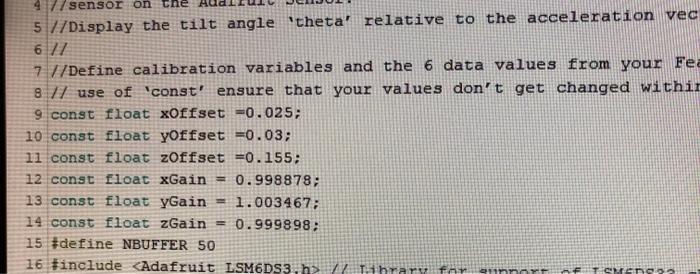
the const float for offset and gain are here for xyz
this is what was missin //Use calibration data (offset and gain) to correct accelerometer readings from the
//Code blocks in blue is merged into the demoAcceleration Smooth.ino sketch // //Use calibration data (offset and gain) to correct accelerometer readings from the LSM6DS33 1/sensor on the Adafruit Sensor. //Display the tilt angle 'theta' relative to the acceleration vector on the 128X32 micro LED // //Define calibration variables and the 6 data values from your Feather calibration // use of const' ensure that your values don't get changed within the sketch const float xOffset : const float yOffset ; const float Offset const float xGain = ; const float yGain = ; const float Gain = 3 #define NBUFFER 50 #include // Library for support of LSM6D533 chip Adafruit_LSM6D533 accelerometer; // Create an accelerometer object 7/insert the header info on OLED DisplayFunctions #include // Wire.h provides 12C support #include // Generic graphics library: fonts, lines, effects #include // Library for the micro OLED display // -- Create an $501306 object called OLED that is connected by I2C #define OLED RESET 4 // Reset pin # (or -1 if sharing Arduino reset pin) #define SCREEN_WIDTH 128 //OLED display width in pixels #define SCREEN_HEIGHT 32 //OLED display height in pixels Adafruit_SSD1306 OLEDISCREEN_WIDTH, SCREEN_HEIGHT, &Wire, OLED_RESET); void setup() Serial.begin(115200); accelerometer.begin_1200); // Start the 12C interface to the sensors setup Display // Start up OLED display delay(1000); 1 void loop() float ax, ay, az, atot; //raw readings from the accelerometer //declare additional variables for the computation of theta float axe, ayc, azc, atotc; // Corrected accelerometer readings float theta; // Angle between z axis and gravity in degrees int nave - 20; // number of points from moving average //read raw data from accelerometer getSmoothedAcceleration(Sax, &ay, Saz, nave); // Use calibration data to compute corrected accelerations axc ayc=; azc=; //insert lines for computing corrected total acceleration, atotc, and angle theta. // Ref. to pages 11 and 12 of the "Digital level project slides" from Week 6 // atot = atotc=; theta = Serial.print(ax,3); Serial.print(" "); Serial.print(ay,3); Serial.print(" "); Serial.print(az,3), Serial.print(" "); Serial.print(atot,3), //insert additional print statements for corrected values Serial.print(" - "); Serial.print(axc. 3); Serial.print(" "); Serial.print(ayc, 3); Serial.print(" "); Serial.print(aze, 3) Serial.print(" "); Serial.print(atoto, 3); Serial.print(" "); Serial.println(theta); // //Modify call to the updateOLED to display updateOLEDCorrected(axc, wyc, aze, theta); delay(20); } // // Read the LSM60533 accelerometer and return the running average of the X, Y and Z // components of acceleration nave readings are averaged for each channel. void getSmoothedAcceleration(float axAve, float ayAve, float azAve, int nave) { int n; float ax ay,az axsum, aysum, azSum; static float axValues[NBUFFER), ayvalues(NBUFFER], azValues[NBUFFER); static int insert=0; sensors_event_t accel, gyro, temp; if(nave > NBUFFER ) { Serial.print("\t\tnave = "); Serial.print(nave); Serial.print(" >NBUFFER = "); Serial.println(NBUFFER); Serial.print("\t\tn = "); Serial.print(NBUFFER); Serial.println("used instead"); n=NBUFFER; } else { n=nave; } accelerometer.getEvent&accel, &gyro, &temp); // get the data 11 - Insert latest readings into the buffer array insert = (++insert) %n; // position of next value to insert axValues[insert] = accel.acceleration x; // Store latest value ayValues[insert] = accel.acceleration,y; azValues[insert] = accel.acceleration.z; // -- Compute the averages. Order of entries doesn't matter. Just add them up axSum = 0.0; aysum = 0.0, azSum = 0.0 for (int i=0; i / Lihrary for TSMED //Code blocks in blue is merged into the demoAcceleration Smooth.ino sketch // //Use calibration data (offset and gain) to correct accelerometer readings from the LSM6DS33 1/sensor on the Adafruit Sensor. //Display the tilt angle 'theta' relative to the acceleration vector on the 128X32 micro LED // //Define calibration variables and the 6 data values from your Feather calibration // use of const' ensure that your values don't get changed within the sketch const float xOffset : const float yOffset ; const float Offset const float xGain = ; const float yGain = ; const float Gain = 3 #define NBUFFER 50 #include // Library for support of LSM6D533 chip Adafruit_LSM6D533 accelerometer; // Create an accelerometer object 7/insert the header info on OLED DisplayFunctions #include // Wire.h provides 12C support #include // Generic graphics library: fonts, lines, effects #include // Library for the micro OLED display // -- Create an $501306 object called OLED that is connected by I2C #define OLED RESET 4 // Reset pin # (or -1 if sharing Arduino reset pin) #define SCREEN_WIDTH 128 //OLED display width in pixels #define SCREEN_HEIGHT 32 //OLED display height in pixels Adafruit_SSD1306 OLEDISCREEN_WIDTH, SCREEN_HEIGHT, &Wire, OLED_RESET); void setup() Serial.begin(115200); accelerometer.begin_1200); // Start the 12C interface to the sensors setup Display // Start up OLED display delay(1000); 1 void loop() float ax, ay, az, atot; //raw readings from the accelerometer //declare additional variables for the computation of theta float axe, ayc, azc, atotc; // Corrected accelerometer readings float theta; // Angle between z axis and gravity in degrees int nave - 20; // number of points from moving average //read raw data from accelerometer getSmoothedAcceleration(Sax, &ay, Saz, nave); // Use calibration data to compute corrected accelerations axc ayc=; azc=; //insert lines for computing corrected total acceleration, atotc, and angle theta. // Ref. to pages 11 and 12 of the "Digital level project slides" from Week 6 // atot = atotc=; theta = Serial.print(ax,3); Serial.print(" "); Serial.print(ay,3); Serial.print(" "); Serial.print(az,3), Serial.print(" "); Serial.print(atot,3), //insert additional print statements for corrected values Serial.print(" - "); Serial.print(axc. 3); Serial.print(" "); Serial.print(ayc, 3); Serial.print(" "); Serial.print(aze, 3) Serial.print(" "); Serial.print(atoto, 3); Serial.print(" "); Serial.println(theta); // //Modify call to the updateOLED to display updateOLEDCorrected(axc, wyc, aze, theta); delay(20); } // // Read the LSM60533 accelerometer and return the running average of the X, Y and Z // components of acceleration nave readings are averaged for each channel. void getSmoothedAcceleration(float axAve, float ayAve, float azAve, int nave) { int n; float ax ay,az axsum, aysum, azSum; static float axValues[NBUFFER), ayvalues(NBUFFER], azValues[NBUFFER); static int insert=0; sensors_event_t accel, gyro, temp; if(nave > NBUFFER ) { Serial.print("\t\tnave = "); Serial.print(nave); Serial.print(" >NBUFFER = "); Serial.println(NBUFFER); Serial.print("\t\tn = "); Serial.print(NBUFFER); Serial.println("used instead"); n=NBUFFER; } else { n=nave; } accelerometer.getEvent&accel, &gyro, &temp); // get the data 11 - Insert latest readings into the buffer array insert = (++insert) %n; // position of next value to insert axValues[insert] = accel.acceleration x; // Store latest value ayValues[insert] = accel.acceleration,y; azValues[insert] = accel.acceleration.z; // -- Compute the averages. Order of entries doesn't matter. Just add them up axSum = 0.0; aysum = 0.0, azSum = 0.0 for (int i=0; i / Lihrary for TSMED

Step by Step Solution

There are 3 Steps involved in it

1 Expert Approved Answer
Step: 1 Unlock blur-text-image

Question Has Been Solved by an Expert!

Get step-by-step solutions from verified subject matter experts

Step: 2 Unlock
Step: 3 Unlock

Students Have Also Explored These Related Databases Questions!